
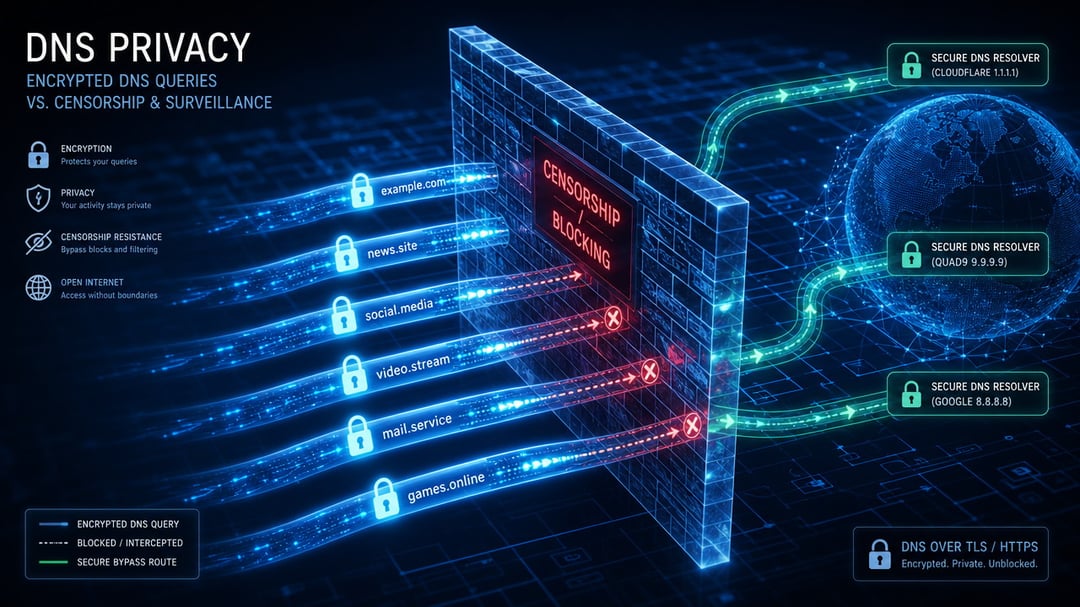
You try a site at work and get a block page. The same site loads on cellular in seconds. That split almost always starts with DNS. Encrypted DNS can hide the lookup from the network in between. It walks around cheap filters. It cannot outrun a firewall that blocks IPs or inspects every handshake.
Why DNS Blocking Is So Common
DNS is the internet's phone book. Your device asks a resolver for the IP behind a name such as news.example.com. On a normal connection that request travels in plain text. Anyone on the path can read every domain you look up.
Schools, workplaces, ISPs and national firewalls exploit that visibility. They return a fake address or a silent failure. The real site may still be online. Your device never learns how to reach it. The method is cheap and it works on almost every device that still uses port 53.
The simplest trick is DNS hijacking. The network intercepts queries and returns an answer it controls. Tougher networks then blacklist IPs, inspect the Server Name Indication field during the HTTPS handshake or drop matching traffic. Encrypted DNS only closes the first of those doors.
What Encrypted DNS Changes
Encrypted DNS wraps the lookup so the path cannot read or rewrite it. Two protocols do most of the work in 2026.
DNS over HTTPS (DoH) hides queries inside ordinary HTTPS traffic on port 443. To a firewall the session looks like regular web browsing. Firefox, Chrome, Edge and Windows 11 all include it. Cloudflare documents the steps in its DoH setup guide.
DNS over TLS (DoT) encrypts DNS on a dedicated connection to port 853. Android's Private DNS setting uses this model. The dedicated port is easy to identify and easy to drop.
Both stop ISP snooping and basic DNS tampering. Neither encrypts the rest of your traffic. The resolver you pick still sees the domains so choose one with a published logging policy. Cloudflare 1.1.1.1, Quad9 and NextDNS are common starting points. For protocol trade-offs see our DNS privacy ranking for 2026.
Where Encrypted DNS Gets Around Blocking
Encrypted DNS succeeds when the only control is plain DNS. That covers a surprising number of everyday networks.
- School and library filters that only rewrite port 53
- Workplace block lists that depend on a local resolver
- ISP family filters and cheap national DNS blacklists
- Café and hotel Wi-Fi that redirects you through captive DNS
Turn on DoH in the browser and those filters often stop working. The lookup never hits the local resolver so the fake answer never arrives. DoH resists blocking better than DoT because it blends into HTTPS. A network that only drops port 853 will still let DoH through.
Where Encrypted DNS Cannot Beat Censorship
Serious censors do not stop at DNS. They block the site's IP so a valid lookup still goes nowhere. They read SNI and cut the connection after the name resolves. Encrypted Client Hello hides that name but support is still uneven.
They also block known encrypted DNS servers. Schools and companies already list endpoints from Google, Cloudflare, Quad9, NextDNS and Apple. China has blocked related TLS 1.3 and ESNI traffic in the past. Russia's TSPU system inspects SNI, IP and QUIC close to the user. In those places encrypted DNS is a privacy upgrade not an unblocker.
A VPN encrypts the full path. Encrypted DNS encrypts only the name lookup. Heavy censorship systems combine IP blocking, SNI filtering and active probing. People who get through use VPNs, obfuscated proxies or rotating endpoints. On a managed school network you may see a warning that encrypted DNS traffic is blocked.
How to Turn On Encrypted DNS
The fastest path is the browser. In Chrome or Edge open Settings, then Privacy and security, then Security. Enable Use secure DNS and pick a provider such as Cloudflare. In Firefox open Settings, then Privacy & Security, and enable DNS over HTTPS. Increased Protection is enough for most people.
On Android set Private DNS to a hostname such as dns.google or one.one.one.one. Windows 11 supports DoH under Network & internet for the active connection. macOS still needs a configuration profile from the provider. If a hotel login page stops loading, disable encrypted DNS long enough to sign in.
Can You Rely on Encrypted DNS Against Censorship?
Encrypted DNS is the right fix for ISP snooping, cheap DNS filters and basic workplace blocks. Pair it with a resolver whose policy you have actually read. That combination closes the easiest privacy leak on most networks.
For state-level censorship, IP blocks or a determined IT department, add a VPN or a purpose-built circumvention tool. Encrypted DNS will not carry that load by itself.
So can encrypted DNS get around blocking and censorship? It can beat DNS-only blocks and it cannot beat everything stronger. Match the tool to the filter in front of you before you expect a lookup to do the rest.