

Does encrypted DNS hide your browsing from your ISP?
Does encrypted DNS hide your browsing from your ISP when you turn on Secure DNS? It hides the contents of your DNS lookups from your internet service provider (ISP) while they travel to your resolver. Your ISP can still see the IP address you connect to and may see the site’s hostname. A visit to https://example.com/account shows where the distinction matters. Looking up example.com, connecting to its server, and requesting /account reveal different details on the network.
What encrypted DNS actually hides
Before your browser can open a site, it needs an IP address for that site. If it needs a fresh lookup, it asks a DNS resolver, the service that finds the address for it. With conventional unencrypted DNS, an ISP carrying the request can read the hostname and see the reply. The browser then uses the address to make a separate connection to the website.
DNS over HTTPS and DNS over TLS
DNS over HTTPS (DoH) sends DNS queries and replies over an HTTPS connection to the resolver. DNS over TLS (DoT) uses a dedicated connection secured by Transport Layer Security (TLS). Both protect the lookup in transit between the device or browser and the resolver.
Who can still read your DNS queries?
The resolver can read the queries it receives because it needs the hostname to look up the address. If your ISP runs the resolver, it can still read those queries at its end. Choosing an independent resolver moves that visibility to the company or organization running it.
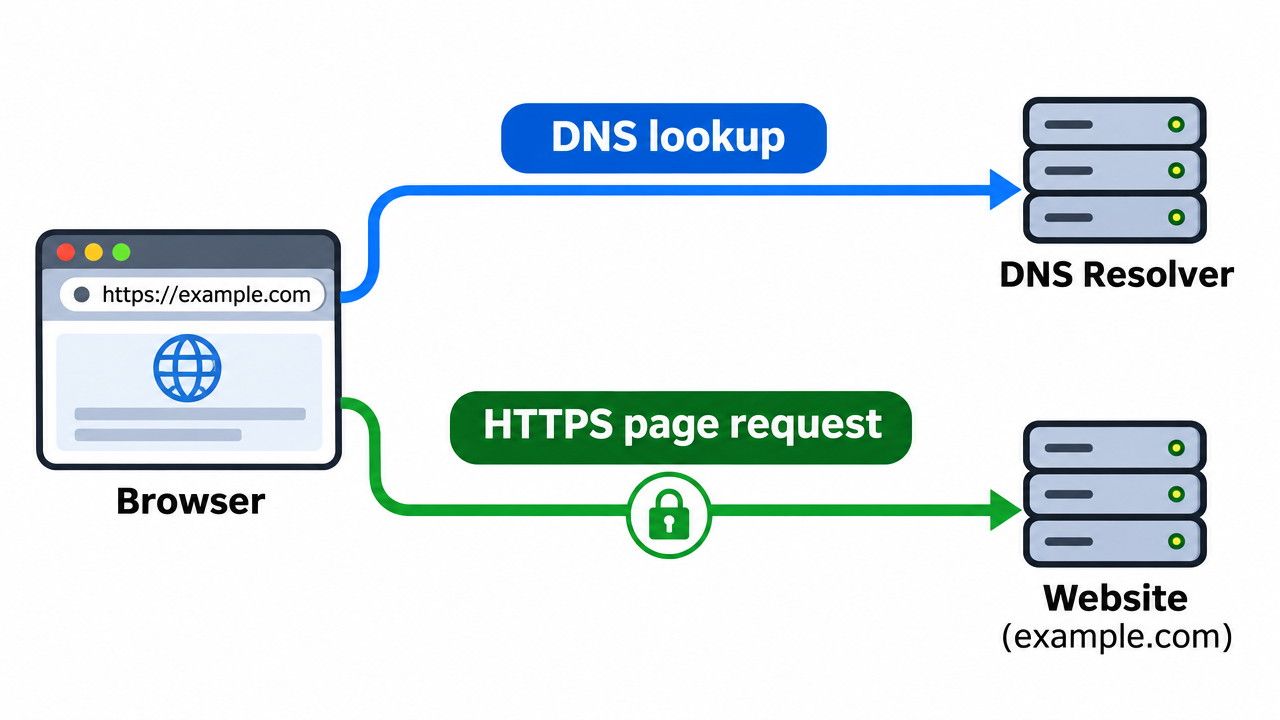
What your ISP can still see with encrypted DNS
Once your browser has an address for example.com, it connects to the server. That connection exposes some details to the ISP even if the DNS lookup was encrypted.
Destination IP addresses and traffic patterns
On a direct connection, your ISP can observe the server’s IP address, when the connection occurs, and how much data moves. The address might strongly suggest a particular site if that site uses it exclusively. If several sites share the address, it could identify their hosting provider while leaving the specific site uncertain.
Traffic volume can offer another clue about the activity. A video stream and a large download can both generate sustained traffic. The ISP can measure the data transferred even when HTTPS encrypts the video or file itself.
Website names, SNI, and Encrypted Client Hello
A browser can send the requested hostname through Server Name Indication (SNI) when it starts a secure connection. That helps a server hosting several sites present the right certificate. Encrypted Client Hello (ECH) can hide that hostname when the browser and server successfully use it. ECH encrypts the part of the handshake that carries the real name. The ISP can still see the destination IP address and may recognize the hosting provider from it.
Page paths and content under HTTPS
When the browser requests /account, HTTPS encrypts the page path, any form data sent over that connection, and the response. An ISP might identify example.com from the connection setup while the request for /account stays encrypted. The same protection applies to a password sent in an HTTPS form.
How to check your browser’s encrypted DNS settings
Check which resolver your browser uses and what it does if a secure lookup fails. If you also want to cover other apps, check the device’s DNS settings and whether those apps use them.
Chrome Secure DNS and Firefox protection levels
In desktop Chrome, open Settings → Privacy and security → Security and look for Use secure DNS. In automatic mode, Chrome can retry a failed lookup without encryption. Selecting a custom provider prevents that fallback and can result in a lookup error if the provider is unavailable.
In Firefox, open Settings → Privacy & Security and find DNS over HTTPS. Default Protection can switch to the default resolver when a secure lookup fails. Max Protection shows a warning and lets you make a site-specific exception that uses the system resolver. Firefox can also disable DoH in Default Protection mode when it detects a VPN or an enterprise policy.
So does encrypted DNS hide your browsing from your ISP?
Encrypted DNS protects the lookup while it travels to the resolver. HTTPS protects what you request and send on the page. ECH can conceal the site’s hostname during connection setup while the destination IP remains visible. To check how much protection your browser provides, start with the resolver and fallback settings.
FAQ
Does switching to a different DNS provider encrypt my lookups?
Switching DNS providers changes who receives and answers your queries. The connection method determines whether each lookup is encrypted. To protect the lookup in transit, configure your browser or device to reach the resolver using DoH or DoT. A provider that supports encrypted DNS can still receive an unencrypted query if your device sends one.
Does a DNS log show every website someone visited?
A DNS log records the queries the resolver actually received. A browser can look up a hostname before you click a link. For instance, it may resolve a suggested domain while you type in the address bar. It can also reuse a cached address when you revisit a site without sending another query to the resolver.
Does a VPN hide more from your ISP than encrypted DNS?
A VPN can hide the website’s destination IP from your ISP for traffic it routes through its encrypted tunnel. The ISP can still see the connection to the VPN server. The VPN provider can see where it forwards that traffic while HTTPS continues to protect page content in transit. Check the provider’s logging policy because it now handles the connections the ISP would otherwise carry directly.


