
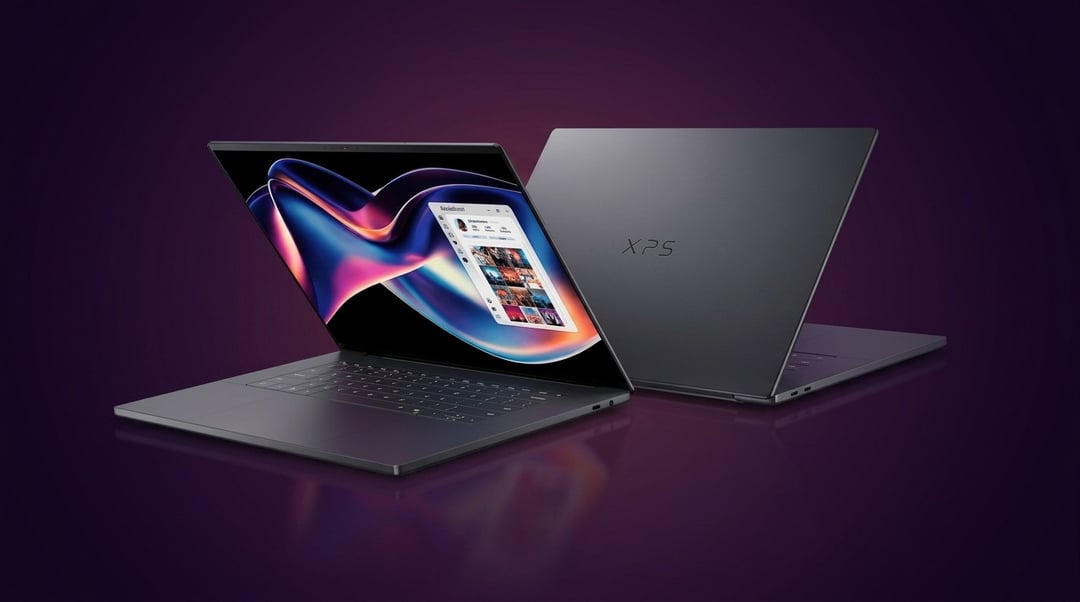
What the Dell XPS 15 (2026) Is Trying to Be
A Flagship Windows Laptop for Everyday Power Users
The Dell XPS 15 (2026) is built for people who want one machine that can handle almost everything. Think office work, media editing, web browsing with too many tabs open, video calls, streaming, and the occasional demanding creative task. It is not trying to be a gaming monster. It is not trying to be the cheapest high-performance laptop either. Dell is clearly aiming at buyers who want a premium Windows laptop that feels elevated in every small interaction.
That matters because the XPS line has always sold more than specs. It sells the idea of refinement. Clean lines. Tight construction. A display that makes everything look better. A keyboard and trackpad that do not make daily work feel like a chore. In that sense, the Dell XPS 15 (2026) understands its audience well.
Where It Fits in the Premium Laptop Market
At $2,000, this laptop sits in a crowded and unforgiving category. Buyers at this level compare everything. They look at MacBook Pro models, premium HP Spectre systems, Lenovo Yoga devices, and ASUS creator laptops. That means Dell cannot rely on brand recognition alone. It has to justify the price through the full package.
And that is where the Dell XPS 15 (2026) stays competitive. It does not always win on raw value. Some rivals offer more graphics power or longer battery life. But few combine design, screen quality, portability, and everyday usability as cleanly as the XPS does.
Dell XPS 15 (2026) Design and Build Quality
Premium Materials and First Impressions
This is one of the first things the XPS 15 gets right. The chassis looks understated and expensive without trying too hard. It avoids flashy design tricks. Instead, it leans on clean edges, slim bezels, and a build that feels solid in the hands. That matters more than people admit. A laptop in this class should feel durable and intentional from the second you open it.
The Dell XPS 15 (2026) also benefits from its mature design language. Dell has had years to refine what users actually touch every day. The lid feels sturdy. The hinge movement feels controlled. The interior looks neat and premium. Nothing about it feels cheap or rushed.
Ports, Practicality, and Daily Use
The weak point is practicality. Premium thin laptops often make trade-offs and this one is no exception. Port selection may feel limiting depending on your workflow. If you use external displays, SD cards, wired accessories, or older USB devices, you may still end up carrying adapters. That is frustrating at this price.
Still, for general use, the machine is easy to live with. It travels well. It looks professional in any setting. And it feels like a device made for people who care about both performance and presentation.
Dell XPS 15 (2026) Display Quality
Screen Sharpness, Color, and Brightness
The display is one of the strongest reasons to consider this laptop. Dell has built the XPS brand around strong visual quality and the 2026 model continues that trend. Text looks crisp. Video looks rich. Photos carry the kind of contrast and color depth that instantly makes cheaper panels feel flat.
For general users, that means everything from spreadsheets to Netflix looks better. For creators, it means the screen can support more serious visual work without feeling like a compromise. Brightness and clarity also help in mixed lighting conditions, which makes the laptop more versatile in real-world settings.
Is the Dell XPS 15 (2026) Screen Worth Paying More For?
Honestly, yes. If display quality matters to you, this is one of the easiest parts of the price to defend. Not everyone needs a premium screen. But once you spend hours reading, editing, watching, and working on a high-end panel, it becomes hard to go back.
Performance and Real-World Speed
Everyday Performance for Work and Multitasking
In normal daily use, the Dell XPS 15 (2026) feels fast. Apps open quickly. Multitasking stays smooth. Web browsing, office work, meetings, and background tasks do not push it in any meaningful way. That kind of consistency matters more than benchmark bragging rights for most buyers.
The system also benefits from fast storage and modern internal hardware. So even when your workload grows messy, the laptop remains responsive. That creates the feeling of headroom, which is exactly what a premium machine should offer.
Creative Workloads and Demanding Tasks
This is where the story becomes more nuanced. The XPS 15 can handle photo editing, coding, design work, and light to moderate video editing. But buyers expecting workstation-class performance should pause. Thermal limits and thin-body constraints still shape what this machine can do under sustained load.
So yes, it is capable. But it is best understood as a premium all-rounder rather than a no-compromise creator beast.
Keyboard, Trackpad, and User Experience
Typing Comfort and Input Quality
The keyboard is comfortable, predictable, and easy to trust for long sessions. The trackpad feels large and accurate. Those things sound small until you use a laptop every day. Then they become the difference between a machine you enjoy and a machine you tolerate.
Trackpad, Audio, and Webcam Experience
The speakers are solid. The webcam experience is good enough for regular calls. Nothing feels revolutionary here. But that is almost the point. The Dell XPS 15 (2026) succeeds by getting many details right at once.
Battery Life and Charging
How Long It Lasts in Real Use
Battery life is respectable rather than class-leading. Lighter tasks can stretch it through much of the day. Heavier creative work will drain it faster. That is normal for a powerful 15-inch machine with a premium display.
Charging Speed and Power Efficiency
Charging is convenient enough for daily use. Still, at $2,000, some buyers may expect stronger endurance. That is one of the few areas where rival laptops can create a clearer value advantage.
Is the Dell XPS 15 (2026) Worth $2,000?
Who Should Buy It
Buy it if you want a polished premium Windows laptop with a great display and strong daily performance.
Who Should Skip It
Skip it if your priority is raw power, battery life, or the best specs for the money.