
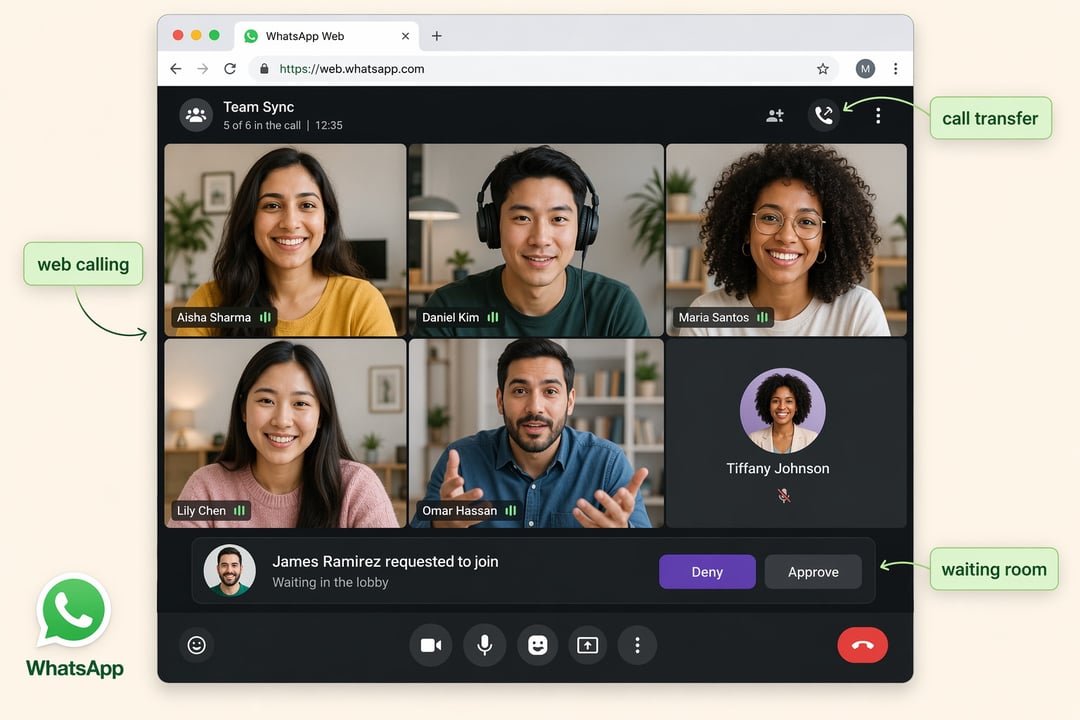
Calling on WhatsApp used to mean picking up your phone or opening the standalone desktop program. The browser version was where you typed. It wasn't where you talked. That gap is closed now — Meta has switched on audio and video calling inside WhatsApp for Web, so a browser tab is finally a real place to have a conversation.
It's a small-sounding change with a big practical effect. If you already live in the web app all day, you no longer have to break your flow, grab your phone, and squint at a small screen to answer someone.
What the Calls Tab Looks Like on the Web
The web interface gets a Calls tab that works the way you'd expect if you've used WhatsApp anywhere else. Your call history sits there, along with your favorites, so you can pull up the person you talk to most without hunting through threads.
The point is consistency. Nothing new to learn, nothing hidden in a different menu. What you already know from the phone and the desktop app carries over.
Screen Sharing and Reactions Come Along Too
The calling features from the desktop app made the trip. You can share your screen, and you can drop reactions during a call.
Screen sharing is the one that matters most here. Walking someone through a document, a bug, or a design is exactly the kind of thing you do while sitting at a computer — and until now, doing it on WhatsApp meant using the separate desktop app instead of the browser you already had open.
Move a Call Between Devices Without Hanging Up
Here's the feature that quietly fixes a daily annoyance: you can transfer a call from one device to another mid-conversation.
Say a call comes in while you're at your desk, either on the desktop app or in the web app. You take it there. Then you need to leave — a meeting, a coffee run, a dog that won't wait. Instead of apologizing, hanging up, and calling back from your phone, you move the call to your phone and keep talking.
No dead air. No "sorry, let me call you right back," which everyone knows sometimes turns into ten minutes.
Waiting Rooms Give Group Calls a Front Door
Group call links are convenient right up until the moment someone you didn't expect walks in. WhatsApp is adding waiting rooms to handle that.
When you create a call link, you can switch on the option to require approval to join. From then on, anyone holding that link waits at the door until you let them in. You can also remove someone from the call if they shouldn't be there.
This one is clearly aimed at people running work calls on WhatsApp. A shared link is easy to forward, and once it's out of your hands you've lost control of who shows up. Approval puts that control back where it belongs — with the person hosting.
What the waiting room gives you:
- Approval before anyone with the link enters the call
- The ability to boot a participant out
- A single toggle set when you create the link, not a setting you scramble to find mid-call
Cleaner Audio and Faster HD Video
Two smaller upgrades are worth knowing about, because they change how a call feels rather than what it does.
The first is background noise suppression, which filters out the noise you pick up in large spaces. If you've ever taken a call from an open office, an airport, or any room with too much echo and too many people, you know why that matters.
The second is about video quality at the start of a call. Video will now stream in high definition within the first few seconds. Previously, a call could take a moment to make the jump to HD — that soft, slightly murky opening before the picture sharpened. That wait is going away.
Neither feature will make a headline on its own. Together, they remove the small frictions that make a call feel like a call instead of a conversation.
Usernames Are Coming to Calling
WhatsApp recently opened up username reservations, and calling is part of the plan. Once usernames go live, you'll be able to use them to call other users across platforms.
That's a meaningful shift for a service built around phone numbers. It means reaching someone on a call without trading digits first — worth keeping in mind if you've been sitting on the fence about reserving a username.
Who This Actually Helps
Three groups get the most out of this:
|
If you…
|
What changes
|
|
Work in the browser all day
|
Calls happen where you already are, no app switching
|
|
Host group calls for work
|
Approval-based waiting rooms and the ability to remove someone
|
|
Move between desk and phone constantly
|
Transfer a live call instead of hanging up and redialing
|
If you're a casual user who mostly calls family from your phone, honestly, not much changes for you today. The features that will matter most in that case are the quieter ones — cleaner audio, HD video that arrives right away — plus username calling once it's live.