
What Is Google TV and How Is It Different From Android TV?
Google TV is a user interface built on top of Android TV. Think of it like a fresh layer of paint—and a smarter brain—on an existing system. Underneath, it’s still Android TV. But what you see and how you interact with it feels different.
It comes preinstalled on smart TVs from brands like Sony, TCL, and Hisense. You’ll also find it on devices like the Google TV Streamer and the original Chromecast. So whether you’re buying a new TV or plugging in a streaming device, Google TV can be the engine running the show.
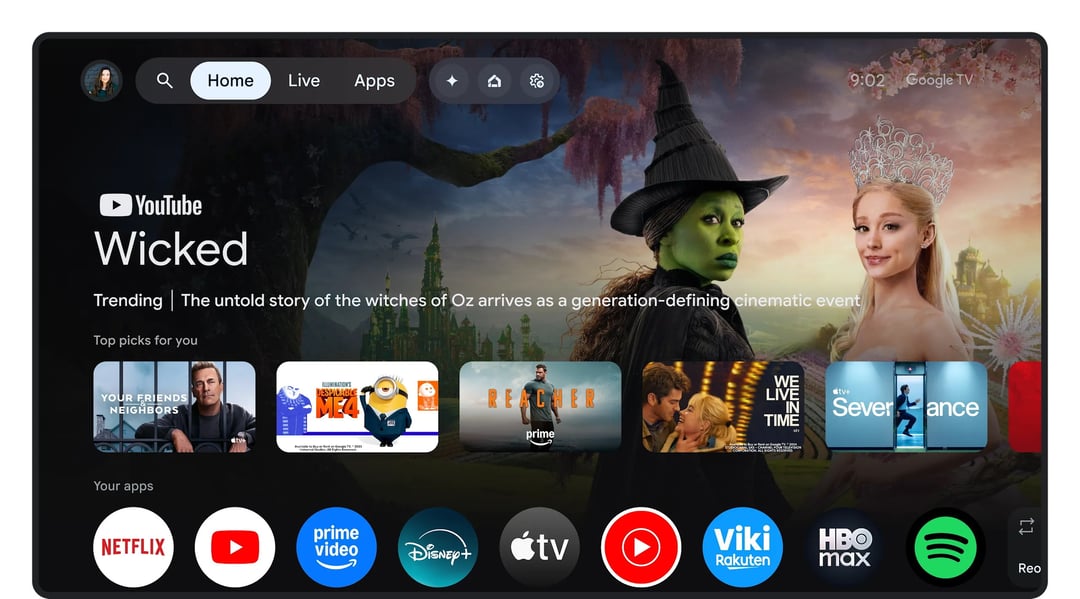
Here’s what really sets it apart: the home screen. Instead of pushing you to open individual apps like Netflix or Hulu, Google TV pulls content from your subscriptions and lays it out in one place. If you’re signed in with your Google account, it already knows what you watch—and it uses that to surface recommendations right away.
And honestly, that changes the whole experience. Less hunting. More watching.
Google TV Features: Smart Recommendations, Voice Control, and More
Personalized Recommendations With the “For You” Tab
The heart of Google TV is the “For You” tab. This is where the algorithm does its thing.
Google TV keeps track of the apps you’re subscribed to and the shows and movies you enjoy. Using machine learning and Google’s Knowledge Graph—a massive database of information about people, places, and media—it suggests content tailored to you.
You’ll see:
- A rotating banner of recommended movies and shows
- A Top Picks for You row
- Your installed apps
- A Highlights tab with entertainment news and updates tied to your interests
It’s all built to reduce friction. You shouldn’t see recommendations for content you can’t access. Everything shown is pulled from the services you use.
Google Assistant and Smart Home Integration
This is where things get interesting.
With Google Assistant built in, you can use voice commands to search for shows, open apps, or even control smart home devices. If your TV remote has Assistant enabled, you can say things like:
- “Play some R&B music.”
- “Open Netflix.”
- “Tell me about Chef Ramsay.”
If you’re logged into a service, you can get specific: “Play Master Chef on Hulu.” It’ll only work if you’re subscribed—but when you are, it’s seamless.
And it doesn’t stop at entertainment. Link your Google Home account, and you can control compatible smart home devices through your TV. If you own Google Nest cameras, you can even pull up live camera feeds on the screen.
Your TV becomes more than a TV. It becomes a command center.
Parental Controls and Kid Profiles
For families, Google TV includes built-in parental controls. You can create kid profiles tied to a parent account, so children don’t need their own email or password.
Using Google Family Link, parents can:
- Set screen time limits
- Lock and unlock profiles
- Apply content rating restrictions
It’s practical. And honestly, it gives you a bit more peace of mind.
How Google TV Works: Setup, Interface, and Connectivity
All Google TV devices require an internet connection. Wi-Fi works across the board, and some devices support Ethernet for a wired connection.
Setup is straightforward. You can use the Google Home app on your phone for a faster experience, or complete the process directly on your TV or streaming device. Having a Gmail account makes everything smoother.
Once you’re in, the interface is clean and familiar—especially if you’ve used Roku or Amazon Fire TV.
At the top of the screen, you’ll find navigation tabs like:
- For You
- Apps
- Live
- Library
- Search and Settings
The layout is designed for discovery. Rows of recommendations are grouped by genre or theme, based on your viewing history and installed apps.
Google TV provides access to more than 8,000 streaming apps, including major platforms like Netflix, Max, and Hulu. You can browse the Apps section or use voice search to find and install new services.
And yes, you can cast content from your phone directly to your TV using the Google TV app on Android or iPhone. Handy when you’re traveling or away from home.
Google TV Devices: Smart TVs, Streaming Devices, and Mobile Apps
Google TV isn’t limited to one piece of hardware.
Smart TVs With Google TV Built In
Many smart TVs now ship with Google TV as the operating system. There are dozens of options across price points, making it accessible whether you’re buying a budget set or a premium model.
Retailers often let you filter specifically for Google TV models, which makes shopping easier.
Google TV Streamer and Chromecast
If you don’t want to replace your television, the Google TV Streamer offers a plug-and-play solution. It connects to your existing TV and transforms it into a Google TV-powered hub.
No extra equipment needed. Just plug it in, connect to Wi-Fi, and sign in.
Google TV App on Mobile Devices
Google TV is also available as an app on both the Google Play Store and Apple App Store. That means you can browse content, manage your library, and stream directly from your phone.
It’s flexible. And that flexibility is kind of the point.
Games on Google TV: Play Store Access and TV Gaming Features
Google TV offers access to a wide selection of games through the deeply integrated Play Store. Titles like Grand Theft Auto: Liberty City Stories, Final Fantasy, and Oceanhorn are available.
Unlike older Android TV setups, the Play Store is tightly woven into the system. Sometimes you’ll need to use voice or text search to find specific games rather than navigating to a standalone app section.
For those using Google TV-powered smart TVs, there’s another benefit. Many of these TVs support advanced gaming features such as:
- NVIDIA GeForce compatibility
- AMD FreeSync
- Variable Refresh Rate (VRR)
While these features don’t directly impact Google TV’s internal gaming, they’re valuable for users with next-gen consoles like PlayStation 5 or Xbox Series X/S.
Frequently Asked Questions About Google TV
1. Is Google TV the same as Android TV?
No, but they’re closely related. Google TV runs on top of Android TV. It uses the same underlying system but offers a redesigned interface with stronger content recommendations and improved personalization.
2. Do I need a Google account to use Google TV?
While not strictly mandatory for basic functionality, signing in with a Google account unlocks the full experience. It enables personalized recommendations, app syncing, and seamless integration with Google Assistant and smart home devices.
3. Can I use Google TV without buying a new TV?
Yes. You can use a Google TV Streamer device to upgrade your current television. Additionally, the Google TV app is available on Android and iOS devices, allowing you to manage and stream content from your phone.