
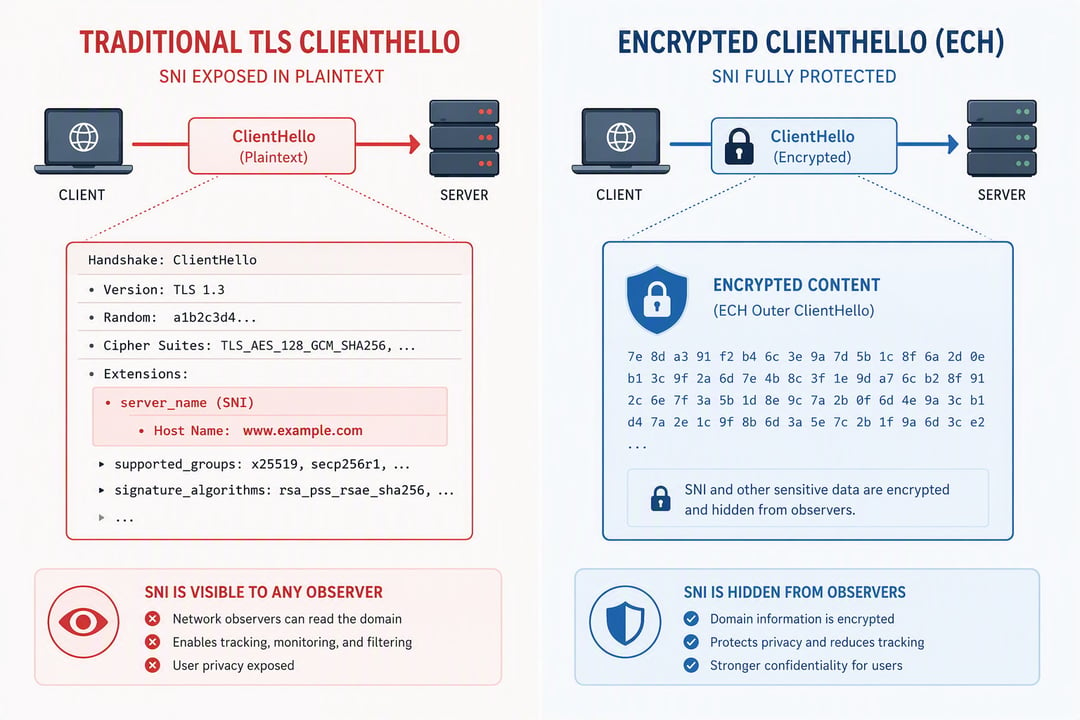
HTTPS encrypts the content of almost every web session you open. Your passwords, messages, and page data stay hidden from anyone watching the network. Yet one detail has remained visible for years: the name of the site you’re trying to reach.
That name travels in cleartext during the TLS handshake. Encrypted Client Hello, or ECH, closes the gap. It’s a TLS 1.3 extension that encrypts the ClientHello message so network observers can no longer read the destination domain or related handshake details. The standard became official as RFC 9849 in March 2026.
The Privacy Hole That Stayed Open
When your browser starts a secure connection, it first has to tell the server which site it wants. Many websites share the same IP address, so the server needs the exact domain name to present the right certificate. That field is called Server Name Indication, or SNI.
Until ECH, SNI sat in the clear. An ISP, a corporate network, a public Wi-Fi operator, or any device sitting on the path could log every domain you visited—even though the rest of the traffic was encrypted. Other handshake fields, such as the list of application protocols the client supports, could also leak useful clues.
An earlier attempt called Encrypted SNI tried to hide only the domain name. It never reached full standardization. ECH takes a broader approach: it encrypts the entire sensitive ClientHello.
How Encrypted Client Hello Works
The design uses two versions of the ClientHello message.
First the client looks up a special DNS record—an HTTPS or SVCB record—that publishes the server’s ECH public key and configuration. The lookup works best over encrypted DNS so the key itself isn’t exposed.
Next the client builds two messages. The real one, called ClientHelloInner, carries the actual domain name, protocol preferences, and other private parameters. The client encrypts this inner message with the public key it just retrieved. Then it creates a second message, ClientHelloOuter, that uses a generic or shared name—often a front-end domain belonging to a large provider. The encrypted inner message rides inside an extension on the outer one.
Only the outer message travels in the clear. Anyone watching the network sees a connection aimed at the shared name. The real destination stays hidden.
When the packet arrives, the server tries to decrypt the inner payload. If decryption succeeds, it continues the handshake with the real parameters. If it fails—because the server doesn’t support ECH or the key is outdated—the server falls back to the outer message and usually returns a fresh configuration so the client can try again.
The protocol is deliberately designed so real ECH connections look ordinary to middleboxes that don’t understand the extension. Clients also send fake ECH-looking data (called GREASE) to sites that don’t support the feature. That way actual protected traffic doesn’t stand out.
Where ECH Stands in 2026
Major browsers already ship support. Chrome turned it on by default starting with version 117. Firefox did the same from version 119. Android 17 became the first major mobile operating system to enable ECH at the platform level, complete with GREASE by default.
On the server side, Cloudflare has rolled ECH out across its free plans and much of its network. Other large providers are following. Full protection only appears when both ends support it and the DNS path delivers a valid configuration. Coverage is growing but still incomplete.
What It Hides and What It Doesn’t
ECH hides the destination hostname and other sensitive ClientHello fields from passive observers. An ISP or network monitor can no longer build a clean list of the sites you visit simply by reading the handshake.
It does not hide the IP address of the server or CDN. Traffic volume and timing remain visible. Unencrypted DNS queries that happen before the handshake can still leak the name. Pairing ECH with encrypted DNS (DoH or Private DNS) closes both gaps at once.
ECH is not a VPN. It doesn’t change your IP address or route traffic through another country. It simply removes one of the last cleartext signals that made destination tracking trivial.
Why This Is Important for Daily Browsing
Most people already assume HTTPS keeps their activity private. ECH brings that assumption closer to reality. Network operators lose an easy way to profile the domains users visit. Large-scale passive logging of browsing destinations becomes harder without active interference.
The feature works quietly in the background on modern browsers. You don’t need to flip a switch. Checking a site such as Cloudflare’s trace endpoint will show sni=encrypted when the protection is active.
As more sites and networks enable ECH, the sets of traffic that look identical grow larger. That improves the privacy gain for everyone. The combination of encrypted content and an encrypted handshake moves the web one step nearer the private experience users have long expected.