
You’ve probably heard someone say they need “a website” when what they actually need is a web app. Or the other way around. It happens all the time.
And honestly, the confusion makes sense.
A website and a web app both open in a browser. Both can look polished. Both can use buttons, forms, images, menus, and animations. From the outside, they can feel almost identical. But underneath, they serve very different purposes.
Here’s the simplest way to think about it:
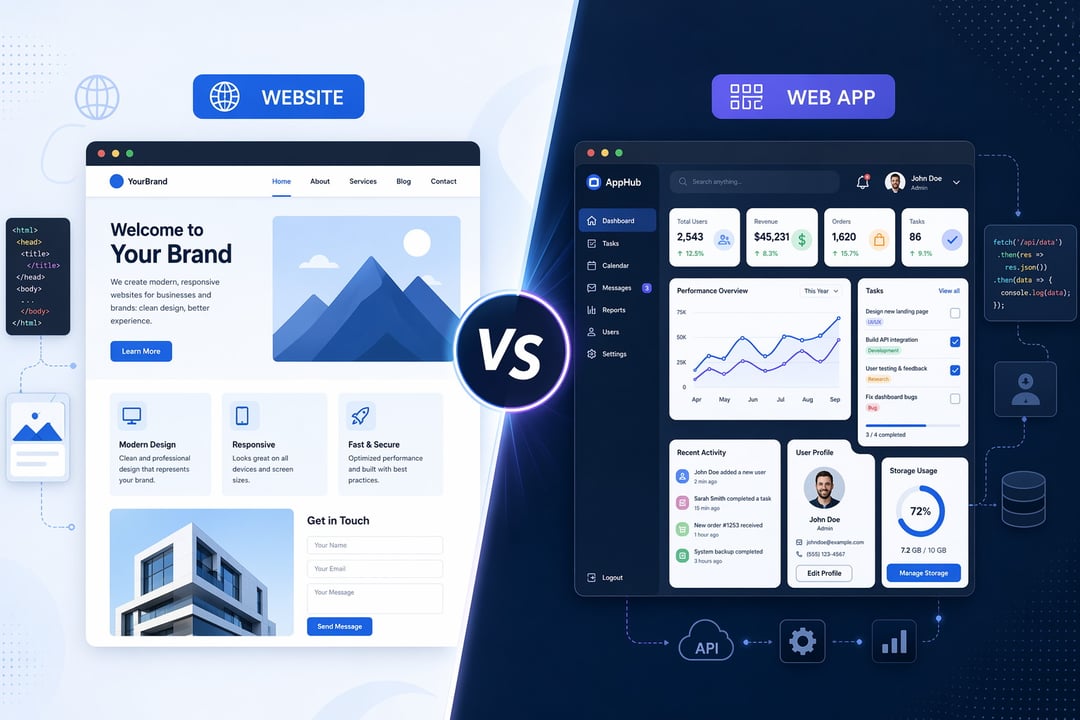
A website helps people find, read, and understand information. A web app helps people do something.
That one distinction drives almost everything else: design, cost, development time, security, maintenance, and the kind of user experience you need to build.
Let’s break it down clearly.
What Is a Website?
A website is a collection of web pages designed mainly to present information. It might explain a business, showcase services, publish articles, promote products, or help visitors contact a company.
Think of a website as your digital front door. Someone lands there because they want to learn something, compare options, check your credibility, or take a simple next step.
A typical website may include:
- A homepage
- About and contact pages
- Service or product pages
- Blog posts or guides
- Case studies
- Testimonials
- Pricing information
- Lead capture forms
For example, a local dentist’s website tells patients where the clinic is, what services it offers, who the dentists are, and how to book an appointment. A consultant’s website explains expertise and invites prospects to schedule a call. A restaurant website shows the menu, opening hours, location, and maybe a reservation link.
In each case, the main job is communication.
Yes, websites can still have interactive elements. A visitor might fill out a form, click a map, download a PDF, or subscribe to a newsletter. But those interactions are usually light. The website is still mostly there to inform, persuade, and guide.
What Is a Web App?
A web app, short for web application, is software that runs in a browser. Instead of simply showing information, it lets users interact with data, complete tasks, and manage workflows.
If you log in and use a dashboard, edit information, upload files, send messages, make payments, save progress, or generate reports, you’re probably using a web app.
Common examples include:
- Gmail
- Google Docs
- Canva
- Trello
- Notion
- Online banking portals
- Booking platforms
- Project management tools
- Customer dashboards
- Ecommerce admin panels
A web app behaves more like a tool than a brochure. You don’t just read it. You use it.
Take Google Docs. You can create a document, edit text, share it with others, leave comments, and watch changes appear in real time. That’s very different from reading an article on a company blog.
Or think about online banking. You log in, check balances, transfer money, download statements, and update personal details. The system responds to your actions and shows information specific to you.
That’s the heart of a web app: interaction plus functionality.
Website vs Web App: The Core Difference
The main difference between a website and a web app comes down to purpose.
A website is content-centered. A web app is function-centered.
A website usually answers questions like:
- Who are you?
- What do you offer?
- Why should someone trust you?
- How can visitors contact you?
- What information do people need before deciding?
A web app answers different questions:
- What can users do here?
- What data do they need to create or manage?
- What tasks should the system help them complete?
- How should the experience change for each user?
- What actions need to be saved, secured, or automated?
Here’s what I mean. A real estate agency website might list services and show available properties. A real estate web app might let users create accounts, save favorite homes, book viewings, compare mortgage options, and message agents.
Same industry. Very different product.
The website attracts and informs. The web app enables action.
Key Features of a Website
Most websites focus on visibility, trust, and clarity. They help people find you through search engines, understand your offer, and decide whether to take the next step.
Strong websites usually need:
- Clear navigation
- Fast loading pages
- Mobile-friendly design
- Search engine optimization
- Useful content
- Strong calls to action
- Trust signals such as reviews or case studies
- Simple contact or signup forms
A good website feels like a well-organized store. The shelves make sense. The signs are clear. The lighting helps you see what matters. You don’t need a staff member explaining every aisle.
That’s what effective website design does. It removes friction.
For most service businesses, creators, nonprofits, and local companies, a website is often the right starting point. It gives people a place to discover the brand and decide whether they want to engage.
Key Features of a Web App
A web app requires deeper planning because users expect it to work like software. They click buttons and expect specific outcomes. They add information and expect it to save. They log in and expect privacy.
A web app often includes:
- User accounts
- Authentication and passwords
- Dashboards
- Databases
- User roles and permissions
- Payment processing
- File uploads
- Notifications
- Reports
- Integrations with other systems
- Real-time updates
- Security controls
This is where things get more complex. A small feature can hide a lot of work.
For example, “let users update their profile” sounds simple. But the system may need form validation, image uploads, database storage, privacy settings, error messages, password protection, and account recovery. That tiny feature is really a cluster of decisions.
Web apps need product thinking. You’re not just designing pages. You’re designing behavior.
Technical Differences Between Websites and Web Apps
From a technical point of view, both websites and web apps usually have a front end and may have a back end.
The front end is what users see: layouts, buttons, text, images, and forms. The back end handles what happens behind the scenes: databases, accounts, permissions, business rules, and server processes.
A simple website may have very little back-end complexity. It might use a content management system like WordPress or Webflow so someone can update pages without touching code.
A web app usually depends heavily on back-end systems. It needs to remember users, protect private data, process actions, and return the right information at the right time.
Security also becomes more serious with web apps. Every site should use secure hosting, HTTPS, backups, and regular updates. But web apps often handle sensitive information such as payment details, personal profiles, business files, or financial records. That means authentication, access control, encryption, and testing matter a lot more.
Not glamorous. Absolutely necessary.
Website or Web App: Which One Do You Need?
Choose a website if your main goal is to explain, promote, publish, or capture leads.
A website is probably enough if:
- You want people to find your business on Google
- You need pages for services, products, or locations
- You want to publish blog content
- You need a professional online presence
- Visitors only need light interaction
- Your main goal is trust and communication
Choose a web app if users need to complete tasks inside the platform.
A web app makes more sense if:
- Users need accounts or dashboards
- People must save or edit information
- The experience changes for each user
- You need payments, reports, bookings, or workflows
- Customers return regularly to use features
- You’re building a software product
Sometimes, you need both. A SaaS company needs a public website to attract customers and a private web app where customers use the product. An online course business needs landing pages to sell the course and a student portal to deliver lessons.
That’s not overbuilding. That’s matching the tool to the job.
Cost and Maintenance Differences
Websites generally cost less than web apps because they involve fewer custom workflows. The main costs often come from design, copywriting, SEO, page development, content setup, hosting, and maintenance.
Web apps usually cost more because they require custom functionality. Developers must plan databases, user flows, security, integrations, testing, and future updates. The work continues after launch because users will report bugs, request improvements, and expect the product to keep evolving.
A website is often a publishing asset. A web app is an ongoing product.
That difference matters when budgeting.
Final Answer: Website vs Web App
So, what’s the difference between a website and a web app?
A website helps people learn about something. A web app helps people do something.
If visitors mainly need to read, browse, contact you, or understand your offer, build a website. If users need to log in, manage data, complete tasks, or use interactive features, build a web app.
And if you need to attract people first and serve them afterward, you probably need both.
Start with the user’s goal. Not the technology. Not the trend. The goal.
Because once you know what people need to accomplish, the right choice becomes much easier.