

Vibe Coding Security Risks and What Can Go Wrong become easier to overlook when an AI tool turns an idea into working code in minutes. A prototype may run correctly while still exposing passwords, trusting unsafe input, or giving users more access than they should have.
That speed can make security problems harder to spot, especially when you are focused on getting a feature online. AI-generated code can contain basic flaws, pull in risky dependencies, or leave sensitive data in prompts and logs. Weak authentication, injection attacks, and exposed default settings can create further trouble. The final risk is assuming that fast testing proves a project is safe.
The following seven risks explain where vibe coding projects commonly fail and what to check before you deploy one.
1. AI-Generated Code Can Contain Basic Security Flaws
Why plausible code is not necessarily safe
Vibe coding can produce an app that builds successfully and appears to work while leaving basic security logic out. A generated form might accept a name, email address, or comment and pass it directly to a database because the code never checks whether the input is valid or safe. An API may return detailed error messages that reveal database fields, file paths, or internal settings.
Review the security behavior, not just the finished feature. Check how the code validates input, handles errors, manages permissions, and behaves when a request is missing or unexpected. Replace unsafe defaults instead of assuming the generated code chose appropriate ones. Test malformed input and failed requests before deployment.
Consider linking this section to Informer Tech's practical cybersecurity or secure coding explainer for readers who need examples of safer validation and error handling.
2. Secrets Can Leak Into Code, Prompts, and Logs
Vibe coding can expose more than source code. API keys, passwords, access tokens, database credentials, and private customer information should never be pasted into an AI prompt or committed to a project. A prompt, generated file, or tool log may preserve that data beyond the immediate task.
What counts as a secret
An AI-generated app might print an API key while debugging, place a database password in a config file, or write request headers and customer records to logs. Keep secrets in environment variables or a dedicated secret management tool, and give each credential only the access it needs. Rotate a credential as soon as it appears in a prompt, commit, output, or log. Before deployment, scan the full repository, including its history and configuration files. Deleting the visible line is not enough. Copies may remain in Git history, build artifacts, prompt records, or logs, so revoke and replace the exposed credential.
3. Unsafe Dependencies Can Enter the Project
The supply-chain risk
An AI coding tool may add a package for a narrow task without explaining whether it is trusted, maintained, or necessary. A generated image-upload feature might pull in a library when the application could use an existing framework capability. Each dependency adds code to track and update.
Review packages before accepting them. Check the maintainer and release history, keep a lockfile so builds use reviewed versions, update versions through a controlled process, and remove packages the application no longer needs.
A vulnerable dependency has a known flaw attackers may exploit. A malicious or compromised package is different: it may contain harmful code from the start, or after an account or release process is breached. Review for both risks.
Suggest an internal link here to Informer Tech's software supply-chain or package-management guide, if relevant.
4. Authentication and Access Controls Can Be Too Weak
Vibe-coded apps may get login checks, password resets, session tokens, roles, or permissions partly right while missing an important path. A user might reset another account's password by changing an ID in the request, reuse an old session token, or reach staff-only data with a regular account.
Who can access what
Hiding an admin button in the interface does not block access. An unauthorized user can call the underlying endpoint directly if the server does not check their role. For example, a request that deletes an account must verify permission on the server, not just hide the delete control from non-admin users.
Test every sensitive action three ways: while signed out, with a normal account, and as an administrator. Check account changes, billing data, file access, and user management. Give each account only the access it needs, and enforce those permissions on the server for every request.
5. User Input Can Trigger Injection Attacks
A form field, URL parameter, uploaded filename, chat message, or API value is untrusted input. If AI-generated code drops that value directly into a database query, operating-system command, HTML template, or browser response, an attacker may alter what the application executes or displays. A search box can become SQL injection; a filename passed to a shell can become command injection; inserted text in a page can become cross-site scripting (XSS). Template expressions can also run when user content is treated as template code.
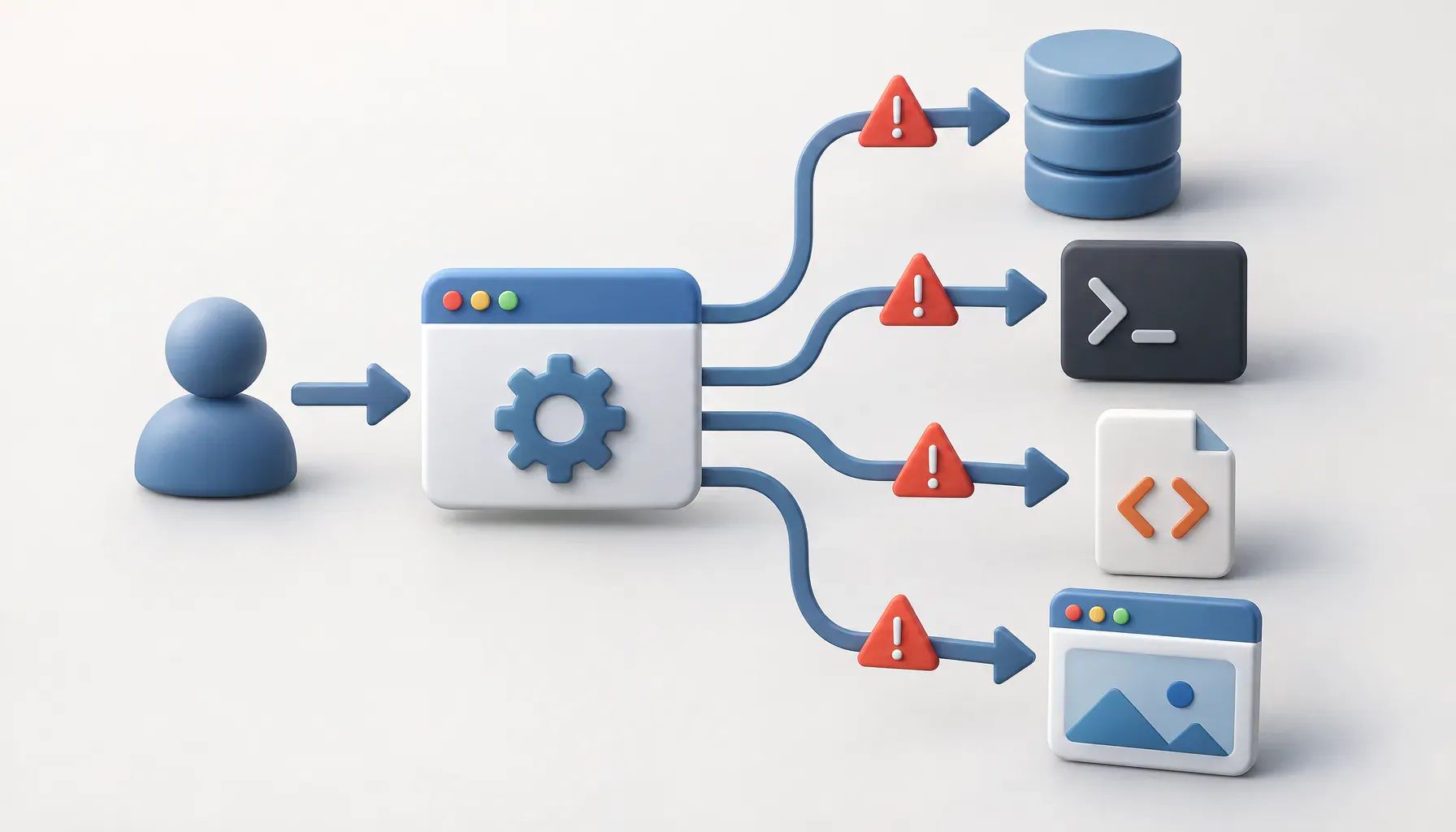
Where untrusted input appears
Prompts should require parameterized queries, context-appropriate output encoding, strict allowlist validation, and no command execution unless it is necessary. HTML encoding does not automatically make a value safe for JavaScript, URLs, SQL, or a command. Prefer library APIs that avoid command parsing, then review every input-to-output path in the generated code. Suggested internal link: an explainer on SQL injection, XSS, or web application security.
6. Default Configurations Can Expose Data or Services
Generated projects may leave debug settings enabled, publish a development dashboard, or use storage rules that allow anyone to read uploaded files. A service that binds to every network interface instead of localhost can also become reachable beyond the intended machine. For example, an error page might reveal database details, file paths, or environment variables to an unauthenticated visitor.
Deployment mistakes that create openings
Before launch, review cloud permissions, database access, file upload rules, CORS settings, error messages, and network exposure. Test the site while logged out and check exactly what an unauthenticated visitor can view, upload, download, or call. Keep development and production configuration separate, disable unused services and dashboards, turn off debug output, and limit storage and database access to the users and processes that need it. A final review should include ports, public endpoints, administrator panels, and default credentials.
7. Speed and False Confidence Can Replace Security Testing
Vibe coding can turn a rough idea into a working feature quickly. That speed can create false confidence: a developer may skip threat modeling, code review, focused testing, or monitoring because the app appears to work. A generated login flow, for example, still needs checks for authorization, unexpected input, exposed secrets, and useful alerts.
What to check before release
Treat release prep as a short security gate:
- Inspect generated code for unsafe data handling and permission logic.
- Scan dependencies and the project for leaked API keys or passwords.
- Test each role, endpoint, and file access path.
- Probe inputs with malformed, oversized, and unexpected values.
- Review production configuration, including debug settings and allowed origins.
- Monitor logs, errors, authentication events, and unusual activity after deployment.
AI-assisted development is not automatically unsafe, but the person deploying the application remains responsible for its security. Keep generated code as untrusted draft code until human review and security checks have cleared it.
How to Reduce Vibe Coding Security Risks
Treat AI-generated code as untrusted draft code until a person reviews it. Start by checking the areas most likely to cause immediate harm: exposed secrets, login and permission checks, user input, dependencies, and production configuration. If an API key, password, token, or other credential has entered a prompt, repository, or log, remove it and rotate it. Deleting the visible value alone does not make the credential safe. Before release, scan the project, test sensitive actions as different types of users, probe inputs, review what an unauthenticated visitor can access, and disable services or settings the application does not need. AI-assisted development is not automatically unsafe, but the person deploying the application remains responsible for its security.