
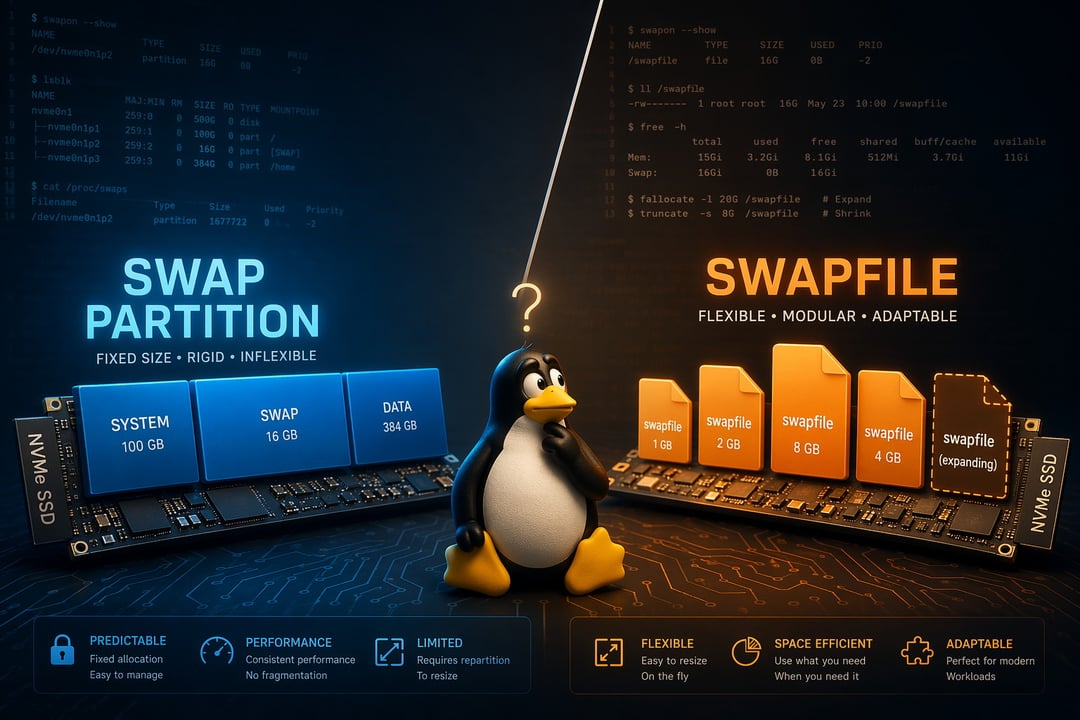
You're setting up a fresh Linux install. Everything's going smoothly until the partitioner asks about swap. Do you create a dedicated swap partition? Or go with a swapfile? Most guides shrug and say "either works." But on modern SSDs and NVMe drives, one choice is genuinely smarter than the other — and understanding why will save you a headache down the road.
What Is Swap, and Why Does Linux Still Need It?
Swap is overflow space. When your RAM fills up, the kernel moves less-active memory pages to disk to free up room for what actually needs processing right now. Think of it as a pressure valve — not a replacement for RAM but a safety net that keeps your system breathing when things get tight.
Here's a common mistake: "I have 16GB of RAM, I don't need swap." You probably do. Even on memory-rich systems, swap supports two critical scenarios. First, low-memory edge cases — browsers, VMs, and compilation jobs are all notorious RAM gluttons. Second, and more importantly, hibernation. Suspend-to-disk writes your entire RAM state to swap space. No swap, no hibernation. Simple as that.
The Traditional Route — Swap Partition on SSD and NVMe
How a Swap Partition Works
A swap partition is a dedicated, fixed block of disk space carved out at install time. The kernel talks to it directly without going through a filesystem layer. That directness was historically meaningful — on spinning hard drives, it let the kernel optimize seek patterns for faster access.
The Case For a Swap Partition
The direct block access does offer a slight latency advantage. For multi-boot setups, a dedicated partition also keeps things cleanly separated — no filesystem dependency, no ambiguity about which OS owns what. Some older bootloaders and distros still default to this approach, and for years it was the unquestioned standard.
The Real Downside on Modern SSDs
Here's where the traditional argument starts breaking down. A swap partition is fixed. You set it at install time and that's it. Need more? You're repartitioning — which means backup, wipe, rebuild. Need less? That space sits permanently reserved, doing nothing, whether you use it or not.
On NVMe drives especially, the performance argument evaporates. NVMe random read/write speeds are so fast that the filesystem overhead of a swapfile becomes statistically irrelevant. The kernel's direct-block advantage is real in theory and negligible in practice.
The Modern Alternative — Swapfile on SSD and NVMe
How a Swapfile Works
A swapfile is exactly what it sounds like — a regular file sitting inside your existing filesystem that the kernel treats as swap space. The OS handles the translation between file and block access. From the kernel's perspective, it functions identically to a swap partition during normal operation.
Why Swapfile Has Become the Default Choice
Ubuntu, Fedora, and most mainstream distros now ship with a swapfile by default. That's not an accident. The flexibility alone justifies the switch. Need to resize your swap? Delete the old file, create a new one, and you're done in three commands — no repartitioning required. Reclaiming that space is just as easy.
On SSD and NVMe hardware, the performance delta between a swap partition and a swapfile is essentially unmeasurable in daily use. Benchmarks exist that show fractional differences under contrived synthetic loads. Real-world workloads? You won't feel it.
The Btrfs Caveat You Can't Ignore
If you're running Btrfs, swapfile setup requires extra care. You must disable Copy-on-Write on the swapfile and set it up with specific flags — otherwise the kernel refuses to use it. Hibernation with swapfile on Btrfs introduces additional complexity with resume_offset calculations. The Arch Wiki's Btrfs swap page covers this thoroughly if you're going that route.
SSD and NVMe — Does the Storage Type Actually Change the Answer?
On spinning HDDs, swap partitions had a measurable edge because the kernel could optimize rotational seek times. That advantage was real and worth considering.
On SSDs and NVMe? The gap closes to near-zero. Arguing over swap type on NVMe is like debating which lane to merge into on an empty highway — either gets you there. What matters far more is having enough swap space configured correctly rather than which mechanism delivers it.
Hibernation Changes the Equation
Both options support hibernation but with different setup complexity. A swap partition is simpler — point your bootloader at the partition and you're mostly done. A swapfile requires passing resume= and resume_offset= kernel parameters correctly, which adds a step or two.
If hibernation is your primary use case and you want the path of least resistance, a swap partition is still a legitimate choice. That's an honest acknowledgment, not a hedge.
How to Choose — A Practical Decision Framework
Choose swapfile if:
- You want flexibility without ever touching your partition layout again
- You're running a single-boot system on ext4 or XFS
- You rarely or never use hibernation
- You're on modern SSD or NVMe hardware (which is most people reading this)
Choose swap partition if:
- You manage a multi-boot system where partition boundaries genuinely matter
- You want the simplest possible hibernation configuration
- You're on Btrfs and prefer to avoid swapfile workarounds entirely
Final Verdict — Swapfile Wins, With One Honest Exception
For most Linux users on modern hardware, swapfile is the smarter default. It's flexible, easy to manage, and performs identically to a swap partition in real-world conditions on SSD and NVMe drives. The idea that partitions are inherently "better" is a holdover from the spinning-disk era that simply hasn't caught up with current hardware realities.
The one legitimate exception is hibernation on simpler setups — swap partition is marginally easier to configure there and worth considering if that's your primary requirement.
Want to get started right now? Here's how to create a 4GB swapfile in three commands:
sudo fallocate -l 4G /swapfile
sudo chmod 600 /swapfile
sudo mkswap /swapfile && sudo swapon /swapfile
Add it to /etc/fstab to make it permanent — and you're done. No repartitioning, no drama, no wasted space. Just swap that works exactly when you need it.