
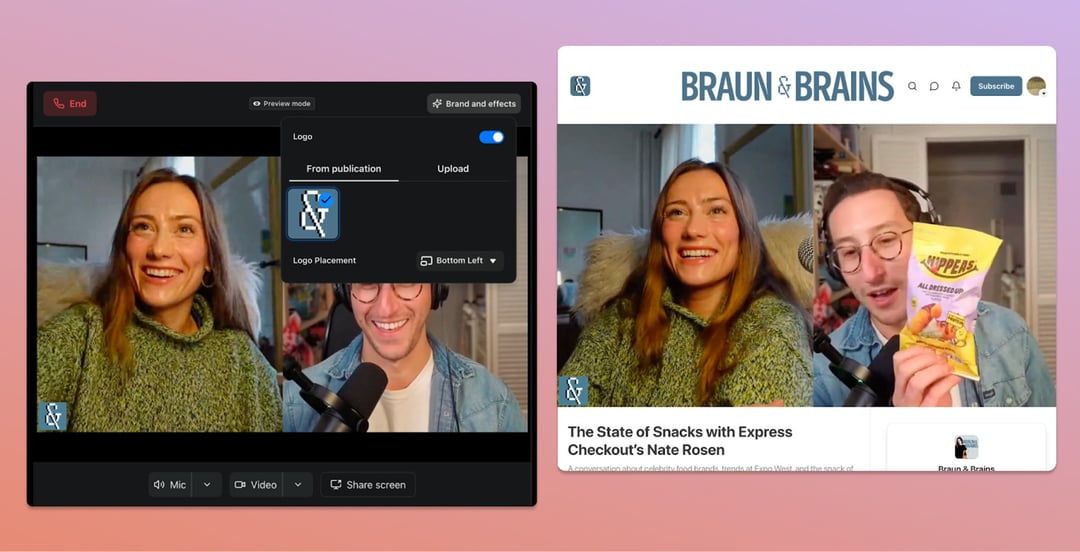
Substack Recording Studio Expands Native Video Creation Tools
Video can feel intimidating. Lights. Editing software. A dozen tabs open. And somewhere in there, the actual message you wanted to share.
Substack is trying to make that part easier.
The company has introduced Substack Recording Studio, a built-in tool that lets creators pre-record and publish videos directly inside the platform. No jumping between apps. No exporting files just to re-upload them somewhere else. It lives where your audience already is.
And that matters. Because the more steps there are between your idea and “publish,” the less likely you are to hit record.
Desktop-Based Video Recording for Solo Creators and Conversations
Record Solo Videos Directly in Substack
The Recording Studio is available on desktop and supports straightforward solo recordings. You sit down, press record, speak your piece. That’s it.
For newsletter writers who’ve been experimenting with video posts—or just thinking about it—this lowers the barrier. You don’t need external production software just to test an idea. You can talk through a concept, expand on a written post, or deliver something more personal. Face to camera. Direct.
And sometimes that’s all people want. Your voice. Your take.
Host Conversations With Up to Two Guests
Substack isn’t limiting this to monologues.
Creators can record conversations with up to two guests inside the platform. That opens the door to interviews, panel-style discussions, and collaborative content without relying on third-party tools.
If you’ve ever tried coordinating guests across multiple apps, you know how messy that can get. Different software. Different links. Technical hiccups before you even start. Keeping it inside Substack simplifies the flow—from scheduling to publishing.
It feels like Substack is leaning into something bigger here: making the platform a full media home, not just a newsletter tool.
Built-In Video Branding With Custom Watermarks
Branding isn’t just a logo in the corner. It’s recognition. It’s repetition.
Substack Recording Studio allows creators to add custom watermarks to their videos. That means your content carries your identity wherever it’s shared.
If clips travel beyond Substack—onto social platforms, group chats, embedded posts—your name stays attached. And in a crowded content ecosystem, that consistency adds up.
It’s a small feature. But small features are often what separate polished creators from everyone else.
Screen Sharing for Collaborative and Educational Content
Explaining something abstract is hard.
Showing it? Much easier.
The studio includes screen-sharing functionality, allowing creators to present visuals during recordings and share their screens with co-hosts. That’s especially useful for walkthroughs, tutorials, presentations, or breaking down data in real time.
Instead of describing what’s on your screen, you can just… show it.
For educators, analysts, and technical writers who’ve moved into video, that’s a practical shift. It turns Substack into something closer to a presentation platform, not just a publishing tool.
Automatic Clip and Thumbnail Generation for Distribution
Editing can be the part that drains your energy. You record something strong—and then spend another hour figuring out how to package it.
Substack Recording Studio automatically generates video clips and thumbnails once recording is complete.
That’s important for two reasons:
- It reduces post-production time.
- It makes distribution easier.
Short clips are what travel. They’re what get shared. By auto-generating them, Substack is nudging creators toward broader reach without adding extra work.
And thumbnails? They’re the first impression. Automating that step removes friction while still giving creators shareable assets.
Substack’s Ongoing Investment in Video Content
This launch isn’t random. It signals a continued investment in video as part of the platform’s evolution.
Substack started as a newsletter platform. Then came video posts. Monetization options. Livestreaming. Short-form video feeds. Now, an integrated recording studio.
It’s a steady expansion—from written newsletters to a more complete creator ecosystem.
If you’re building an audience, this matters. It means Substack isn’t treating video as an add-on. It’s building infrastructure around it.
And infrastructure shapes behavior. The easier something becomes, the more creators experiment with it.
What Substack Recording Studio Means for Independent Creators
For independent creators, the biggest challenge isn’t ideas. It’s execution.
Tools that reduce friction—recording, branding, screen sharing, clip generation—give creators more room to focus on message instead of mechanics.
Instead of stitching together five different platforms, you can record, brand, and publish inside one environment.
That simplicity can mean more consistency. And consistency is what builds audience trust over time.