
What Makes the Razer Laptop Sleeve 16 Different From Standard Laptop Cases
Most laptop sleeves do one job. They sit in your bag, protect your machine, and that’s it. Functional. Quiet. Forgettable.
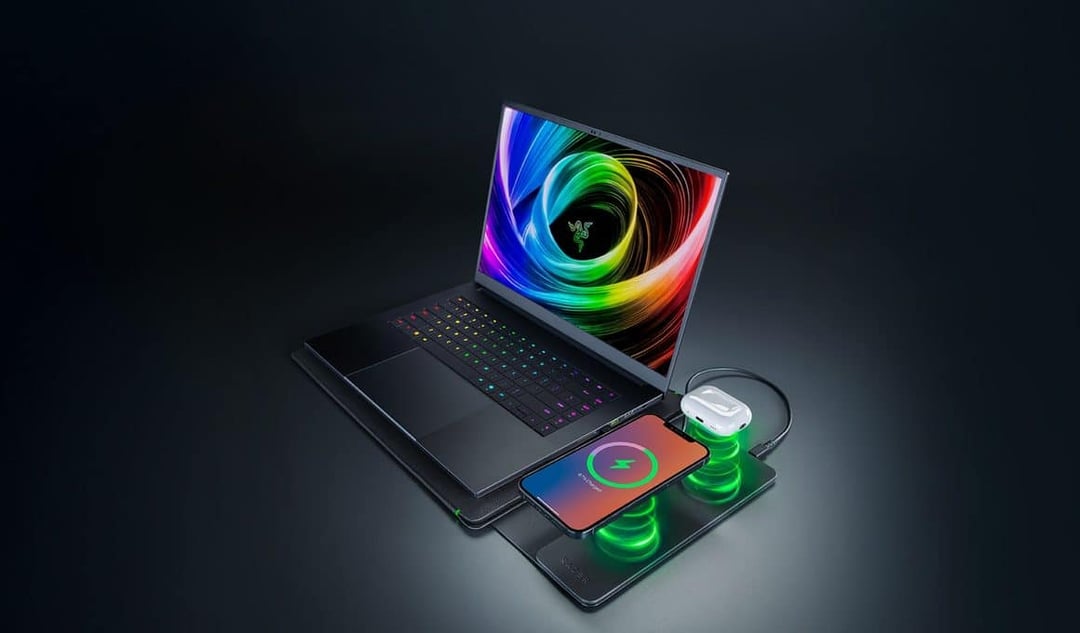
But the Razer Laptop Sleeve 16 does something unexpected. It hides a Qi wireless charging mat right in the front panel. So when you lay your iPhone, wireless earbuds case, or any Qi-enabled device on top, it starts charging—assuming the sleeve itself is plugged in via USB-C.
Here’s what that means in real life: your protective case becomes part of your workspace. You’re not just carrying your 16-inch laptop. You’re carrying a charging surface with it.
It’s built to handle larger 16-inch laptops, and Razer didn’t skimp on materials. You get a microfiber lining inside to protect your device, reinforced edges for durability, and a cable pass-through that lets you keep everything connected while the sleeve stays closed. That detail matters. It turns the sleeve into something closer to a mobile charging dock than just a cover.
And honestly, that’s the hook. It’s not just storage. It’s function layered into something you already use every day.
Integrated 15W Qi Wireless Charging: Features and Real-World Performance
The embedded wireless charging pad supports up to 15W output. On paper, that’s solid. Not blazing fast—but respectable for wireless charging.
You place your phone or earbuds on the front surface, and as long as the sleeve is connected through USB-C, it delivers power. Simple. Clean. Less cable clutter on your desk.
But here’s where expectations need a reality check.
15W Output and Charging Efficiency
Fifteen watts is considered modest in today’s fast-charging world. It’s enough to top off your phone or keep accessories charged during the day. But it’s not going to replace a high-speed wired charger if you’re in a rush.
And there’s no magnetic alignment built in. That means you’ll need to place your device carefully to make sure it’s charging efficiently. No snap-into-place guidance. No automatic positioning.
It works. But you’ll want to double-check alignment.
Power Dependency Limits Mobility
There’s another practical limitation. The sleeve itself needs to be plugged into a power source through USB-C.
So while it feels like a portable charging solution, it’s not truly independent. It doesn’t have an internal battery. It’s more of a desk-friendly accessory than something you’d rely on while walking through an airport or sitting in a park.
Think of it less as mobile power and more as a cleaner desktop setup that travels with you.
Premium Materials and Protective Design for 16-Inch Laptops
Beyond the charging feature, the Razer Laptop Sleeve 16 stays true to its core purpose: protection.
It’s designed specifically for larger 16-inch laptops, which already narrows the audience. But for users in that category, it offers:
- Microfiber interior lining to prevent scratches
- Reinforced edges for added durability
- A structured build that feels premium
- A cable pass-through that supports connected use
That last feature is subtle but important. You can keep your device plugged in while it’s still inside the sleeve. Combine that with the integrated wireless charging surface, and you essentially create a compact workstation setup.
It’s the kind of design that makes sense if your desk setup changes often. Home office today. Coffee shop tomorrow. Office the next day.
Price Comparison: Standard Sleeve vs Wireless Charging Version
Now let’s talk numbers.
The standard Razer Laptop Sleeve 16 costs $79.99.
The version with the integrated Qi wireless charging mat? $129.99.
That’s a $50 premium for the charging functionality.
Is it smart? Yes. It adds real utility.
Is it essential? That’s harder to argue.
You’re paying significantly more for a feature that delivers modest charging speeds and still requires an external power connection. For some users, the convenience and novelty will absolutely justify the price. For others, a traditional wireless charging pad placed on a desk might achieve the same result for less money.
It’s innovative. But it’s not a must-buy for everyone.
Who the Razer Laptop Sleeve 16 With Wireless Charging Is For
This accessory feels tailored for a specific kind of user:
- Someone already invested in the Razer ecosystem
- Someone carrying a 16-inch laptop daily
- Someone who values a clean, cable-minimized workspace
- Someone willing to pay more for integrated design
If you’re just looking for basic laptop protection, the standard $79.99 sleeve likely makes more sense.
But if you appreciate gear that does double duty—and you like the idea of your laptop sleeve quietly charging your phone while you work—this version offers a clever twist on something ordinary.
It turns a passive accessory into an active one.
And that’s what makes it interesting.