
OpenAI Codex Windows app: the big shift for “agentic” AI coding on PC
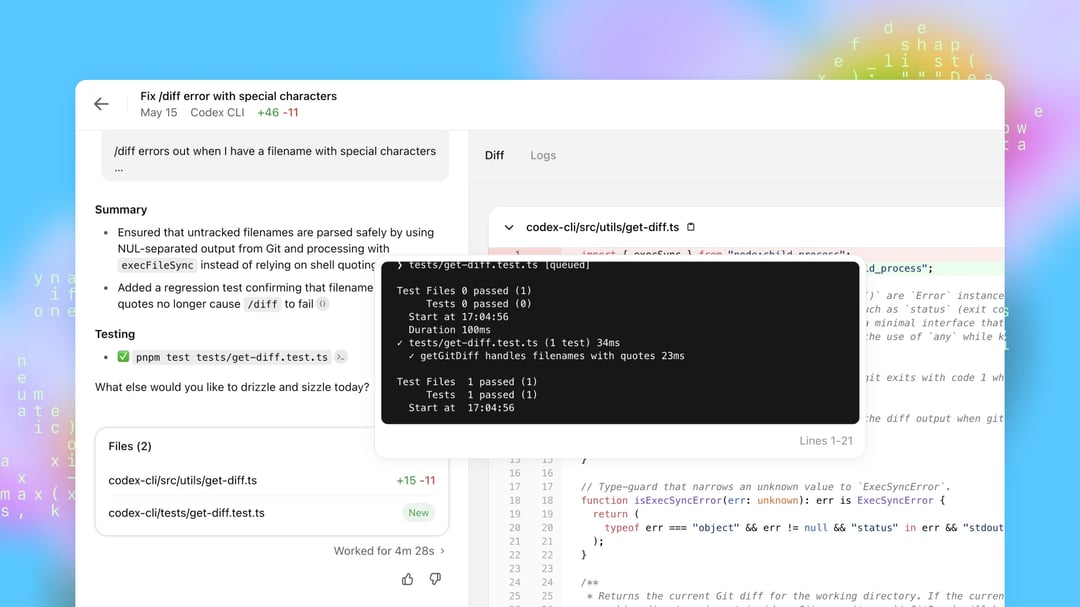
Windows users now have a native desktop version of OpenAI’s Codex app—an “agentic” AI coding workspace designed to build software from natural-language prompts. The core idea is simple: instead of you writing every line, you direct AI agents that can write code, run commands, and handle multiple tasks at once.
Codex positions itself in the same emerging category as other agent-based coding tools, where the experience feels less like autocomplete and more like delegating work to a junior developer (one who can move fast, but still needs supervision).
You can download the Windows app from the Microsoft Store: OpenAI's Codex.
What Codex is: a workspace where ChatGPT-powered agents write code from prompts
Codex works like a dedicated environment for AI coding agents powered by specialized versions of ChatGPT. You point Codex at a codebase (or even an empty folder) and start issuing plain-English instructions.
Natural-language coding prompts Codex is built for
The prompts can be basic, like asking it to “list the contents of this directory,” or more ambitious, like “make me an app that transcribes the recorded speech in audio files.” The emphasis here is that you’re not just asking for snippets—you’re asking for actions inside a project context.
Codex can plan before it acts (and that matters for real projects)
One of the more practical capabilities is that Codex can “plan out” its actions before executing them. For complex builds, it can think through the work and present a detailed roadmap. You can review that plan, tweak it, and comment before approving the next step.
That planning layer is the difference between “here’s some code” and “here’s how we’ll implement this feature safely across the project.”
Parallel AI agents: running multiple coding tasks at the same time
Codex supports agents that can run in parallel, meaning you can direct multiple programming tasks simultaneously. In practice, that can look like splitting work the way you would with a team:
- One thread handles a new feature
- Another investigates a bug
- Another refactors a module
- Another reviews a repo branch
The app’s left-hand column helps you track multiple Codex chats at once, so you can manage several “teams” of agents working on separate tasks simultaneously. When an agent needs you to approve a pending action, the app surfaces notifications per chat so you don’t lose the thread.
Autonomy controls: approval-first vs hands-off automation
Before you let Codex run, you can choose how autonomous the agents are.
High-control mode: approve every command
At one end of the spectrum, the agents come back for approval before every command. This is the safer, slower route—useful when you’re working in a sensitive codebase or you simply want tight oversight of what’s being executed.
Full automation: faster, unpredictable, and potentially expensive
At the other end, you can “take your hands off the wheel” and let agents code with minimal intervention. The tradeoff is clearly stated: this can be unpredictable, and it can get expensive quickly—because agentic coding burns through tokens fast.
Working with local folders and GitHub repositories
Codex isn’t limited to toy examples. It supports both local and remote workflows.
Connect to local directories for in-place development
You can open an existing coding project or an empty directory and start building immediately. This keeps Codex grounded in the actual structure of your files rather than working from abstract prompts alone.
Connect Codex to GitHub repos and work with branches
Codex can also connect to remote GitHub repositories, enabling agents to check out branches before making changes. That’s a practical feature for real development, because it aligns with how teams isolate work before merging.
Worktrees and sandboxing: keep agent changes away from production
Codex supports worktrees that sandbox what the agents do before anything is deployed to a live production environment. It’s essentially a buffer between “the agent made changes” and “those changes are live,” which is exactly what you want when you’re letting automation touch your code.
How Codex compares to Claude Code and Google Antigravity
Codex is framed as part of a competitive field of agentic AI coding tools.
- Anthropic’s Claude Code is positioned as a direct competitor, offering both a command-line (CLI) option and a desktop component inside the main Claude app.
- Google Antigravity is described as a newer entrant that lets you code with agents powered by Google’s Gemini models, as well as Claude and OpenAI’s open-weight GPT-OSS models.
Codex fits this same pattern: multiple agents, parallel work, and a prompt-driven workflow that’s closer to managing tasks than typing code.
Pricing and quotas: Codex is free, but tokens disappear fast
Codex is free to use and works with free ChatGPT accounts—but strict usage quotas apply. And even on paid ChatGPT plans, the allowance can run out quickly due to how rapidly coding agents consume tokens.
Why token burn becomes the real “cost” of AI coding agents
Agentic tools don’t just generate a short answer and stop. They plan, iterate, execute commands, and run multiple threads. That kind of continuous work can chew through token budgets at a pace that surprises people—especially when you’re running parallel chats or letting autonomy go higher.