Microsoft Account SMS Verification Is Going Away
Microsoft is moving away from SMS verification for personal account logins, meaning users who still receive six-digit sign-in codes by text message will need to prepare for a different way to authenticate.
For a while, personal Microsoft accounts have supported login verification through a texted six-digit code. That method is now being phased out, with Microsoft steering users toward passkeys instead. The shift fits with Microsoft’s broader move toward passwordless authentication, especially since new Microsoft accounts have already been pushed toward passkeys.
The company hasn’t shared a firm timeline beyond saying the change is coming “soon.” That makes the next step pretty clear: if your Microsoft account still depends on SMS codes, it’s worth switching sooner rather than waiting until the option disappears.
Why Microsoft Wants Users to Move Away From SMS Codes
SMS-based login codes have been convenient, but convenience isn’t the same thing as security. Microsoft has called SMS-based authentication “a leading source of fraud,” which explains why the company is now pushing more aggressively toward passkeys.
A six-digit text message code can help protect an account better than a password alone, but it still leaves room for risk. That’s the big issue Microsoft is trying to close. If SMS authentication is becoming a major fraud problem, the safer path is to move users to a login method that doesn’t rely on text messages at all.
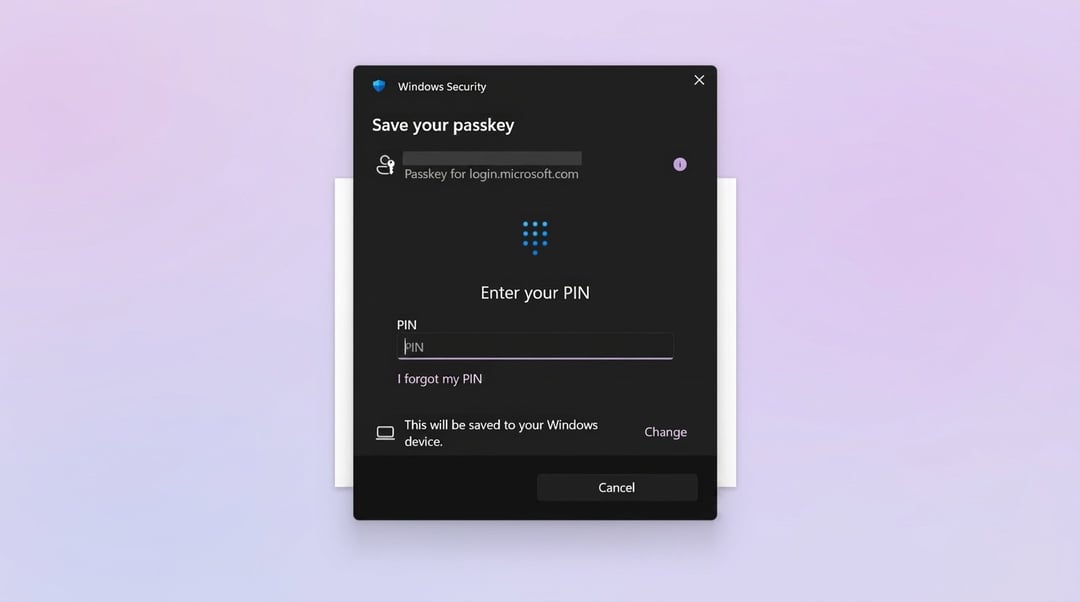
Passkeys are designed to be more secure because they don’t work like normal passwords or SMS codes. They use a pair of unique keys, and both are required for a successful login.
How Passkeys Work for Microsoft Accounts
Unlike a password, which is one set of characters that can be stolen or guessed, a passkey uses two separate keys.
One key is stored on your device. That key is protected by local security methods such as:
- Facial recognition
- Fingerprints
- PIN codes
The second key is kept by the website, app, or service where the account exists. In this case, that means the Microsoft account service holds the matching key needed to complete the login.
Why Two Keys Make Login More Secure
A passkey login only works when both keys match. Your device has one part, and the service has the other. That means someone can’t simply guess a password or steal a single login code and use it by itself.
This is the main reason passkeys are being positioned as the future of Microsoft account security. They move the login process away from text messages and toward device-based authentication guarded by biometrics or a PIN.
Why Switching to Passkeys Should Be a Priority
If you’re still using SMS codes for your Microsoft account, switching to passkeys is the smarter move for digital security. Microsoft is already heading in that direction, and SMS verification is on the way out.
The exact shutdown timing isn’t clear yet, but the lack of a concrete date doesn’t make the change less urgent. Actually, it makes preparation more important. Once SMS verification is phased out, users who haven’t switched may run into sign-in changes they weren’t ready for.
What Users Should Do Now
The safest path is simple: set up passkeys for your Microsoft account as soon as you can.
That way, your account is already aligned with Microsoft’s preferred authentication method before SMS codes are removed. It also gives you time to get comfortable with the new sign-in flow instead of dealing with it only after SMS verification stops being available.
Passkey Limitations Still Need Clear Answers
There’s still one awkward question: what happens when you can’t use passkeys?
One example is logging into Windows on a virtual machine. In cases like that, the answer isn’t clear yet. Microsoft appears focused on enforcing passkeys, but how it will handle no-passkey situations remains unresolved.
For now, users can only wait to see how Microsoft addresses those edge cases. The direction is obvious, though. Microsoft wants personal account logins to move away from SMS verification and toward passkey-based authentication.
Microsoft Account Security Is Becoming More Passwordless
Microsoft’s move away from SMS verification is part of a larger shift toward passkeys and passwordless sign-ins. The idea is to reduce reliance on passwords, texted codes, and other login methods that are easier to attack.
For personal Microsoft accounts, the practical impact is straightforward: SMS codes are being retired, and passkeys are becoming the preferred way to sign in.
That may feel like a hassle if SMS codes have always worked well enough for you. But from a security standpoint, Microsoft’s direction is clear. Text messages are no longer the login method it wants users depending on.