
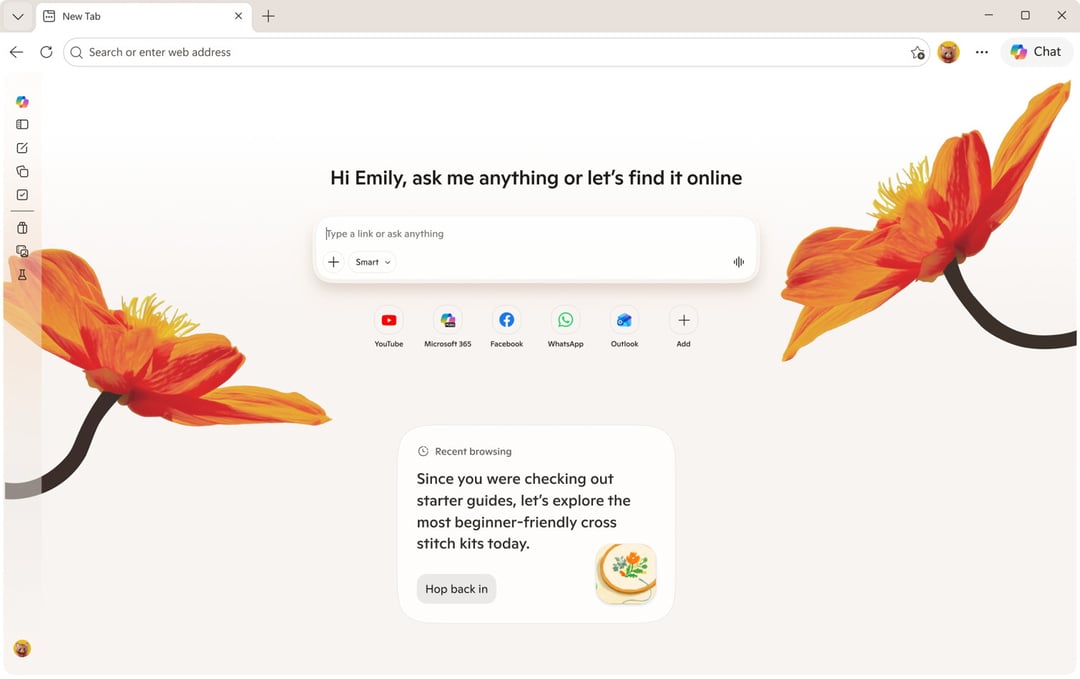
What "Journeys" Actually Does to Your Browsing Experience
There's something quietly frustrating happening inside Microsoft Edge right now, and honestly, it deserves more attention than it's getting.
Microsoft has been rolling out a batch of substantial updates to Edge on both desktop and mobile — and while some of it looks shiny on the surface, one change in particular is a step backward that's dressed up as progress. The browser's traditional history feature, that reliable list of every site you've visited, is being handed over to Copilot. What you get back isn't your history. It's an AI summary of your history. And those two things are very, very different.
Microsoft calls this new feature Journeys. The idea is that it helps you "pick up where you left off" — say, you were deep in research on cross-stitch beginner guides, got pulled away, and now you want to resume. Sounds useful, right? Here's the problem: when Edge surfaces that topic for you and you click back in, Copilot auto-generates a summary of those pages. No direct links. Just a paragraph of AI-generated text telling you what it thinks you need to know.
Think about that for a second. You can't click back to the specific page you were reading. You can't retrace your steps. You're handed a digest and told to work with that. If you actually need to find something specific — a product page, a tutorial, a forum thread — you're back to square one, searching from scratch.
The Problem With Letting AI Summarize Where You've Been
Here's what makes this particularly maddening. Traditional browser history isn't glamorous, but it works. It's a timeline. It's searchable. Google's Chrome, for instance, lets you search your history for a specific site or topic — a clean, fast, human-controlled solution.
Microsoft took that idea and handed it to an AI model that, as anyone who's spent time with these tools knows, is notoriously reluctant to link back to original sources. So you end up with a polished-sounding summary that floats in the air, disconnected from the actual web pages that produced it. That's not a productivity feature. That's a productivity trap.
And there's a broader concern here too — the idea sometimes called "AI brain," where relying on AI to do your thinking gradually erodes your own ability to navigate and synthesize information. Edge's Journeys pushes users further in that direction, quietly removing the tools that let you stay in control.
What Microsoft Is Killing to Make Room for This
Here's the part that stings. Microsoft actually solved this problem back in 2019 with a feature called Collections — a sidebar tool that let you group and save tabs for later. It was simple, direct, and genuinely useful. It kept the actual pages, not a summary of them.
Collections is being discontinued. Microsoft announced it earlier this year and it's set to disappear later in 2026, even though it's still present in the browser for now. So the feature that gave you control is going away, and the feature that replaces it takes control away from you. That's the trade being made here.
Where Copilot in Edge Actually Makes Sense
To be fair — and this matters — there's one related feature in this update that does make sense. Edge now lets you add specific open tabs to a Copilot query. So if you've done your own research, narrowed things down, and want AI input to help make a final call, you can bring those tabs into the conversation on your terms.
That's a genuinely useful setup. You're leading. You've done the work. You're asking for a second opinion on something specific. That's humans and AI working together the right way, with the human making the final call.
The difference between that and Journeys is autonomy. One gives it to you. The other quietly takes it away.
The Broader Edge Update: Familiar Features, Late to the Party
The rest of Microsoft's Edge announcements feel a bit like déjà vu. Copilot Vision and Voice are finally arriving on the mobile version of Edge — tools that let you interact with what you're seeing on screen. Useful, sure. But Google Lens launched years ago. Similarly, Edge is now getting the ability to generate quizzes from web pages and create podcasts from content — features Google has offered for quite a while now.
There's also a push toward making Edge's new tab page feel less like a cluttered widget board and more like a curated topic feed, similar to what Google does. The idea is that Copilot synthesizes information from around the web based on your interests. In practice, though, there are already reports of Copilot surfacing dubious claims from questionable sources — and while you can manage what it pulls from, that takes effort most people won't bother with.
Microsoft is also leaning hard on the term "long-term memory" for these new AI features — meaning the AI can resurface relevant information from your past sessions. But here's the thing: we already have a solution to that problem. It's called saving a URL to a file. It's been around forever. It works perfectly. It doesn't hallucinate.
Journeys Strips Out the One Thing Browser History Was Built For
What makes Journeys so frustrating isn't that AI is involved. It's that the AI is replacing something that was already functional and replacing it with something less useful. Directions apps on your phone are great because they enhance your ability to navigate — you're still the one deciding where to go. Journeys doesn't work like that. It makes decisions for you, summarizes for you, and removes the raw material you'd need to do it yourself.
The whole point of browser history has always been simple: here's where you've been, here are the links, go find what you need. Journeys dismantles that and calls it an improvement.