

Encrypted Client Hello is easy to turn on and easy to misread. A green padlock, a browser flag, or a site that "supports ECH" does not prove this visit hid its name. This test separates three outcomes. The client never offered ECH. The server rejected it. Or the handshake accepted it and the real name stayed inside.
What "protecting you" means on the wire
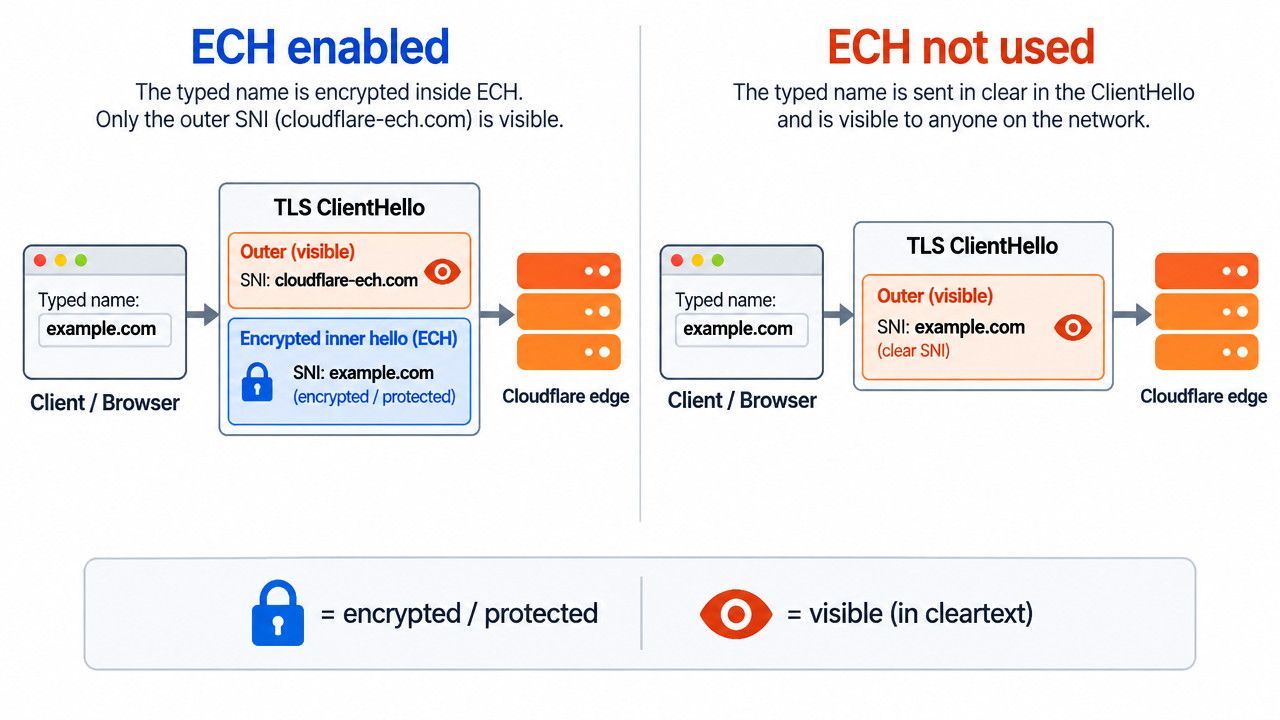
ECH is a TLS 1.3 extension, published as RFC 9849, that encrypts the sensitive parts of the first client message. The ClientHello splits in two. The outer hello is visible and carries a public name. The inner hello carries the real server name, encrypted to a key the client-facing server published in advance.
On Cloudflare that public name is cloudflare-ech.com. An observer can tell you reached some ECH site on that network. They cannot tell which one from the handshake alone, as Cloudflare's ECH docs describe. Picture a hotel key card. The clerk sees you entered the hotel. The card does not print your room number for the lobby to read.
That protection is narrow. RFC 9849 still leaves the destination IP visible, and a DNS lookup made in the clear still names the site. ECH is aimed at a passive network observer, not at the TLS terminator. Cloudflare and the site owner still learn the name, which the Cloudflare announcement states outright.
Set up a client that can use ECH at all
Three things have to be true before a test means anything. The client must speak TLS 1.3. It must receive an HTTPS or SVCB record that still contains the ech parameter. And that lookup should travel over encrypted DNS, so a local resolver cannot strip the parameter and leave you with a normal hello. RFC 9849 treats that stripped record as a downgrade.
Firefox and Chromium-family browsers offer ECH when encrypted DNS is active and the site published a key. Safari has little or no user-facing control, according to this 2026 ECH setup guide. A network can also disable the feature without touching the site. An empty or NXDOMAIN answer to HTTPS queries stops Chrome. The same answer for use-application-dns.net stops Firefox, which Cloudflare documents as a canary.
Confirm the site published an ECH configuration
Look up the HTTPS record for the exact name you will open. You need an ech parameter. Without it, this name cannot be protected, whatever the browser settings say. RFC 9849 makes publication of that configuration a prerequisite, and the packet.guru guide shows how to inspect the record.
A published key is necessary, not sufficient. It can be stale, stripped on your path, or ignored after the server rejects ECH. Use a known Cloudflare proxied name as the positive control. Free zones have ECH on by default, and other plans can turn it off in Edge Certificates, per Cloudflare's docs.
Read the handshake you just completed
Open https://www.cloudflare.com/cdn-cgi/trace, swapping in the domain under test, and read the sni= line. sni=encrypted means that completed handshake encrypted the server name. A plaintext name means it did not. Cloudflare documented this trace check in its encrypt-that-SNI write-up. Hard-refresh or force a new connection first. A reused session can show an old result.
If you capture packets, pass only when the ClientHello has the encrypted_client_hello extension and the visible SNI is the public name, not the name you typed. Ignore GREASE. A fake ECH extension sent when the server never advertised a key is not protection, as the setup guide notes.
Separate a cover name from real privacy
A pass on SNI can still leak the name through the destination IP. If that address hosts only one site, an observer does not need the ClientHello. RFC 9849 says this directly. Shared hosting and a large anonymity set are what make the cover name useful.
Certificate Transparency can still publish the name. ECH does not pull a certificate out of public logs, which the packet.guru guide flags as a separate leak. And the client-facing server still decrypts the inner hello. You have hidden the name from intermediaries, not from the service that terminates TLS.
Failure modes that fake a pass
A page that loads is not evidence. If something tampers with DNS and drops ech, the browser falls back to a clear ClientHello and the site still opens. RFC 9849 treats that as a downgrade, not as a protected visit.
Rejection is stricter than fallback. When ECH is rejected, that connection must not carry application data. A later retry without ECH can leak the name after the first attempt failed. A middlebox that blocks unknown TLS extensions can force the same path. Compare the site on a clean resolver and on the network you actually use before you trust a single result.
A verdict you can defend
To test whether ECH is actually protecting you, require all three parts. The HTTPS record still has ech. This handshake shows sni=encrypted or a public-name outer SNI, not the name you typed. And you have either closed or accepted the remaining leaks: destination IP, clear DNS, and certificate logs. If any part fails, ECH is not protecting that visit, even when the feature is enabled.
FAQ
Does sni=encrypted mean every site I open is hidden?
No. It describes that handshake. Repeat the check on the name you care about.
Why does ECH fail on my office network but work at home?
The resolver may be stripping HTTPS ECH data, or answering the Firefox canary so the browser never offers ECH, as Cloudflare documents.
Is ECH the same as DNS over HTTPS?
No. DoH hides the lookup. ECH hides the name in the TLS handshake. RFC 9849 needs both for the privacy claim.
Can I tell from the address bar?
No. The padlock does not say whether the ClientHello was encrypted.


