
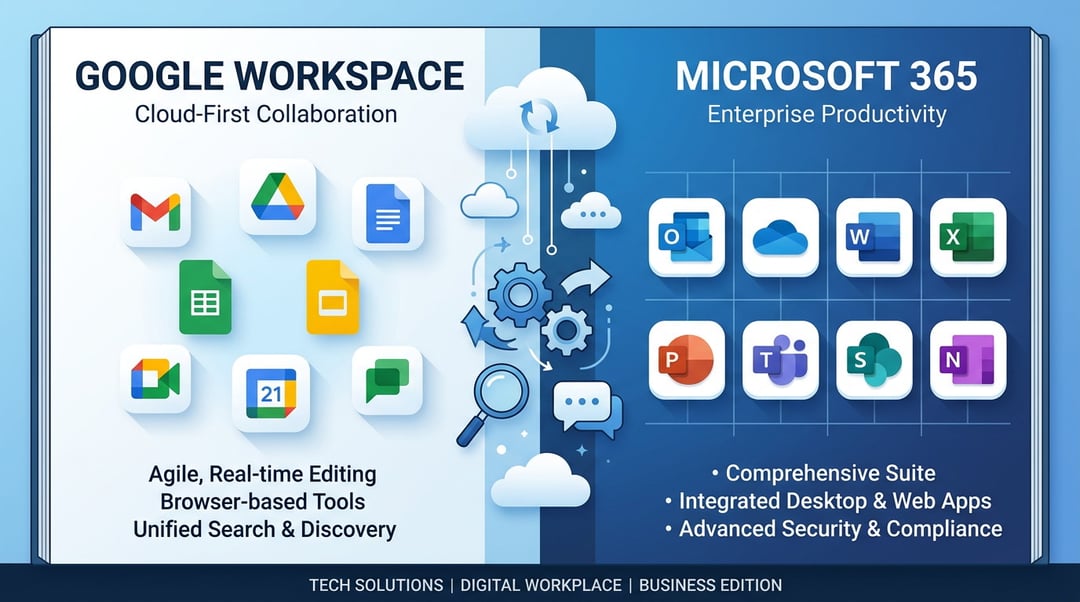
Choosing between Google Workspace and Microsoft 365 shapes how teams communicate, collaborate, and secure their data. This decision affects daily workflows as much as long‑term IT strategy. Both platforms dominate the productivity software market. Each delivers mature tools, cloud infrastructure, and embedded AI. Yet their philosophies differ in meaningful ways.
This guide examines Google Workspace and Microsoft 365 across applications, collaboration, security, pricing, and real‑world use cases. The goal is clarity. No hype. Just practical insight.
Core Philosophy: Cloud-Native Simplicity vs Enterprise Continuity
The fundamental difference between Google Workspace vs Microsoft 365 begins with origin.
Google Workspace was built as a browser-first system. Its architecture assumes constant connectivity and real-time collaboration. Files live in the cloud by default. Multiple users edit simultaneously without friction.
Microsoft 365 evolved from the desktop version of Office. Word, Excel, and PowerPoint existed long before cloud sync. Microsoft later integrated these applications into a cloud ecosystem anchored by OneDrive, SharePoint, and Teams.
This history matters.
Google optimizes for simplicity and shared editing. Microsoft optimizes for depth and enterprise governance. Organizations must decide which philosophy aligns with operational reality.
Application Ecosystem: Depth vs Speed
Google Docs vs Microsoft Word
Microsoft Word remains the gold standard for advanced document formatting. It supports complex layouts, citation management, macro automation, and publishing precision. Legal teams and academic institutions rely heavily on these features.
Google Docs prioritizes seamless collaboration. Users edit in real time. Version history remains transparent and intuitive. Comments resolve quickly without heavy configuration.
If document complexity drives your workflow, Word offers greater control. If rapid collaboration matters more, Docs excels.
Microsoft documentation details advanced Word capabilities at
https://learn.microsoft.com/microsoft-365/
Google provides Workspace documentation at
Google Sheets vs Microsoft Excel
Excel dominates advanced analytics. Power Query, Power Pivot, and VBA scripting allow extensive modeling. Financial analysts often depend on Excel for large datasets and complex formula structures.
Google Sheets emphasizes accessibility and shared dashboards. Teams build lightweight data trackers quickly. Cloud-based collaboration reduces version conflicts.
Excel handles large memory-intensive files more reliably. Sheets simplifies collaborative reporting for distributed teams.
Google Slides vs PowerPoint
PowerPoint offers refined animations and enterprise branding tools. Marketing departments frequently depend on this precision.
Google Slides supports real-time editing with minimal overhead. Teams produce presentations quickly without file management concerns.
PowerPoint favors polish. Slides favors speed.
Communication and Collaboration Infrastructure
Gmail vs Outlook
Gmail delivers streamlined design and powerful search. It filters email effectively with minimal configuration. Its interface prioritizes clarity.
Outlook integrates deeply with Microsoft Exchange. It provides granular administrative controls and policy enforcement. Enterprises value this precision.
Gmail simplifies communication. Outlook strengthens governance.
Google Meet vs Microsoft Teams
Microsoft Teams functions as a collaboration hub. It combines chat, video conferencing, file storage, and application integration within structured channels.
Google Meet focuses on video conferencing with lightweight controls. It integrates smoothly with Google Calendar and Gmail.
Teams supports advanced telephony and enterprise communication layers. Meet offers intuitive simplicity.
For organizations that centralize internal collaboration, Teams provides broader capability. For streamlined communication, Meet remains effective.
Storage Architecture: Drive vs OneDrive and SharePoint
Storage design reveals another distinction in the Google Workspace vs Microsoft 365 comparison.
Google Drive operates as a unified cloud repository. Sharing occurs through direct permissions. Folder hierarchies remain flexible.
Microsoft uses OneDrive for personal storage and SharePoint for structured collaboration. Teams connects directly to SharePoint document libraries. This structure enhances governance but increases architectural complexity.
Conceptual model comparison:
- Google structure
- User → Drive → Shared Folder → Real-time editing
- Microsoft structure
- User → OneDrive → SharePoint Site → Teams Channel → Document Library
Microsoft emphasizes layered control. Google emphasizes fluid accessibility.
Artificial Intelligence: Gemini vs Copilot
AI integration now influences productivity decisions significantly.
Microsoft 365 integrates Copilot into Word, Excel, PowerPoint, and Teams. Copilot draws context from Microsoft Graph. It analyzes organizational data securely within tenant boundaries.
Google Workspace integrates Gemini across Docs, Gmail, Sheets, and Meet. Gemini leverages Google’s search intelligence and language models.
Copilot performs strongly when analyzing structured enterprise datasets. Gemini excels at drafting content and summarizing communications quickly.
Microsoft Copilot overview:
https://www.microsoft.com/microsoft-365/copilot
Google Gemini for Workspace:
AI features require additional licensing in many cases. Organizations must evaluate cost against productivity gain.
Security and Compliance
Security considerations often determine the final choice between Google Workspace vs Microsoft 365.
Microsoft 365 integrates tightly with Microsoft Defender and Azure Active Directory. It supports granular role-based access control and advanced eDiscovery capabilities. Regulated industries often prefer this depth.
Google Workspace applies zero-trust principles across its infrastructure. It simplifies administrative dashboards and enforces strong default protections.
Key compliance capabilities include:
- Data Loss Prevention configuration
- Retention policy management
- Legal hold tools
- Regional data residency controls
Microsoft generally leads in highly regulated environments. Google offers streamlined security suited to small and mid-market organizations.
Pricing and Total Cost of Ownership
Google Workspace pricing tiers remain relatively simple. Plans scale based on storage, security controls, and administrative features.
Microsoft 365 pricing varies more widely. Enterprise tiers bundle desktop applications, compliance tools, and security enhancements.
However subscription cost alone does not define total ownership expense.
Organizations must factor:
- Migration planning
- Employee training
- Integration with existing systems
- Ongoing administrative overhead
Microsoft environments may require deeper configuration. Google environments may reduce administrative complexity.
Ideal Use Cases
Google Workspace is often suitable for:
- Startups and remote-first companies
- Education institutions
- Teams prioritizing rapid collaboration
Microsoft 365 is often a good fit for:
- Large enterprises
- Regulated industries
- Organizations dependent on advanced Excel modeling
The best choice aligns with workflow intensity and governance needs.
Migration and Vendor Lock-In
Switching between platforms requires careful planning.
Email migration involves MX record updates and mailbox transfer processes. File migration demands mapping between Drive and SharePoint structures. Proprietary file formats introduce compatibility considerations.
Third-party migration tools reduce disruption. However workflow retraining remains unavoidable.
Organizations should assess long-term digital strategy before committing deeply to either ecosystem.
Final Choice: Google Workspace or Microsoft 365
The decision is not merely a feature checklist exercise. It reflects a broader operational philosophy.
Google prioritizes streamlined collaboration and intuitive design. Microsoft emphasizes feature depth and enterprise extensibility.
Evaluate organizational size, compliance requirements, and workflow complexity. Consider how teams actually work each day.
The optimal platform supports productivity without introducing unnecessary friction. Clear alignment between tools and strategy ultimately drives sustained efficiency.