Google Images just got its biggest facelift in years, and it's not aimed at helping you find a photo faster. It's aimed at keeping you scrolling. The redesign reshapes the search engine into a browsable, constantly refreshing gallery that pulls images from across the web, and it arrives alongside a new tool that lets you generate your own AI images without ever leaving Google Search. The timing isn't random either — Google is marking 25 years since Google Images first launched, and this update is its answer to what image search should look like now.
From a Search Box to a Scrollable Feed
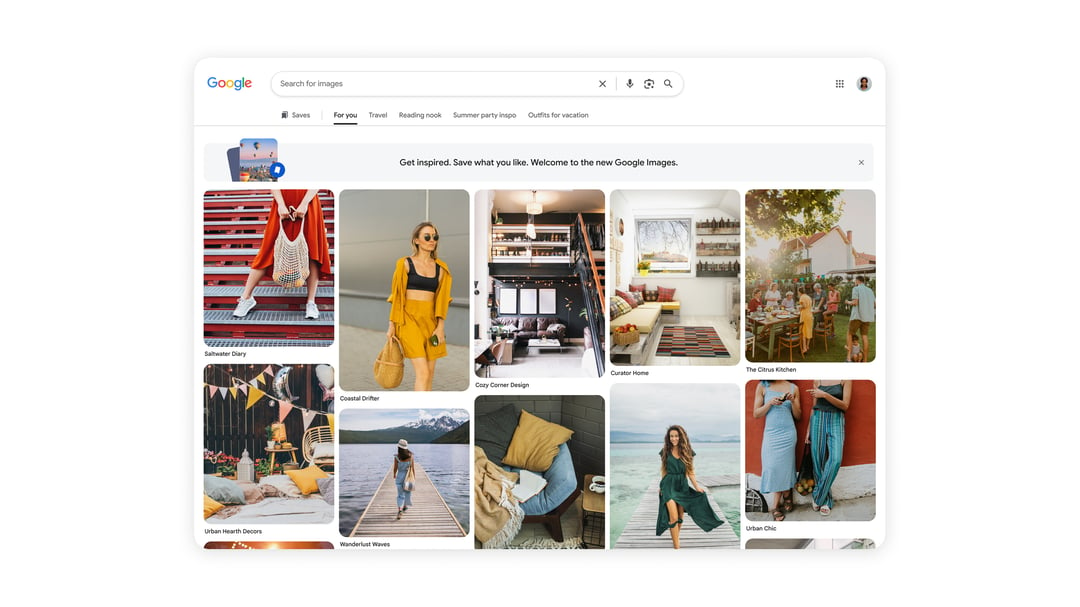
For a quarter century, Google Images has worked the same basic way: type something in, get a grid of matching photos, click the one you want. The new version flips that model. Instead of starting with a search, users land on a "For You" gallery built around their own interests and past browsing habits. It behaves less like a search results page and more like a feed — one that Google says refreshes in real time as new images come in.
That's a direct echo of how Pinterest works, and Google isn't being subtle about the comparison. Pinterest built its entire business on letting people browse and bookmark visual inspiration, whether that's outfit ideas, home decor, or travel photos. Google is essentially borrowing that same formula and applying it to Images, turning a utility people used for quick lookups into a destination people might open just to scroll.
Why the Shift Makes Sense for Google's Business
There's a clear incentive behind the redesign beyond user convenience. A discovery-focused Google Images gives people a reason to linger inside Google's ecosystem rather than clicking away after finding one photo. More time spent browsing across Google's platforms translates into more opportunities to serve ads, which is likely a core motivation behind the change.
How the New "For You" Gallery Works
Once someone lands on the redesigned Google Images, they'll see that personalized gallery front and center, curated based on their interests and browsing history. The design encourages continuous scrolling rather than a single search-and-click action, and Google says the images populating the feed update in real time.
Saving Ideas Into Collections
As people browse, they can bookmark images into "collections," which show up as tabs sitting above the main gallery. This gives the feed a practical, return-to-later function rather than just a one-time scroll. A few examples of how someone might use collections:
- Putting together vacation outfit ideas before a trip
- Building a board of general travel inspiration
- Collecting design ideas for a reading nook
That collections feature is really the piece that makes the Pinterest comparison stick — it's not just about looking at images, it's about organizing them for something you're planning.
Bringing AI Image Generation Into Search
The second half of this update tackles a different problem: what happens when the image you're picturing simply doesn't exist online yet. Google is rolling out the ability to generate custom images directly within AI Overviews in Search, powered by its latest Nano Banana model. The idea is that instead of describing what you want and hoping something close turns up in results, you can type a prompt and have Google build the image on the spot.
Where This Actually Comes in Handy
This isn't meant to replace regular image search — it's designed for the moments when you have a very specific visual in mind that no existing photo captures. Google points to a couple of practical use cases: picturing what a room would look like painted red, or visualizing a dorm room decorated with a coastal theme. Both are situations where browsing existing photos only gets you so far, since no stock photo matches your exact space or idea.
There's also a competitive angle here. By letting people create images directly inside Search, Google is positioning itself as a one-stop option for both finding and generating visuals, rather than having users bounce over to a separate AI tool like ChatGPT when Google's results fall short.
Rollout Details and Availability
The redesigned Google Images gallery is rolling out over the coming weeks, starting with desktop users in the U.S. who have their language set to English. Anyone who wants to try it needs to be signed into a Google Account first.
The image generation feature inside AI Overviews is following a similar timeline, rolling out over the coming weeks in English. However, its availability is tied to regions that already support image creation in AI Mode, so where it shows up first will depend on where that underlying feature already exists.