
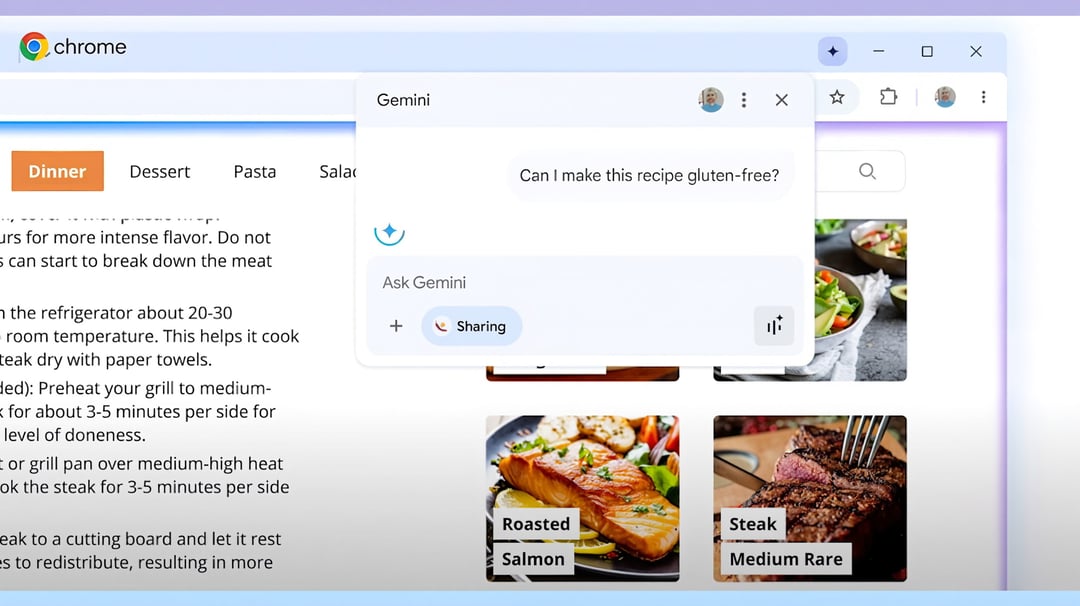
Google Gemini in Chrome: Global Expansion to New Markets
Google is expanding its Gemini integration within Chrome to new regions, including India, Canada, and New Zealand. That matters because Chrome isn’t just a browser anymore. It’s slowly turning into an AI-powered workspace — the kind where your browser doesn’t just show information, it helps you process it.
This rollout brings Gemini directly into the Chrome interface for users in these countries, marking another step in Google’s push to embed AI deeper into everyday browsing.
But here’s the important detail: certain functionality is not included in this latest expansion. While Gemini integration is arriving in these regions, not every feature available elsewhere is part of this rollout.
How the “Ask Gemini” Feature Works in Chrome
The “Ask Gemini” Icon in the Tab Bar
Users who receive access will see an “Ask Gemini” icon directly in the Chrome tab bar. It’s not hidden in a menu. Not buried in settings. It sits right where you’re already working.
Click it on any open tab, and Gemini activates for that specific page.
That placement is intentional. It keeps AI assistance inside your normal browsing flow instead of forcing you to open another app or window.
Summarizing Content Instantly
One of the primary uses of Gemini in Chrome is content summarization.
Open a long article. Hit the icon. Ask for a summary.
Instead of skimming endlessly or copying text into another tool, Gemini processes the page directly inside Chrome. For students, researchers, or anyone drowning in tabs, that’s a serious time saver.
Asking Questions About Any Webpage
Gemini isn’t limited to summaries. Users can ask direct questions about the content on the active tab.
For example:
- Clarify a concept
- Break down a technical explanation
- Explain a section in simpler terms
It turns passive reading into interactive learning.
Creating Quizzes to Understand a Topic
Another notable capability is quiz generation.
Users can request a quiz based on the page they’re viewing. That’s especially useful for learning and retention. Instead of just reading, you test yourself. It shifts the browser from consumption mode to comprehension mode.
For students or professionals preparing for exams, certifications, or presentations, that feature adds practical value.
Gemini’s Ability to Work Across Multiple Tabs
Cross-Tab Intelligence
Google says Gemini can work across tabs.
That’s significant. Most AI tools respond to one piece of content at a time. Cross-tab functionality means Gemini can pull context from multiple open pages.
Imagine researching a topic with five sources open. Instead of manually comparing them, Gemini can potentially synthesize information across those tabs.
That’s closer to having a research assistant than a chatbot.
Feature Limitations in the Latest Rollout
While Gemini integration is expanding to India, Canada, and New Zealand, Google is keeping certain functionality out of this expansion.
The core integration — including the “Ask Gemini” tab bar icon and interactive capabilities — is arriving. However, not every feature available in other regions is included at this stage.
That suggests a phased rollout strategy. Expansion first. Full feature parity later.
For users in these regions, this means access to core AI-powered browsing tools, with the possibility of additional enhancements in the future.
What This Expansion Means for Chrome Users
AI-Enhanced Browsing Becomes Mainstream
With Gemini embedded directly into Chrome, AI becomes part of the default browsing experience — not an optional add-on.
And because Chrome operates across platforms, this integration has broad reach.
Productivity and Learning Benefits
Key benefits include:
- Faster content digestion through summaries
- Interactive learning through quizzes
- On-page question answering
- Cross-tab research assistance
For professionals, students, and researchers, these capabilities reduce friction between reading and understanding.
Strengthening Google’s AI Ecosystem
By embedding Gemini into Chrome, Google reinforces its AI ecosystem inside one of its most widely used products.
Instead of launching separate AI apps, the company is integrating intelligence into existing tools — making adoption easier and more natural.