
Google’s Agentic AI Push in Search
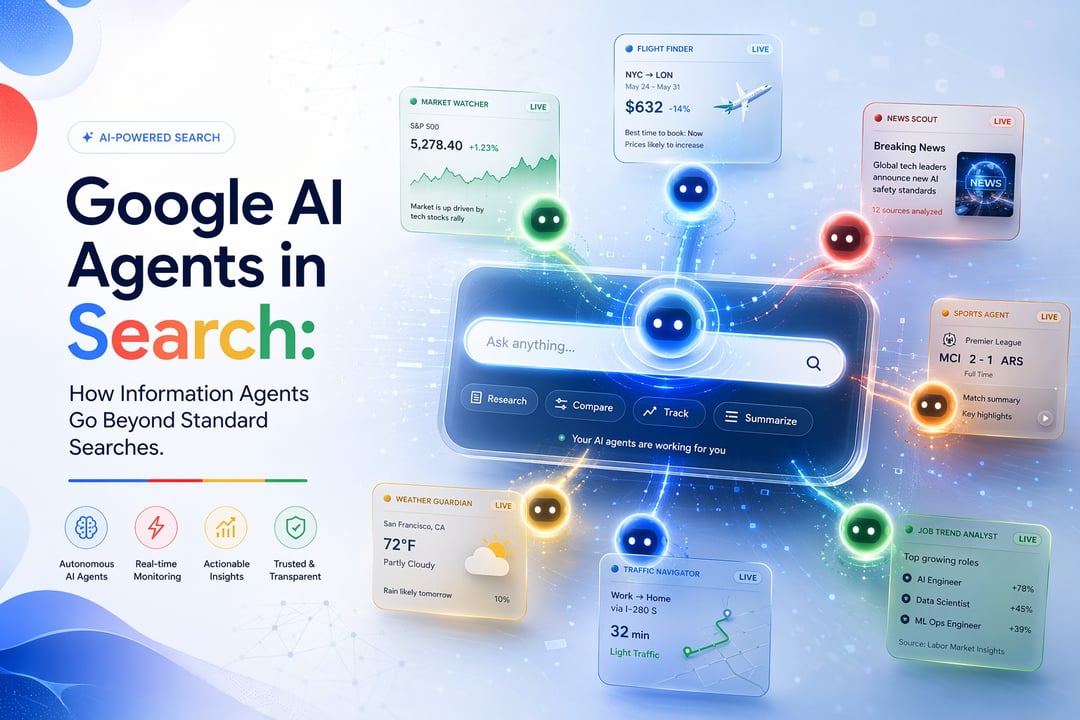
At the Google I/O 2026 keynote, Google revealed new agentic capabilities in Search that let users create, customize, and manage multiple AI agents for topics they want to follow.
The move is part of Google’s broader shift toward agentic AI systems. Instead of simply answering one question at a time, these systems are designed to take initiative and help with ongoing tasks. That’s the real difference here. Standard search waits for a user to ask something. Google’s information agents are built to keep working in the background.
These agents can operate continuously, 24/7, helping users stay updated on subjects they care about without forcing them to run the same searches again and again.
How Google Information Agents Work
Google’s information agents are not just another way to get a list of links. They’re designed to collect and synthesize information from multiple sources, explain why something matters, compare different perspectives, and surface actionable insights.
In that sense, they feel like the next step beyond Google Alerts, the notification service Google launched in 2003. But the new agents are meant to go further than basic notifications.
Instead of simply telling users that something new appeared online, the agents can help make sense of what changed, why it may be relevant, and where someone can go next to learn more.
From One-Time Search to Continuous Tracking
Traditional search is reactive. A user types a query, gets results, and then has to come back later if they want an update.
Google’s information agents shift that process into something more continuous. A user can set an agent around a specific topic, and the agent keeps monitoring that topic in the background. When relevant information appears, the Google app can send a push notification.
That means users don’t have to manually check the same subject every day. The agent handles the tracking and brings updates forward when something important happens.
What Google AI Agents Can Track
The agents are designed for a range of topics and everyday needs. A user following the stock market, for example, could create an information agent around specific companies, share prices, or economic trends.
That agent could monitor market activity throughout the day, track breaking news, summarize earnings reports, alert the user when major changes happen, and provide summaries and links for additional reading.
The same idea applies to more routine tasks too.
Stock Market Updates and Economic Trends
For people tracking markets, an information agent could focus on selected companies, share price movements, or broader economic activity. Instead of checking several sources manually throughout the day, users could rely on the agent to monitor activity and surface meaningful updates.
The agent could also summarize earnings reports and breaking news, giving users a faster way to understand what has changed.
Flight Prices and Travel Planning
Google’s AI agents can also help with upcoming travel by tracking flight prices. Rather than repeatedly searching for the same route, users can create a tracked topic and let the agent watch for relevant updates.
When something worth knowing appears, the Google app can send a notification.
Sports, Live Events, News, Housing, Jobs, Weather, and Traffic
Google’s information agents can also be used for:
- Monitoring sports teams and live events
- Following breaking news
- Keeping tabs on housing market trends
- Tracking job market trends
- Watching weather updates
- Monitoring traffic changes
The feature is built around the idea that many searches are not really one-time questions. They’re ongoing interests. And for those ongoing interests, an always-on agent can be more useful than a standard search box.
How to Use Google’s New Information Agents
To use the feature, users can open AI Mode in Search and enter a prompt.
One example is: “Keep me updated on nearby movie tickets for ‘The Mandalorian and Grogu.’”
Once the prompt is set, the agent tracks the topic. When something relevant appears, the Google app sends a push notification.
Users can also see their active tracked topics in AI Mode history. From there, they can jump back in to manage an alert, refine it, or turn it off.
Managing and Refining Tracked Topics
AI Mode history gives users a place to view active tracked topics. This is where they can return to an agent after creating it.
If the alert needs to be adjusted, users can refine it. If it’s no longer useful, they can turn it off. That matters because information agents are designed to run continuously, so users need a simple way to manage what they’re tracking.
Availability for Google AI Pro and Ultra Subscribers
Information agents will be available this summer. Google is first rolling them out to Google AI Pro and Ultra subscribers in the U.S.
After that initial rollout, the company plans to bring the feature to additional markets later on.
Google Search Redesign and the Intelligent Search Box
Alongside information agents, Google also introduced a major redesign of Search. The company describes the redesign as a reimagined “intelligent search box” and says it is the biggest change to Search in more than 25 years.
The new interface is designed to support longer and more conversational queries. That fits with the broader direction of AI-powered Search, where users may ask more complex questions instead of typing short keyword phrases.
AI-Powered Query Suggestions
Google also introduced a new AI-powered query suggestion system. Unlike traditional autocomplete, this system is designed to help users create more nuanced and context-aware searches.
That means Search is not only changing how results are returned. It’s also changing how users shape their questions in the first place.
Google I/O 2026 Search and AI Announcements
The new information agents arrived as part of a wider set of Google I/O 2026 announcements around AI and Search.
Other related updates included a major Search redesign, updates to the Gemini app, and the introduction of Gemini Spark, described as a 24/7 agent assistant with Gmail integration.
Together, these announcements show Google’s focus on AI systems that can help with ongoing tasks, richer queries, and more personalized information tracking.