
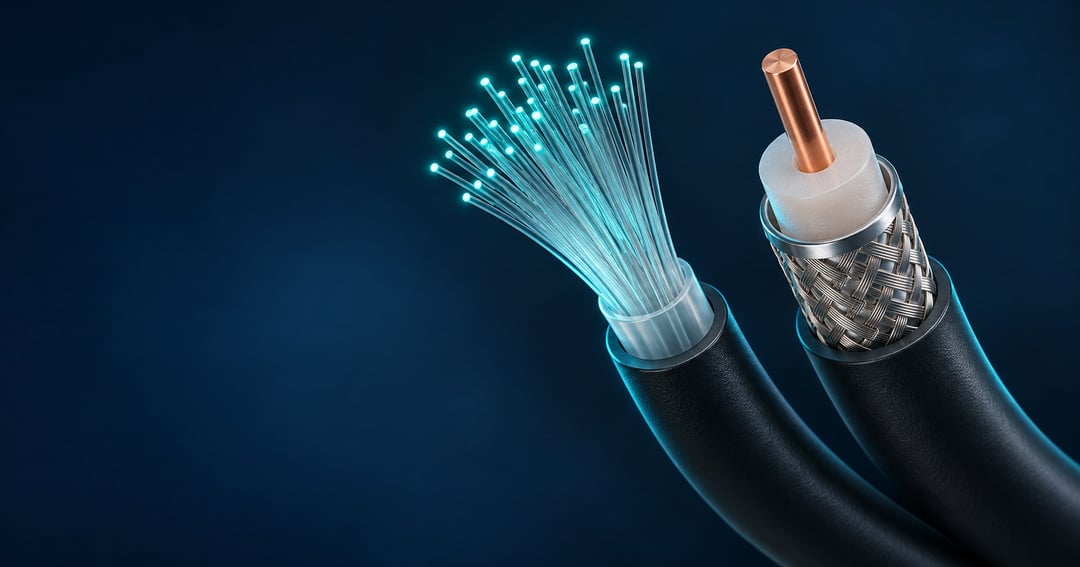
Fiber internet typically delivers faster uploads, low latency, and more capacity for households using several connected devices at once. Those advantages can matter when video calls, 4K streaming, online games, and cloud backups all share the same connection.
Cable can handle many of those activities, too. Whether switching makes a noticeable difference depends on your current service, the plan you choose, and the equipment inside your home.
How Fiber and Cable Internet Work
The main difference is how each connection carries data to your home.
Cable internet sends electrical signals through coaxial wiring. Many cable providers use a hybrid network: fiber handles much of the route, while coaxial cable completes the connection to the house.
Fiber-to-the-home keeps the connection on fiber-optic cable from the provider through to your property. Thin glass strands carry pulses of light, and an optical network terminal converts those signals into data your router and devices can use.
Fiber can move large amounts of information across long distances with relatively little signal loss. Its glass transmission medium also resists electromagnetic interference, which can affect electrical signals traveling through copper wiring. These characteristics help providers offer high speeds in both directions.
Fiber vs. Cable Internet: Key Differences
Both technologies support fast home internet. Cable networks continue to improve, including newer services capable of multi-gigabit downloads and symmetrical speeds. The differences below describe typical residential offerings.
|
Feature
|
Fiber internet
|
Cable internet
|
|
Data transmission
|
Pulses of light travel through glass strands
|
Electrical signals travel through coaxial wiring, often connected to a fiber backbone
|
|
Download speeds
|
Gigabit and multi-gigabit plans are available
|
Gigabit plans are available, with multi-gigabit service on newer networks
|
|
Upload speeds
|
Upload and download rates often match
|
Uploads are typically slower, though newer technology supports matching rates
|
|
Latency
|
Generally low, supporting responsive applications
|
Can also be low, depending on network conditions
|
|
Capacity
|
Substantial bandwidth with potential for future upgrades
|
Substantial bandwidth, with further gains tied to network improvements
|
|
Reliability considerations
|
Resists electromagnetic interference
|
Performance is influenced partly by coaxial infrastructure and local network conditions
|
The most useful distinction may be upload performance. A household that frequently sends large files or runs several connected activities simultaneously may notice more benefit than one whose current cable plan already meets its needs.
Why Fiber Upload Speeds Matter
Download speed determines how quickly you receive files, load online content, and stream video. Upload speed affects the information you send, including work presentations, video files, and photos headed to cloud storage.
With conventional cable service, sending a large file can take longer than downloading a file of the same size. Many fiber plans offer symmetrical service, meaning their advertised upload and download speeds are equal. For example, a symmetrical 1 Gig plan can advertise up to 1 Gbps for both uploads and downloads.
That additional upload capacity can be useful for remote workers and people who regularly transfer large files. It also provides more room for video meetings, livestreams, and cloud backups, all of which send data from your home to the internet.
Latency Affects Gaming and Video Calls
Latency measures the time it takes to send information across a network and receive a response. It is commonly expressed in milliseconds.
For online gaming, lower latency helps your inputs reach the game server sooner. In competitive games, that responsiveness can provide an advantage over a connection with longer delays. During video meetings, excessive latency can cause awkward pauses or make participants speak over each other.
Fiber generally offers low latency, but buying a faster plan does not automatically remove lag. Several other factors influence responsiveness:
- The distance to the server
- Congestion on the network
- Wireless interference
- The router being used
- The quality of the connection between your device and router
If a weak Wi-Fi connection is causing problems, switching a gaming device to Ethernet may help more than paying for a faster internet plan.
More Capacity for Streaming and Connected Devices
A busy household can place several demands on one connection. Someone may be watching a 4K movie while another person plays online, with smart home devices connected in the background.
A single activity may use only a relatively modest amount of bandwidth. One 4K stream commonly needs approximately 15–25 Mbps, depending on the streaming service and video quality. The greater challenge comes when streams, downloads, uploads, and background updates all compete for capacity.
A high-capacity fiber plan gives those activities more room to run together. This can make fiber especially useful in homes where several people regularly use the internet at the same time.
Cable can also provide enough bandwidth for 4K streaming. The value of switching depends on the combined demands of your household and how well your existing connection handles them.
Is Fiber More Reliable Than Cable?
Fiber has advantages in the way it carries signals. Light traveling through glass is resistant to electromagnetic interference, and fiber can cover considerable distances without using the same electrical amplification approach as copper networks.
These characteristics can support consistent performance, particularly on a well-maintained fiber-to-the-home network. They do not mean cable is inherently unreliable. Cable performance depends on local infrastructure, congestion, equipment quality, and how the provider manages available capacity.
Fiber connections can still suffer outages. Physical damage, failed equipment, and power interruptions can affect service, while congestion and other network limitations can influence actual speeds.
When Gigabit and Multi-Gigabit Internet Are Useful
Gigabit plans advertise speeds in gigabits per second. A 1 Gig connection offers up to 1,000 Mbps, while a 5 Gig connection offers up to 5,000 Mbps.
Multi-gigabit capacity can benefit households with heavy, simultaneous internet use. It may also help content creators and professionals who frequently transfer large video projects or other sizable files. The extra capacity provides room for future connected devices and applications.
However, a faster plan needs compatible equipment to deliver its full benefit. A computer with a standard 1 Gig Ethernet port cannot use the entire speed of a 5 Gig connection by itself. Your router, switches, network ports, cables, and devices all affect the performance you receive.
For many households, the practical benefit is having more bandwidth to distribute among several devices. It may not dramatically change a single activity.
What T-Mobile Fiber Includes
T-Mobile Fiber provides home internet over an entirely fiber-optic connection. Its plans offer symmetrical upload and download speeds, with gigabit and multi-gigabit options depending on the selected plan and location.
The service includes:
- Unlimited data
- A Wi-Fi router
- Installation
- No annual contract
Unlimited data can be relevant for households that regularly stream high-resolution video, move large files, or maintain extensive cloud backups.
Availability, advertised plan speeds, and applicable taxes and fees vary by address. Those details matter when comparing the service with your current connection.
Check Your Home Wi-Fi Before Upgrading
Fast internet reaching your home does not guarantee the same performance on every device. An older router or a poorly placed wireless access point can limit what you receive, even with fiber service.
Walls, distance, interference, and the number of connected devices all affect wireless performance. Newer Wi-Fi equipment or a mesh system may improve coverage in a larger home.
Before choosing multi-gigabit service, check whether your equipment supports the advertised speeds. It also helps to compare the additional capacity with what your household actually uses. Your current plan, available alternatives, and home network all influence whether switching is worthwhile.
FAQ
Is fiber better than cable for online gaming?
Fiber’s generally low latency and substantial upload capacity can help with online gaming, though cable can also perform well. Server distance, congestion, and whether you connect through Wi-Fi or Ethernet also affect responsiveness.
Do you need fiber internet for 4K streaming?
No. Many cable connections can support 4K video, with a single stream commonly requiring about 15–25 Mbps depending on the service and quality. Fiber’s additional capacity becomes more useful when several people stream or use other connected applications simultaneously.
Can fiber internet slow down during peak hours?
Yes. Fiber can experience congestion and other performance limits, even with its high capacity. Actual speeds depend on the provider’s infrastructure, network conditions, and your home equipment.


