
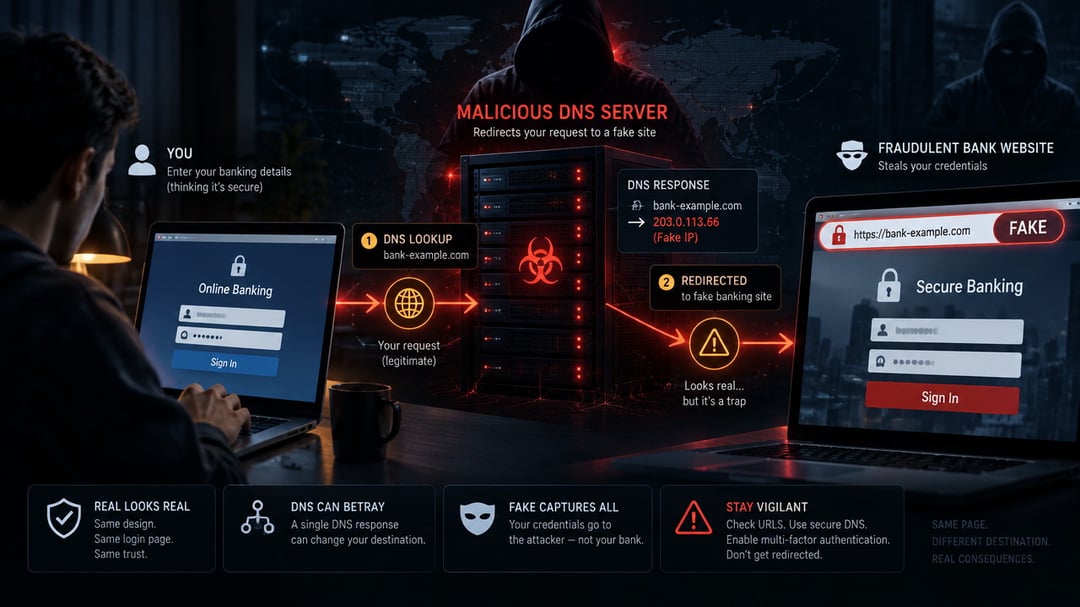
You type your bank’s web address correctly. You use a bookmark. Maybe you even check for the padlock in the browser. And yet, with a fake DNS attack, you could still land on a convincing impostor page designed to steal your banking login.
The good news is that these attacks leave a trail. Once you understand how DNS redirection works, you can spot the warning signs, secure the weak points, and react quickly if something feels off.
What Fake DNS Is and Why It Can Defeat Familiar Banking Habits
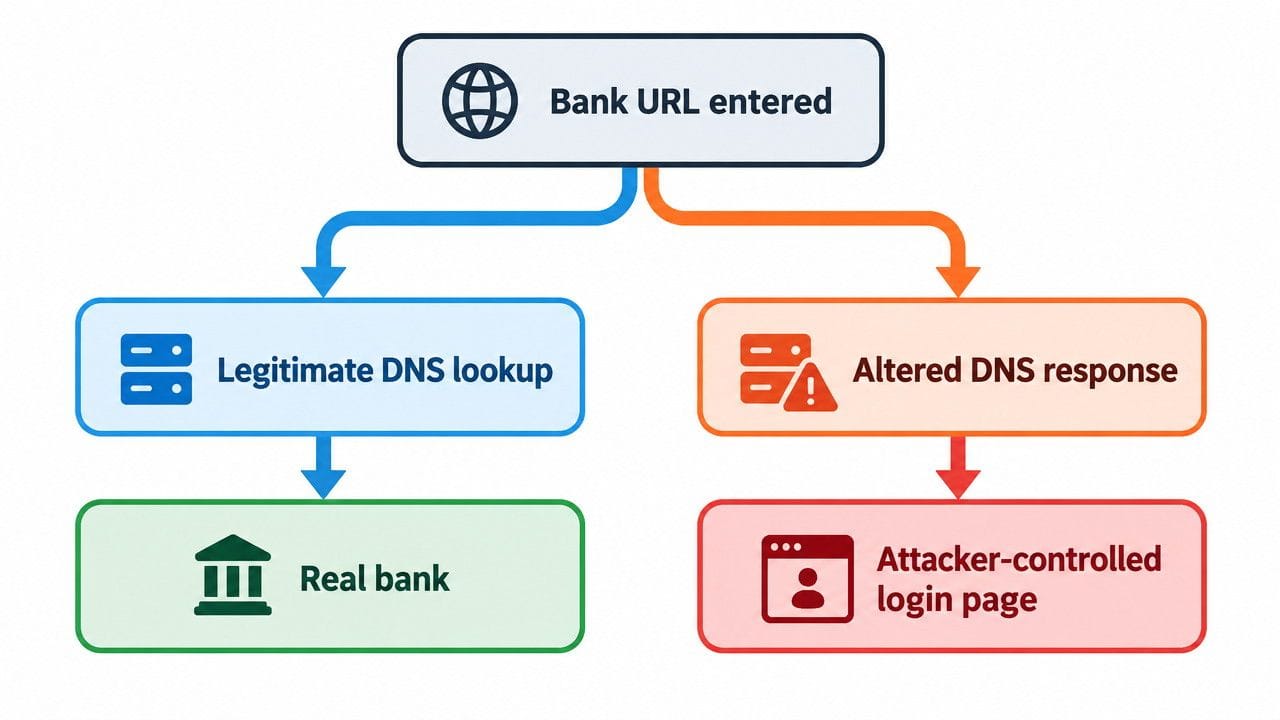
DNS, or the Domain Name System, works a bit like the internet’s address book. When you enter a domain name, DNS tells your device which internet address to contact.
A fake DNS attack interferes with that lookup. Instead of receiving the real address for a bank, your device receives an attacker-controlled destination.
Several related terms describe this family of attacks:
- DNS hijacking: An attacker changes DNS settings or DNS records to redirect traffic.
- DNS spoofing or poisoning: An attacker supplies fraudulent DNS information.
- Pharming: A broader term for redirecting people from a legitimate site to a fake one, often through DNS manipulation or malware.
Unlike classic phishing, the victim may not click a suspicious link. They may type the correct bank URL and still reach the wrong place. The FDIC has warned that pharming malware can intercept requests for legitimate sites and redirect people to fraudulent copies. FDIC guidance
Fake DNS vs. Traditional Phishing
Traditional phishing starts with a lure: a fake security alert, delivery notice, or “unusual activity” message. The link points to a lookalike login page.
Fake DNS changes the route underneath the browser. Think of it this way: phishing gives you a bad street address. DNS hijacking changes the road signs after you’ve left home.
Both attacks want the same thing: your username, password, multifactor authentication code, or other information that helps criminals enter your account.
Why HTTPS Alone Is Not a Complete Safety Check
HTTPS encrypts traffic between your browser and the site you reach. That matters. But it does not guarantee that the site is the one you intended to reach.
CISA has documented DNS infrastructure hijacking campaigns where attackers changed DNS records and could obtain valid TLS certificates for redirected domains. In other words, a lock icon may appear even when DNS manipulation has sent traffic somewhere malicious. CISA’s advisory explains the risk.
How Scammers Use Fake DNS to Capture Banking Credentials
Fake DNS attacks work by taking control of a step most people never see: the lookup that happens before a browser connects to a website.
An attacker first changes DNS settings, compromises a router, infects a device, or gains access to an organization’s domain-management account. Then they redirect selected traffic to a fraudulent site that imitates a bank’s login screen.
The page may look polished. It may even show the bank’s logo, colors, and familiar prompts. But every password entered there goes to the criminal.
Compromised Home Routers and Wi-Fi Networks
Home routers are a tempting target because they connect every device in the house. If an attacker changes the router’s DNS settings, phones, laptops, tablets, and smart TVs may all receive fraudulent directions.
The UK’s National Cyber Security Centre reported that attackers exploited routers and modified DNS settings so connected devices used attacker-controlled DNS servers. NCSC’s report shows why router updates and strong administrator passwords aren’t optional.
Malware and Device-Level Redirection
Malware can also alter DNS behavior on one device. That means the problem may follow a laptop while every other device on the network works normally.
This is one reason a strange banking page should never be dismissed as “just a browser glitch.” A compromised device can quietly redirect traffic before the bank’s real site ever loads.
Attacks on Domain and DNS Provider Accounts
Some DNS attacks happen far from the victim’s home network. Criminals may steal credentials for a domain registrar or DNS provider, then change records that direct visitors to the wrong server.
CISA describes campaigns that targeted domain infrastructure and altered DNS records for specific organizations. That type of attack can affect many visitors at once and may look legitimate at first glance.
Red Flags That Suggest a Fake DNS or Banking-Login Scam
No single warning sign proves a DNS attack. Still, a few patterns deserve attention.
A banking site that suddenly asks you to sign in repeatedly, requests unfamiliar details, or behaves oddly may be fraudulent. So may a bank page that looks normal on mobile data but strange on your home Wi-Fi.
Certificate warnings are another serious red flag. Stop immediately if your browser says a connection is not private or a certificate does not match. But don’t assume a clean-looking padlock settles the question.
Also check the full domain name. Scammers often rely on hurried reading. A single extra letter or an unusual ending can be enough to send credentials into the wrong hands.
Preventing Scams with Stronger DNS and Account Security
Preventing scams works best as a layered habit, not a single setting. Secure the network, secure the device, and secure the bank account.
Secure the Router and Home Network
Change the router’s default administrator password and use a unique, long replacement. Install firmware updates from the manufacturer and replace routers that no longer receive security support.
If banking pages suddenly behave differently across several devices, review the router’s DNS settings. The NCSC recommends securing routers because compromised router configurations can redirect connected devices. NCSC guidance
Harden Bank and Email Accounts
Use a unique password for every important account, especially email and banking. A password manager makes this practical without forcing you to memorize dozens of random strings.
Enable multifactor authentication when your bank and email provider offer it. Email deserves special attention because password-reset links and security alerts often land there first.
Protect the Device and Connection
Keep your operating system, browser, router firmware, and security software current. Updates often close the exact weaknesses attackers exploit.
Avoid banking over public Wi-Fi when you can. If you need account access urgently, a trusted mobile connection is usually the safer choice. And never install software or browser extensions suggested by an unexpected pop-up.
What to Do If You Think Your Banking Login Was Intercepted
Stop entering information. Disconnect from the suspicious network if you can, then use a known-safe device or cellular connection.
Contact your bank through its official app, a number on your statement, or a verified website you access independently. Do not use a phone number from a pop-up, text message, or suspicious email.
Change the exposed password immediately and review recent transactions, login alerts, and linked payment details. If your home router may be involved, reset it, update its firmware, set a new administrator password, and confirm that its DNS configuration is legitimate.
Fast action matters. CISA and the FDIC both stress the importance of reporting suspected compromise through trusted channels. CISA’s DNS advisory is a useful reference for understanding the broader threat.
FAQ: Fake DNS and Banking Login Security
Can scammers redirect a legitimate bank URL?
Yes. DNS hijacking or poisoning can redirect a legitimate request to attacker-controlled infrastructure before the correct site loads.
Does the padlock icon prove a banking site is genuine?
No. It confirms encryption for the connection, but sophisticated attackers may still use valid certificates after manipulating DNS records.
Can a compromised router affect my phone too?
Yes. Any device receiving DNS information from that router may be redirected, including phones, tablets, and laptops.
What should I do after entering my password on a suspicious page?
Contact your bank through an independently verified channel, change the password from a safe device, and review account activity immediately.
Conclusion: Fake DNS Makes Banking Security a Network Issue Too
Fake DNS attacks turn an invisible internet service into a trapdoor beneath a banking login page. You can reduce the risk by securing your router, updating devices, using unique passwords, and enabling multifactor authentication.
And if a banking page feels wrong, trust that instinct. Stop, verify the connection independently, and contact the bank through a channel you know is real.