
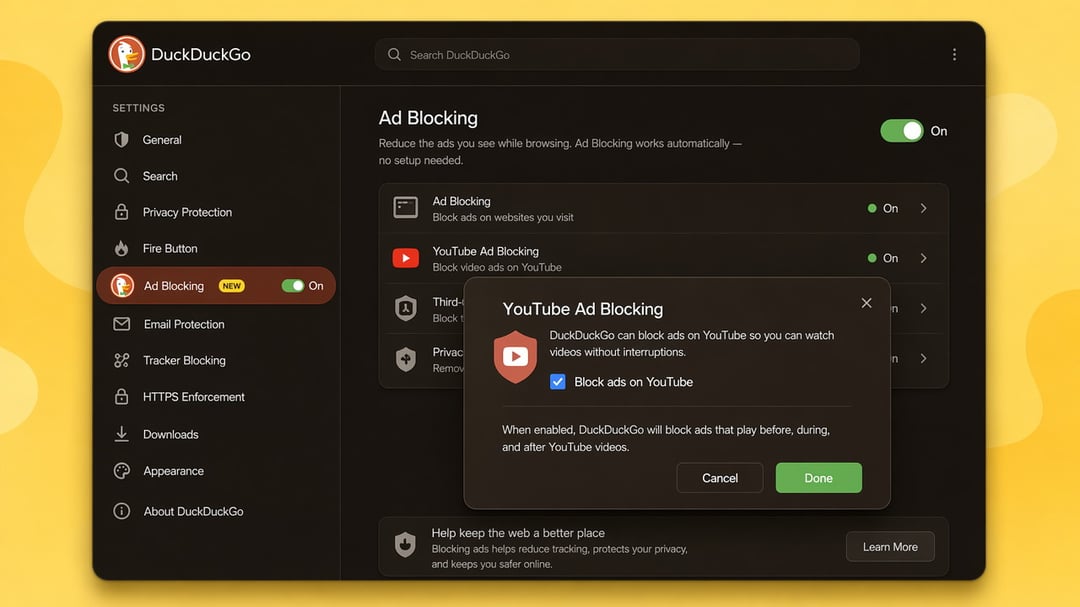
DuckDuckGo has rolled out a new feature aimed squarely at one of the most common online annoyances: video ads on YouTube. The privacy-focused browser maker confirmed that its free desktop and mobile browser now stops most of the ads that normally play before and during YouTube videos, giving users a smoother, less interrupted viewing experience without any extra setup.
How the New YouTube Ad Blocking Feature Works
The standout part of this update is how little effort it takes to use. There's no toggle to find, no hidden menu, and no configuration required. Anyone using an up-to-date version of the DuckDuckGo browser can simply head to YouTube and start watching, with far fewer ad breaks getting in the way.
Platform Availability
iPhone, Windows, and Mac Users Get It Automatically
For people on iPhone, Windows, or Mac who are running the latest version of the DuckDuckGo browser, the ad-blocking feature is already active by default. There's nothing to enable manually on these platforms.
Android Support Is on the Way
Android users aren't left out, but the rollout timeline is slightly different. The feature isn't yet switched on automatically for Android, though DuckDuckGo has confirmed that default activation is coming soon. In the meantime, Android users who want the benefit right away can turn it on manually inside the browser's settings.
The Feature Only Works Through the Browser, Not the App
One important limitation to understand is that this ad-blocking capability is tied specifically to the DuckDuckGo browser experience on the web, not the standalone YouTube app. If a YouTube link opens directly inside the YouTube app on a phone, the ad-blocking won't apply. To get the benefit, users need to open YouTube.com or m.youtube.com within the DuckDuckGo browser itself rather than letting the link jump into the native app.
What's Powering the Ad Blocking Behind the Scenes
The technology behind this feature isn't built entirely from scratch. It relies on community-maintained filter lists from uBlock Origin, a well-known free and open-source content-blocking tool, combined with DuckDuckGo's own additional rules. Those extra rules are designed to improve compatibility with YouTube and cut down on any glitches or broken functionality that ad-blocking can sometimes cause.
Users should expect one small trade-off: videos may take a bit longer to buffer before playback starts. However, once a video begins playing, it's designed to run through without being interrupted by ads.
How This Differs From Duck Player
DuckDuckGo already offers a separate tool called Duck Player, a built-in YouTube viewer that strips down the interface and adds extra privacy protections. This new ad-blocking feature is a distinct offering. It's built for people who want the regular, full YouTube.com experience, just without most of the ad interruptions. That means features like watch history tracking and resuming your spot in a playlist continue to function normally, which isn't always the case with the more minimal Duck Player mode.
Something to Keep in Mind
DuckDuckGo has been upfront that this feature blocks most video ads, not every single one. Users shouldn't expect a completely ad-free experience in every scenario, but they should notice a significant drop in how often ads interrupt their viewing.