
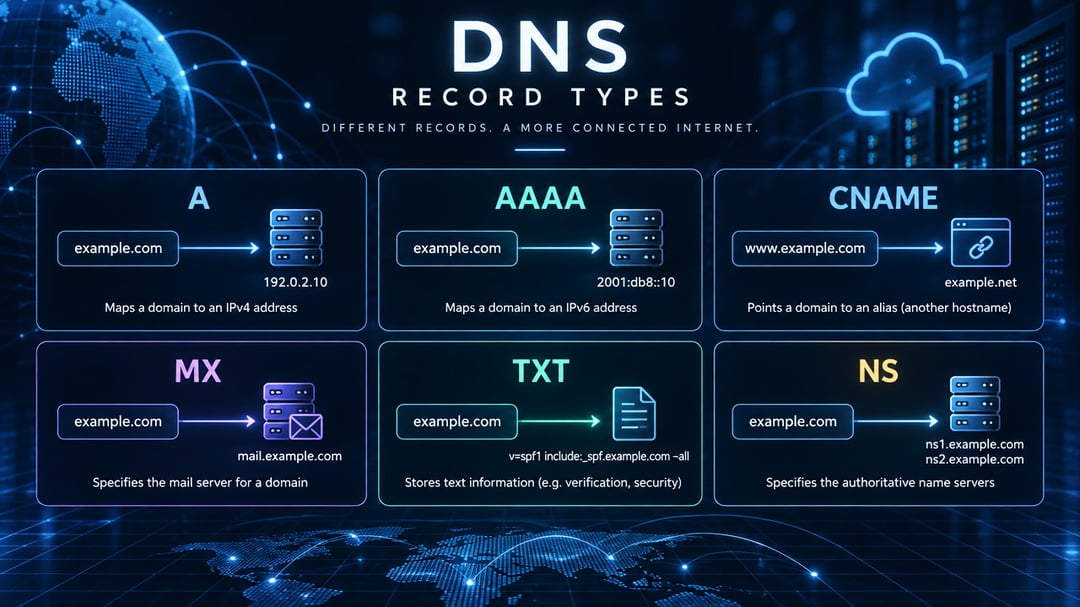
Every time you point a domain at a server, configure email delivery, or verify ownership with a third-party service, you're working with DNS records. Most of us have copied and pasted A records or MX entries without knowing exactly what they do or when to reach for a different type.
This guide breaks down the DNS records explained in plain terms: what each one controls, the syntax it expects, and the specific problems it solves. By the end, you'll know which record to create when you're setting up a new subdomain, migrating mail servers, proving domain ownership, or troubleshooting a resolution issue.
A and AAAA records
A records map domain names to IPv4 addresses, while AAAA records map to IPv6 addresses. These are the most fundamental DNS records because they tell browsers and other clients which server to contact when someone visits your domain.
The syntax is straightforward. An A record looks like this:
example.com. 3600 IN A 192.0.2.1
The AAAA equivalent uses the longer IPv6 format:
example.com. 3600 IN AAAA 2001:0db8::1
Use A and AAAA records whenever you need to point a domain or subdomain directly to a server IP. If you run a web server at 203.0.113.42, you create an A record for your domain pointing to that address. The same applies to subdomains: blog.example.com, api.example.com, and any other hostname that needs to resolve to a specific machine.
Most sites need at least one A or AAAA record for the root domain and another for the www subdomain, unless you use a CNAME to alias www to the root. Sites serving both IPv4 and IPv6 traffic typically publish both record types for the same hostname.
CNAME records
A CNAME record creates an alias that points one domain name to another. Instead of returning an IP address directly, it tells the DNS resolver to look up a different name and use whatever address that name resolves to.
The syntax is straightforward: the alias name, the record type, and the canonical (true) name it points to. A common example is www.example.com. CNAME example.com. This makes the www subdomain automatically follow wherever the root domain points.
Use CNAME records when a subdomain should inherit its IP from another domain. This is particularly useful for CDN endpoints like cdn.example.com. CNAME d111111abcdef8.cloudfront.net., where the CDN provider controls the underlying IPs and you want your subdomain to track them automatically. Service integrations follow the same pattern: pointing mail.example.com to a hosted email provider's domain keeps your mail routing current without manual updates.
CNAME records have one important restriction: they cannot exist at the root domain itself (example.com), only at subdomains. They also cannot coexist with other record types at the same name, because the alias redirects all lookups to the target domain.
MX records
MX (Mail Exchange) records tell email servers where to deliver messages for your domain. Each MX record points to a mail server hostname and includes a priority value that determines the delivery order. When someone sends an email to your domain, their mail server queries your MX records, then tries each server starting with the lowest priority number.
The syntax follows this pattern:
example.com.  IN  MX  10  mail1.example.com.
example.com.  IN  MX  20  mail2.example.com.
The numbers (10 and 20) are the priority values. The sending server attempts mail1.example.com first because 10 is lower than 20. If that server is unavailable, it falls back to mail2.example.com.
Use MX records when configuring email delivery for your domain. If you set up Google Workspace, you'll point MX records to Google's mail servers with priorities they specify (typically 1, 5, 5, 10, 10). Microsoft 365 uses a similar pattern. Most production setups configure at least two MX records for redundancy so email delivery continues if one server goes down.
TXT records
TXT records hold arbitrary text data, most commonly for verification and security policies. The DNS system doesn't care what's in them — it just stores and returns the string when queried.
Syntax: yourdomain.com. IN TXT "v=spf1 include:_spf.google.com ~all"
That example is an SPF record, which tells receiving mail servers which IP addresses are allowed to send email on your domain's behalf. The v=spf1 declares the version, include:_spf.google.com delegates to Google's authorized sender list, and ~all soft-fails mail from unlisted sources.
Another common use: yourdomain.com. IN TXT "google-site-verification=abc123def456"
That proves to Google Search Console that you control the domain. Most web services that require domain ownership — analytics platforms, email providers, security tools — ask you to add a verification string as a TXT record.
TXT records also configure DKIM (cryptographic email signatures) and DMARC (email authentication policy). A single domain can have multiple TXT records serving different purposes, though some registrars concatenate long strings across multiple entries if they exceed 255 characters.
Use TXT records when proving ownership, authorizing email senders, or publishing machine-readable policies that other systems need to look up.
NS, SOA, SRV, CAA, and PTR records
NS and SOA records handle foundational DNS infrastructure. NS records delegate a domain to specific nameservers, telling the internet which servers are authoritative for your zone. SOA records define zone authority metadata including the primary nameserver, the administrator's email, and refresh intervals for secondary servers. Your DNS provider typically manages both automatically.
SRV records enable service discovery by specifying the hostname, port, and priority for specific services. A SIP provider might publish _sip._tcp.example.com. 86400 IN SRV 10 60 5060 sipserver.example.com. to tell clients that SIP service runs on sipserver.example.com port 5060, with priority 10 and weight 60 for load distribution. XMPP and Microsoft Active Directory rely heavily on SRV records.
CAA records restrict which certificate authorities can issue SSL certificates for your domain. example.com. CAA 0 issue "letsencrypt.org" allows only Let's Encrypt to issue certificates, blocking unauthorized CAs and preventing mis-issuance attacks.
PTR records perform reverse DNS lookups, mapping an IP address back to a hostname. Mail servers check PTR records to verify that sending servers are legitimate; missing or mismatched PTR records often trigger spam filters. Your hosting provider or ISP typically manages PTR records for assigned IP addresses.
Most site owners rarely touch these records compared to A, CNAME, MX, and TXT entries.
Which DNS records to configure first
Most domains need just a handful of record types to function. Start with A or AAAA records to point your domain to a server, add MX records if you're receiving email, and create a TXT record with an SPF policy to improve deliverability. CNAME records help when you want a subdomain to follow another hostname automatically, which is common for CDNs and third-party services. The other types — NS, SOA, SRV, CAA, and PTR — matter in specific scenarios, but your DNS provider usually handles NS and SOA without manual input. If you're setting up a new domain, configure A and MX first, then add verification TXT records as services request them.