
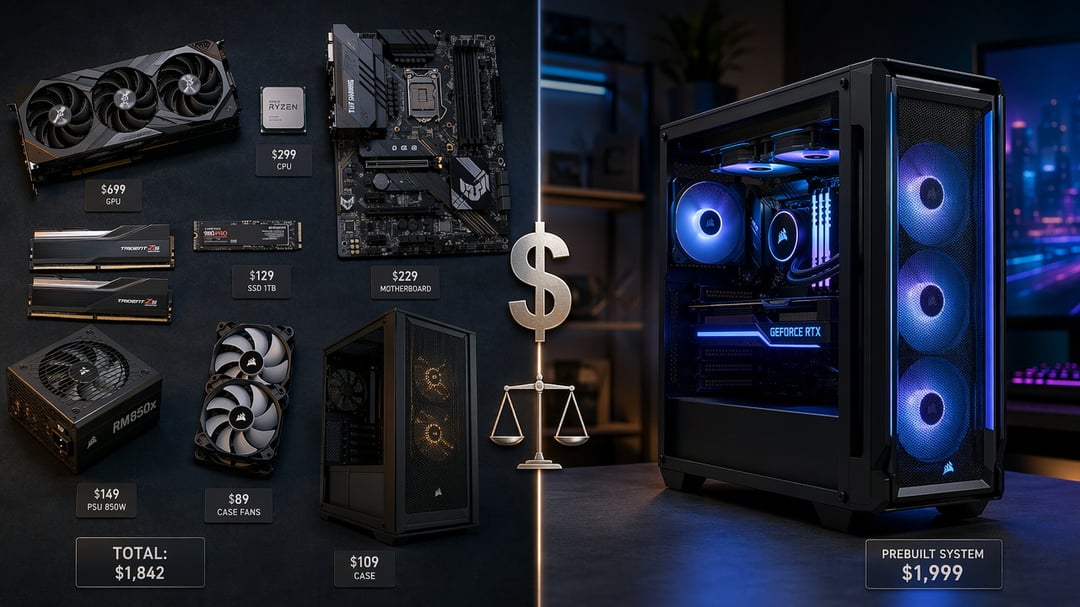
If you've spent any time in PC circles, you've heard the claim repeated like gospel: building your own PC saves money. And in many cases, it does. But "many cases" is not "all cases" — and the gap between those two realities costs buyers real money every year.
The truth is more nuanced. Whether a custom build actually beats a prebuilt depends on your budget, your timing, and which costs you choose to count. This breakdown covers both sides honestly so you can make the right decision for your wallet.
The Case for Building Your Own PC
You Pay for Parts, Not Packaging
The strongest argument for a custom build is transparency. Every dollar goes directly toward a specific component — not toward a manufacturer's margin, branded packaging, or bundled software you'll never install.
System integrators typically add 10–20% markup on mid-range builds. That's the cost of assembly, testing, and retail infrastructure. When you build yourself, that markup disappears. At the $700–$1,500 range — the sweet spot for custom builds — the savings are often significant. A custom gaming PC in that bracket frequently matches or outperforms a prebuilt priced $100–$200 higher at equivalent specs.
You also control where the money lands. If gaming performance is the priority, the full GPU budget goes toward a stronger graphics card instead of being spread across components you don't need. That kind of allocation is impossible in a prebuilt.
Long-Term Upgradeability Lowers the 3-Year Cost
A custom build's financial advantage compounds over time. Standard form factors — ATX, Micro-ATX, Mini-ITX — mean individual components are replaceable without redesigning the whole system. A GPU upgrade two years from now doesn't require a new motherboard or a new case.
Prebuilts don't always offer that flexibility. Many use proprietary cooling solutions, non-standard power supply units, or compact enclosures that make future upgrades difficult or impossible. When a prebuilt falls behind, full replacement is often the only option. That cycle is expensive. A custom build that you maintain incrementally often comes out meaningfully ahead over a three-year ownership window.
Where Prebuilt PCs Actually Win
OEM Bulk Pricing Is a Real Competitive Advantage
Large manufacturers — Dell, HP, Lenovo, ASUS — purchase components at a scale no individual buyer can replicate. At entry-level price points (under $600) and high-end configurations (above $2,000), that volume pricing produces prebuilts that are genuinely difficult to beat on raw value.
A sub-$600 prebuilt frequently undercuts an equivalent custom build because the OEM sources budget CPUs, RAM, and storage at wholesale rates unavailable at retail. GPU pricing remains a relative weak point for prebuilts — but at the low end, the math simply doesn't favor building your own.
Warranty Coverage and Support Have Real Dollar Value
A prebuilt ships with a unified system warranty — typically one to three years — covering every component under a single support umbrella. One call. One ticket. One resolution.
Custom builds don't work that way. Each component carries its own warranty from its own manufacturer. A failed SSD means an RMA with the storage brand. A faulty GPU means a separate process with the graphics card manufacturer. For buyers without troubleshooting experience, navigating multiple RMA processes is time-consuming and stressful. If professional diagnosis becomes necessary, the cost quickly erodes any savings the build generated.
Hidden Costs Most Custom Builders Overlook
The parts list is never the complete picture. Several expenses consistently get left out of build comparisons — and they close the gap more than most buyers expect.
Windows licensing is the most significant omission. A retail Windows 11 Home license runs $100–$140. OEM licenses embedded in prebuilts cost manufacturers a fraction of that. That difference alone meaningfully narrows the savings on many builds.
Peripherals catch first-time buyers off guard. Monitors, keyboards, and mice aren't included in a custom build. Some prebuilt packages bundle them — read product listings carefully before assuming they don't.
Time is the most consistently undervalued cost. A first build typically requires four to eight hours across research, assembly, cable management, and troubleshooting at least one unexpected issue. That's a real investment and a genuine barrier for anyone who needs a working machine quickly.
Which Option Is Right for You?
Build custom if:
- Your budget sits between $700 and $1,500
- You're comfortable dedicating several hours to the process
- Upgradeability over the next three or more years matters to you
- You already own a Windows license or qualify for a free upgrade
Buy prebuilt if:
- Your budget is under $600 or above $2,000
- You need the system running immediately with minimal setup
- You prefer a single warranty covering the entire machine
- The assembly process genuinely doesn't interest you
The Honest Verdict
Custom builds are cheaper — but conditionally. The mid-range is where the advantage is real and measurable. At the budget end and the high end, prebuilts close the gap or reverse it entirely.
The smarter question isn't "which is cheaper in general?" It's "which is cheaper for my budget, my timeline, and the complete list of costs I'm actually paying?" Run those numbers honestly and the right answer becomes obvious.