
A developer opens a database for troubleshooting during a deadline. A colleague shares a customer export through an unrestricted link. Both intend to remove access afterward. Neither remembers until someone discovers the exposed data.
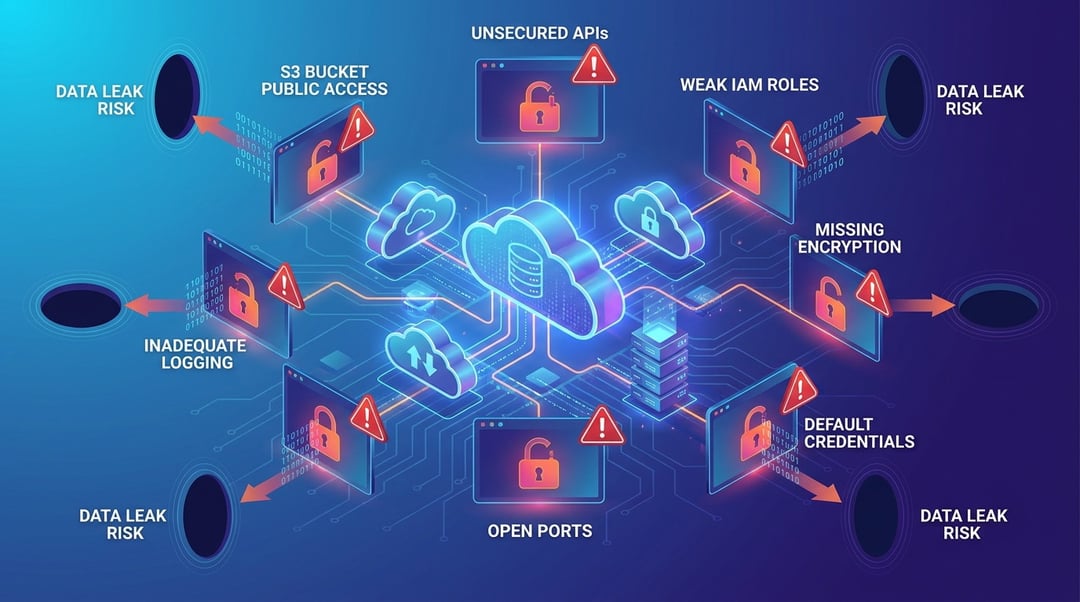
Cloud misconfigurations turn ordinary shortcuts into unintended access routes. They involve unsafe permissions, network rules, identity settings, or monitoring choices—not necessarily flaws in the cloud platform itself.
Providers secure their underlying infrastructure. Customers still need to configure access and protect their information within that infrastructure.
These seven mistakes explain how cloud data leaks happen, what makes them dangerous, and which practical controls reduce the risk.
1. Making Private Cloud Storage Public
How public storage misconfigurations expose data
Cloud storage buckets hold files such as invoices, application uploads, and customer exports. Their access settings determine who can retrieve those files.
A team might deliberately publish marketing images while accidentally exposing confidential documents in the same bucket. Unrestricted sharing links create similar problems: possession of the link becomes permission to access information.
AWS recommends blocking public access unless an application explicitly requires it. Its guidance also recommends disabling older access control lists when they serve no necessary purpose.
Reduce the risk: Keep confidential storage private and separate it from public website assets. Apply account-wide public-access controls where available. Give every exception an owner, documented justification, and review date.
2. Granting More Access Than the Job Requires
Why excessive permissions expand cloud data leaks
Permissions control which resources an identity can access and which actions it can perform. Broad permissions increase the damage that follows credential theft or an application compromise.
Consider an application that only needs to upload receipts. Granting it access to every storage bucket also exposes unrelated payroll records if someone compromises that application.
Least privilege means authorizing only the necessary actions on specific resources. AWS recommends this approach alongside regular reviews of unused identities, roles, permissions, and credentials.
Reduce the risk: Separate reading, writing, and administration wherever practical. Review service accounts as carefully as employee accounts. Remove temporary privileges after troubleshooting rather than allowing emergency access to become permanent.
3. Opening Databases to the Entire Internet
When network shortcuts create unintended exposure
Cloud firewalls and security groups determine which connections can reach a resource. A rule allowing 0.0.0.0/0 accepts traffic from every IPv4 address for the specified ports.
That setting may suit a public web server. It rarely suits a database containing customer information.
Internet exposure alone does not guarantee a leak. However, it lets outsiders reach a service that weak passwords, missing authentication, or software vulnerabilities might compromise.
Reduce the risk: Keep databases on private networks whenever possible. Use controlled administrative connections rather than opening database ports globally. Review IPv6 rules separately because fixing IPv4 exposure does not automatically close equivalent IPv6 access.
Treat network restrictions and authentication as complementary controls, not interchangeable ones.
4. Leaving Cloud Credentials in Code or Shared Documents
How misplaced secrets bypass otherwise sound controls
Access keys, database passwords, and application tokens let software authenticate without a person entering credentials each time.
Embedding these secrets in source code creates a dangerous dependency. Anyone who obtains the secret may inherit its permissions until the credential expires or someone revokes it.
Deleting a visible key does not necessarily remove copies from repository history, downloaded files, or shared messages.
AWS recommends temporary credentials for workloads wherever possible instead of distributing long-lived access keys.
Reduce the risk: Use workload identities and a secrets manager where appropriate. Scan repositories and deployment pipelines for exposed credentials. Revoke or rotate leaked secrets immediately, then investigate their use. Deletion alone does not contain the exposure.
5. Assuming Encryption Makes Data Private
Why encryption cannot repair unsafe permissions
Encryption protects information by making stored or transmitted data unreadable without the necessary cryptographic access. It does not replace authorization.
If a cloud service accepts an overly permissive request, it may decrypt the information and return readable content. An encrypted file can therefore still leak through incorrect access settings.
Backups deserve equal attention. A tightly controlled production database provides little reassurance when someone shares its export with an outside account.
Reduce the risk: Verify encryption for storage, backups, and network connections. Restrict decryption permissions and review key administration separately from ordinary data access. Check snapshot sharing and restore permissions.
Ask two distinct questions: Is the data encrypted? Who can retrieve it?
6. Disabling Logging or Ignoring Configuration Alerts
How visibility gaps prolong cloud exposure
Logging does not prevent public access. It helps teams reconstruct changes, recognize suspicious activity, and understand what happened.
A configuration alert identifies an unsafe setting. An audit record identifies an action. Teams need both perspectives to connect an exposed resource with the change that created it.
Avoid assuming that enabling one logging service captures every relevant event. Management changes and individual file-access events can require different settings, depending on the provider.
Reduce the risk: Confirm coverage for sensitive resources and retain logs in a restricted location. Alert on public access, administrative changes, and disabled security controls.
Assign an owner and response deadline to each meaningful alert. Otherwise, monitoring becomes an expensive collection of unread warnings.
7. Sharing Administrator Accounts Without Strong Authentication
Why identity misconfigurations undermine cloud security
Shared administrator accounts obscure responsibility. They also complicate offboarding because removing one person may require changing credentials for everyone.
A compromised administrator can modify permissions, create new identities, or open previously private resources. That makes administrative access especially consequential.
AWS recommends multifactor authentication, temporary credentials, and careful protection of root-user credentials.
Reduce the risk: Give administrators individual accounts and separate privileged access from everyday work. Require strong MFA, preferably phishing-resistant methods where supported. Restrict emergency accounts and monitor their use.
Remember that MFA for interactive sign-ins does not automatically protect every application credential. Review machine access separately.
How to Check Cloud Misconfigurations This Week
Start with settings that expose sensitive information directly:
- Identify public storage, unrestricted sharing links, and externally shared backups.
- Review administrator access and missing MFA requirements.
- Close unnecessary public database and management ports.
- Revoke exposed credentials and remove unused identities.
- Confirm encryption, logging coverage, and alert ownership.
Then make these checks repeatable through deployment reviews and automated configuration policies. Record approved exceptions with expiration dates.
Cloud data leaks often begin when a temporary convenience becomes an undocumented default. Clear ownership and recurring checks help stop that transition before exposed information leaves the organization.


