
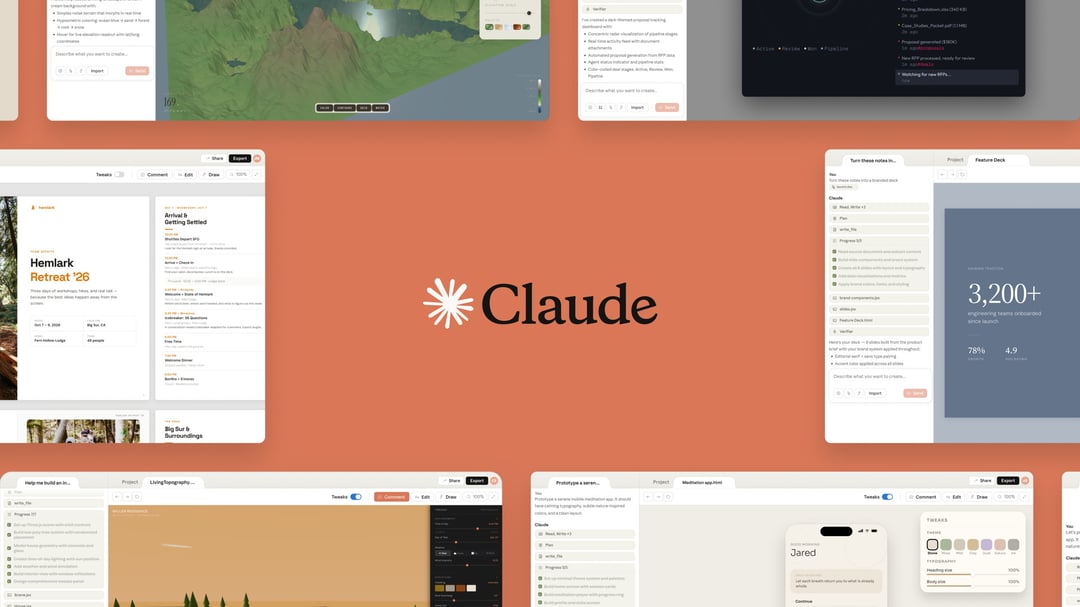
Claude Design Features for Prototypes, Slides, and One-Pagers
Anthropic has launched Claude Design, a new experimental product built to help users create visuals such as prototypes, slides, one-pagers, and similar materials with Claude. The product is designed to make it easier for people like founders and product managers who do not have a design background to communicate ideas in a visual format.
With Claude Design, users start by describing what they want to make. Claude then generates an initial version based on that request. After that, the visual can be refined through direct edits or by asking for changes in plain language.
A simple workflow might begin with a request for a serene mobile meditation app prototype with calming typography, subtle nature-inspired colors, and a clean layout. From there, the design can be adjusted by changing colors, resizing typography, or adding something like a dark mode toggle.
How Claude Design Helps Non-Designers Move From Idea to Visual
Claude Design is positioned around speed and accessibility. Rather than expecting users to begin inside a traditional design tool, it focuses on helping them move from an idea to something visual quickly.
That matters for teams and individuals who need to share concepts without building everything from scratch in a design environment. Founders and product managers, in particular, often need a fast way to turn rough thinking into something presentable. Claude Design is meant to fill that gap by lowering the barrier between concept and output.
The product centers on a simple pattern:
Describe the Visual
Users explain what they want in natural language.
Generate a First Draft
Claude creates an initial version based on that prompt.
Refine the Output
Users can continue improving the result with edits or follow-up requests.
This makes the process more conversational and more flexible for people who may not be comfortable working in a conventional design workflow.
Claude Design and Canva Integration
At first glance, Claude Design may appear to overlap with Canva, especially as Canva has expanded its own AI capabilities. But Anthropic says Claude Design is intended to complement Canva rather than replace it.
The distinction is straightforward. Claude Design is built for users who are not starting from a design tool and need to turn an idea into a visual quickly. Canva remains part of the workflow once that first version has been created.
After teams build presentation decks or prototypes, they can export them in several formats:
- PDFs
- URLs
- PPTX files
- Direct transfer to Canva
Once the work is in Canva, Anthropic says it becomes fully editable and collaborative. That makes Claude Design less of a standalone replacement and more of a front-end idea-to-visual layer that can feed into existing team workflows.
Team Design Systems and Brand Consistency in Claude Design
One of the more practical capabilities in Claude Design is its ability to apply a team’s design system across the projects it creates. That means outputs can stay aligned with a company’s broader visual style instead of feeling disconnected from the rest of the brand.
Anthropic says Claude Design can do this by reading a company’s codebase and design files. That gives teams a way to generate work that reflects existing visual standards rather than forcing them to restyle everything manually after the fact.
Support for Multiple Design Systems
Teams are not limited to a single setup. They can refine components and maintain more than one design system. That flexibility could be useful for organizations managing different brands, product lines, or internal visual standards.
Consistent Visual Output Across Projects
Because Claude Design can apply those systems to every project it creates, teams can aim for stronger consistency across decks, prototypes, and other visual materials.
Claude Design Availability and Model Powering the Product
Claude Design is powered by Claude Opus 4.7. It is currently available in research preview.
Access is available to these subscriber groups:
- Claude Pro
- Claude Max
- Claude Team
- Claude Enterprise
That release approach signals that Anthropic is still treating the product as experimental while making it accessible to a wide range of paid users, from individual professionals to larger organizations.
Anthropic’s Enterprise and Prosumer Push
The launch of Claude Design also reflects Anthropic’s broader push into enterprise and prosumer markets. The company is expanding its AI workplace tools at a time when competition in that area is intensifying.
Earlier in the year, Anthropic introduced Claude Cowork, an agentic assistant built for complex tasks. A few weeks later, it added agentic plug-ins to Cowork that were designed to automate specialized tasks across different departments within a company.
Seen in that larger pattern, Claude Design looks like another step in building workplace-focused AI products that serve practical business needs. Instead of focusing only on text-based assistance, Anthropic is extending Claude into visual creation and team workflows.
Claude Design Use Cases for Founders and Product Managers
Claude Design is especially aimed at people who need to express an idea visually without deep design expertise.
Founder Use Cases
Founders often need quick visuals for internal communication, early-stage product concepts, and presentation materials. Claude Design gives them a way to go from a rough concept to a prototype, slide deck, or one-pager without starting from scratch in a dedicated design platform.
Product Manager Use Cases
Product managers frequently need to show interface concepts, explain flows, or present ideas clearly to stakeholders. Claude Design offers a faster path to building those materials and iterating on them through requests and edits.
Team Collaboration Handoff
Even though Claude Design helps create the initial visual asset, the workflow does not stop there. Teams can export outputs and continue editing or collaborating in Canva, which makes the product fit into broader team processes instead of forcing a closed system.