
The Problem Every Power User Knows Too Well
If you've been running multiple Claude Code sessions at once, you know the drill. One terminal tab for refactoring, another for tests, maybe a third handling code review — and suddenly you're playing whack-a-mole just trying to keep track of what's running, what's waiting, and what already finished an hour ago without you noticing.
Developers got creative about it. Tmux panes, third-party tools like Patapim, custom split-panel setups. Functional workarounds, sure. But workarounds all the same. There was no first-party way to just see everything in one place.
That's changed now.
What Agent View Actually Does
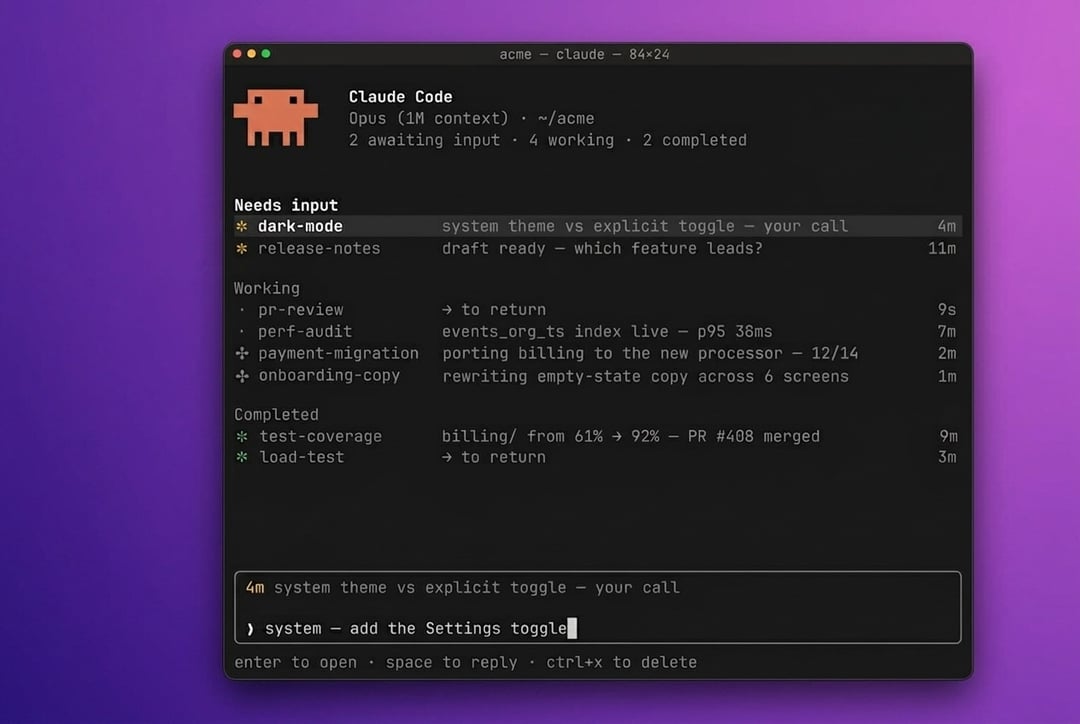
Anthropic shipped Agent View as part of Claude Code version 2.1.139, and it's exactly what it sounds like — a unified command-line dashboard that pulls every active Claude Code session into a single screen. Run claude agents and you get a consolidated list: what's running, what's waiting on your input, what's done.
But it goes further than just a status board. You can launch new agents directly from that view, and — this is the part that actually saves context-switching headaches — send instructions to running sessions without jumping between windows. Everything stays in one place.
It launched as a Research Preview, which means Anthropic is still iterating, but it's available right now.
The /goal Command and "Run Until Done" Mode
Alongside Agent View, there's a new /goal command that pairs with it really naturally. The idea is simple: you set a completion condition — something like "all tests pass and the PR is ready" — and Claude keeps working autonomously across multiple turns until it gets there.
Think about what that means practically. Instead of checking in every few minutes to nudge things forward, you define the finish line and let it run. A live overlay panel tracks elapsed time, turns, and token usage while the agent works, so you're never flying blind.
The Reddit community apparently had a field day with this, calling it a "run until done" mode — which honestly is a better description than anything in the official changelog.
How This Fits Into Anthropic's Bigger Picture
This isn't a standalone feature that appeared out of nowhere. Anthropic has been methodically building toward multi-agent coordination throughout 2026 — Remote Control for managing sessions across machines, Dispatch and Channels for background agent pipelines, a multi-agent orchestration framework that came out at their Code with Claude event earlier this month.
Agent View fits into that stack, but it's solving a more immediate, everyday problem. The bigger infrastructure is powerful, but if you can't quickly see what six concurrent sessions are doing right now, that power gets frustrating fast. This is the piece that makes the day-to-day workflow actually manageable.
Who Can Use It and What Else Shipped
Agent View is available now for Pro, Max, Team, Enterprise, and API plan users. You need Claude Code v2.1.139 or later — just update and you're good to go.
The release also includes over 100 other changes: plugin improvements, MCP server fixes, and new transcript navigation shortcuts. Most of those are under-the-hood quality-of-life stuff, but worth knowing the version bump carries more than just the headline feature.