
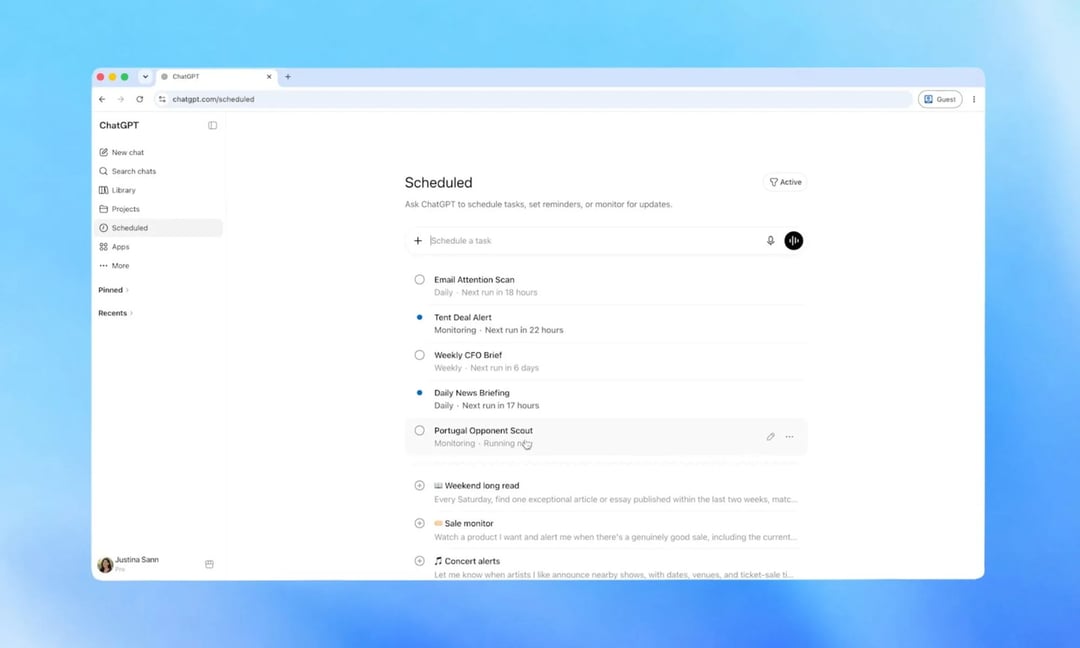
OpenAI Gives Scheduled Tasks Their Own Home
So here's the thing about automation in ChatGPT — it's been there for a while, kind of tucked away. But OpenAI just rolled out a dedicated Scheduled page, and honestly, it's about time. You can pull it up right from the sidebar, and it lays out every active task you've got running alongside when each one's set to fire off next. No more scrolling back through old chats trying to remember where you set something up.
What You Can Actually Do From the Scheduled Page
This is where it gets genuinely useful. From that one screen, you can pause a task, edit it, resume it, or just delete it outright — and you don't have to go digging through past conversations to find it first. OpenAI also loosened up how tasks get timed. Instead of locking yourself into an exact minute, you can now set something to run sometime in the morning, afternoon, or evening, whatever window works for you. And according to OpenAI, the tasks themselves are running faster and more reliably than they used to.
The rollout covers Go, Plus, Pro, Business, and Enterprise users, and it's live on both web and mobile.
Smarter Monitoring: ChatGPT Can Watch the Web For You Now
Here's the part that feels like a real upgrade rather than a tidy-up. Monitoring tasks got smarter — ChatGPT can now go out and search the web on its own, or check in on apps you've connected, and it'll only ping you when there's actually something new worth knowing. That's a meaningful shift from constantly checking things yourself.
The Catch You Should Know About
It's not unlimited, though. OpenAI says tasks can't run more than once an hour, so don't expect minute-by-minute updates. And if a task sits unattended long enough, it might just pause itself automatically. Worth keeping in mind if you're setting something up and walking away for a while.
Pulse Is Going Away — Here's What Replaces It
This update also marks the end of the road for Pulse, which launched last year as OpenAI's personalized daily briefing feature. Pulse pulled together a summary based on your interests and whatever you'd been chatting about, then delivered it automatically. Now that functionality is getting folded straight into the scheduled tasks system instead of living on its own.
If you're a Pro user, you'll keep Pulse for 14 days starting Wednesday. After that, the way to get the same experience is to just schedule a daily briefing yourself through the new tasks hub.
Why This Is Important for the Future
Scheduled tasks weren't new — they'd been sitting in ChatGPT for a while already. But giving them this much visibility says something about where OpenAI thinks things are headed: automation isn't a side feature anymore, it's becoming a core part of how people are expected to use the product. As for free-tier users, there's no word yet on when — or if — they'll get the new Scheduled page.