
Best Secure DNS Providers Against Phishing: 5 Picks Compared

Best Secure DNS Providers Against Phishing (2026)

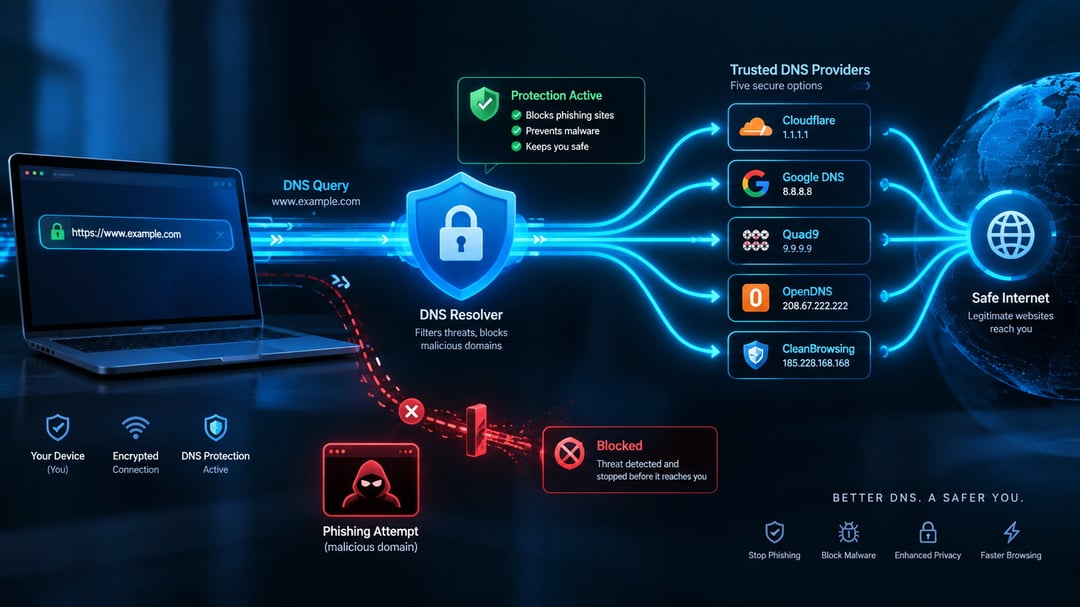
Phishing attacks trick you into handing over passwords, credit card numbers, and personal information by pretending to be legitimate websites or services. One of the most effective defenses sits at a layer most people never think about: your DNS provider. The best secure DNS providers against phishing block access to known malicious domains before your browser ever loads them, stopping scams before they reach you.

Most internet users rely on whatever DNS server their ISP assigned, which typically offers no filtering at all. Switching to a security-focused DNS provider takes about five minutes and works across every device on your home network. Below, you'll find five providers compared by their phishing protection strength, privacy practices, ease of setup, and cost, so you can pick the one that fits your household's needs.

What Makes a DNS Provider Secure Against Phishing

A secure DNS provider intercepts requests to known phishing domains and blocks the connection before your browser loads the malicious page. Standard DNS services translate domain names to IP addresses without checking whether the destination is safe. Security-focused providers add threat intelligence feeds that maintain real-time blocklists of phishing sites, malware distributors, and command-and-control servers.

These threat feeds aggregate reports from security researchers, honeypots, and compromised site databases, often updating within minutes of a new phishing campaign going live. When you request a flagged domain, the DNS resolver returns a block page instead of routing your traffic to the attacker.

Encryption protocols matter too. DNS-over-HTTPS (DoH) and DNS-over-TLS (DoT) encrypt your DNS queries, preventing attackers on public networks from seeing which sites you visit or redirecting you to fake versions through DNS hijacking. Together, filtering and encryption create layers of protection that basic DNS lacks.

Cloudflare for Families

Cloudflare for Families offers two free DNS tiers: one blocks malware, the other blocks malware plus adult content. Both filter known phishing domains without requiring an account or software installation. The service runs on Cloudflare's global network of data centers, which typically delivers response times under 20ms for most users.

Setup requires changing two DNS addresses in your router or device settings. Cloudflare provides step-by-step instructions for Windows, macOS, iOS, Android, and major router brands. The company states it does not log IP addresses or sell browsing data, a policy detailed in its public privacy documentation.

The free tier lacks custom filtering rules, usage dashboards, and the scheduled blocking available in paid DNS services. You cannot whitelist specific domains or receive alerts when devices attempt to reach blocked sites. For households wanting baseline phishing protection without configuration, the service works immediately after the DNS change takes effect.

Quad9

Quad9 operates as a nonprofit DNS resolver that blocks access to malicious domains using threat intelligence from IBM X-Force, Abuse.ch, and other security sources. The service checks DNS queries against these continuously updated threat feeds and refuses to resolve domains associated with phishing, malware, or botnet command-and-control servers.

The organization runs infrastructure in Switzerland and complies with European data protection standards. Quad9 does not log query data that could identify individual users, making it suitable for privacy-conscious households and businesses operating under GDPR requirements.

Performance sits slightly behind Cloudflare and Google in most benchmarks, though response times remain fast enough that most users notice no practical difference during browsing. The service works well for home networks and small businesses that want automatic phishing protection without installing software on each device. Larger enterprises may prefer solutions that offer granular policy controls and activity reporting.

NextDNS

NextDNS operates on a freemium model that gives users granular control over DNS filtering. The service blocks phishing sites, malware domains, and other threats through customizable blocklists. You can enable or disable specific protection categories, create allowlists for legitimate sites mistakenly flagged, and set different profiles for various devices or networks.

The analytics dashboard shows which queries were blocked, which domains your devices contacted, and where threats originated. This visibility helps you understand your household's internet activity and confirm the filtering works as intended.

The free tier includes 300,000 queries per month, enough for most single users or small households. Beyond that limit, queries pass through unfiltered unless you upgrade. Paid plans start at $19.90 annually and remove query caps entirely. The pricing makes NextDNS practical for families who need filtering on multiple devices without paying per-device fees that other services charge.

OpenDNS Home (Cisco Umbrella)

OpenDNS Home offers free DNS security backed by Cisco's enterprise threat intelligence network. The service blocks phishing sites by checking every DNS request against a database that processes over 620 billion requests daily across Cisco's commercial customer base.

The free tier provides basic phishing and malware protection. You can customize filtering to block categories like adult content, gambling, or social media—useful for families managing children's internet access. Setup requires changing two DNS addresses in your router or device settings: 208.67.222.222 and 208.67.220.220.

The paid Home VIP tier ($19.95/year) adds faster support and more granular content controls, letting you set different rules for different devices. Most home users find the free version sufficient for phishing protection. Upgrade if you need detailed activity reports or want support responses within one business day rather than community-based help.

CleanBrowsing

CleanBrowsing operates three free DNS filters with ascending protection levels: Security (phishing and malware only), Adult (adds adult content blocking), and Family (blocks adult content plus mixed content sites). The Security filter stops known phishing domains and malicious sites without affecting normal browsing, making it suitable for users who want protection without content restrictions.

Paid plans add custom filtering rules, SafeSearch enforcement across search engines, and granular category controls for schools or families managing multiple devices. The service maintains response times competitive with major providers and includes IPv6 support.

CleanBrowsing's free tier delivers core anti-phishing protection without requiring an account or payment method, which removes friction for users testing DNS-based security. Families benefit from preset filters that require no technical configuration, though the strict Family filter occasionally blocks legitimate sites in gray-area categories like gaming forums or social media.

Which DNS Provider Should You Choose

Cloudflare fits privacy-focused users who want fast resolution without data logging. Quad9 serves anyone prioritizing threat blocking over speed, especially for older devices that lack modern security features. NextDNS works well for families and remote workers who need granular control over filtering policies without managing hardware. Google Public DNS suits users already invested in Google services who value uptime and global reach over privacy. Cisco OpenDNS remains the practical choice for small businesses that need centralized management and reporting without dedicated IT staff.

Free tiers handle most personal use. Paid plans make sense when you need custom filtering rules, detailed logs, or support across multiple locations. NextDNS and Cisco OpenDNS charge for advanced features; Cloudflare and Quad9 stay free.

DNS filtering alone won't stop phishing. Use it alongside browser warnings, email filters, and updated software. No single layer catches everything.

Pick a Provider and Test It This Week

Switching to a secure DNS provider takes about five minutes and blocks phishing sites before they can load in your browser. If you want strong protection without configuration, start with Quad9 or Cloudflare for Families—both are free, fast, and require no account. For granular control over what gets blocked, NextDNS gives you filtering rules and logs even on the free tier. Families who need content filtering alongside phishing protection should look at CleanBrowsing or OpenDNS Home. Remember that DNS filtering is one layer in a complete security setup. Keep your browser and operating system updated, use unique passwords, and stay cautious with unexpected links even when DNS protection is active.


Join the Community

Get the latest tech news, reviews, and exclusive insights delivered straight to your inbox. Join a community of tech enthusiasts who trust Informer Tech.

Weekly digest

No spam

Unsubscribe anytime