
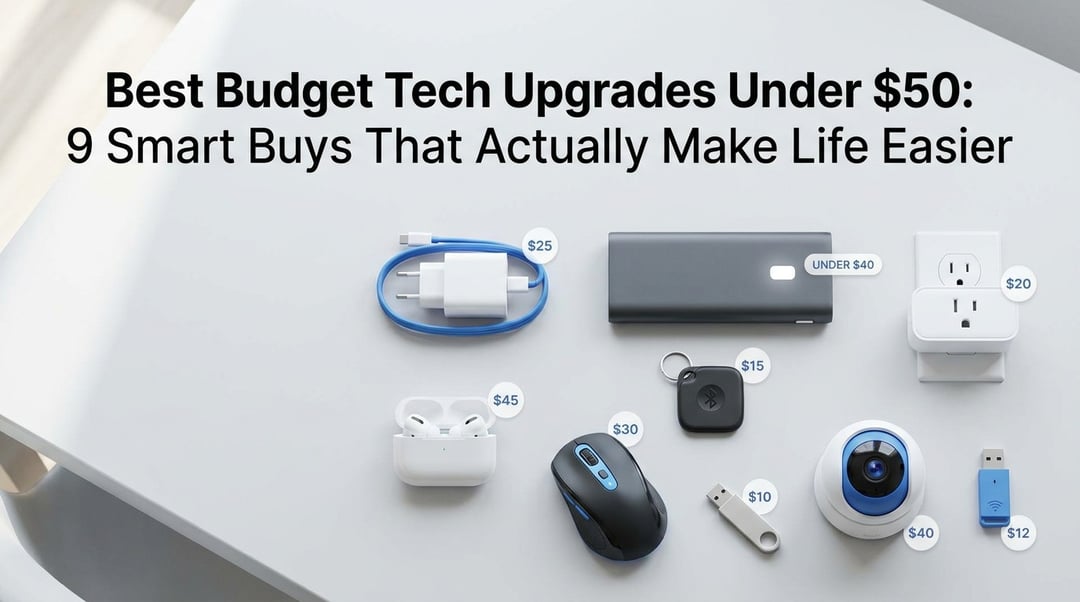
Best Budget Tech Upgrades Under $50: 9 Smart Buys That Actually Make Life Easier

9 Best Budget Tech Upgrades Under $50: 2026 Buying Guide

The best budget tech upgrades under $50 aren’t flashy. They don’t make your desk look like a sci-fi movie set. They just fix the tiny problems that annoy you every single day.

Slow charging. Dead phone battery. Lost keys. Weak Wi-Fi. Bad video calls. Too many cables. You know the stuff.

And honestly, that’s where cheap tech shines now. You don’t need to spend $300 to feel an upgrade. Pick the right $15, $30, or $45 gadget and your day gets smoother in a way you notice immediately.

Prices move around, so treat the “under $50” line as a practical shopping target. Always check the current price before buying.

How to Choose the Best Budget Tech Upgrades Under $50

A good cheap tech upgrade should solve a real problem. Not a pretend problem invented by a product page.

Before buying anything, ask one simple question: Will I use this every week? If the answer is no, skip it. A faster charger, better mouse, smart plug, or Bluetooth tracker will usually beat a novelty gadget because it touches your daily routine.

Also check compatibility. USB-C chargers need the right wattage and cable. Smart plugs should work with your voice assistant or smart home setup. Bluetooth trackers depend heavily on whether you use iPhone, Android, or both. For wireless products, standards from groups like the Wi-Fi Alliance and Bluetooth SIG can help you understand what you’re really buying.

Anker 45W USB-C Charger

A fast USB-C charger is the kind of upgrade that feels boring until you use it. Then your old charger feels painfully ancient.

The Anker 45W USB-C Charger is a smart pick for phones, tablets, earbuds, handheld gaming devices, and some lightweight laptops. It supports modern fast charging through USB-C Power Delivery, which is the standard maintained by USB-IF. That matters because fast charging isn’t magic. Your charger, cable, and device all need to support the right power profile.

This is especially useful if you’re still using an old 5W or 12W phone charger. You’ll notice the difference during that frantic 20-minute charge before leaving the house.

Anker Nano Power Bank 10,000mAh

Battery anxiety is real. You leave the house at 38% and suddenly every errand feels like a survival challenge.

10,000mAh Anker Nano Power Bank gives most phones roughly one to two extra charges depending on the model and charging conditions. That makes it perfect for travel, concerts, commuting, long school days, work events, and emergency backup.

Look for USB-C input and output because it keeps your cable situation simple. A built-in charge display is also handy since those four tiny LED dots on older power banks never tell the full story.

If you fly often, check the FAA guidance on lithium batteries. Most small power banks are fine in carry-on bags, but you still want to follow the rules.

Kasa Smart Plug Mini With Matter

A smart plug is the easiest way to make a normal home feel a little smarter without replacing half your appliances.

The Kasa Smart Plug Mini with Matter can turn lamps, fans, coffee makers, holiday lights, and small appliances into app-controlled devices. You can set schedules, timers, and routines. That means your living room lamp can turn on before you get home or your fan can shut off after you fall asleep.

Matter support is the big advantage here. The Connectivity Standards Alliance created Matter to improve smart home compatibility across platforms. In plain English, it helps devices work more smoothly with Alexa, Google Home, Apple Home, and other ecosystems.

Small caveat: don’t use smart plugs with high-draw appliances unless the plug specifically supports them.

Tile Mate

If you lose your keys twice a week, stop pretending you’ll become a more organized person next Tuesday. Get a tracker.

The Tile Mate attaches to keys, backpacks, luggage, and gear bags. When the item is nearby, you can make the Tile ring from your phone. When it’s farther away, Tile’s finding network can help update its location if another Tile user passes near it.

Apple AirTag is excellent for iPhone users, but Tile has one practical advantage: it works with both iOS and Android. That makes it better for mixed-phone households.

You can learn more through Tile’s official site, but the real pitch is simple. It saves you from tearing apart the couch cushions while already late.

JLab Go Air Pop Earbuds

Not everyone needs expensive earbuds with adaptive noise cancellation and spatial audio. Sometimes you just need reliable audio for walks, calls, podcasts, and gym sessions.

The JLab Go Air Pop earbuds are popular because they hit the sweet spot: low price, compact case, solid battery life, and decent everyday sound. They’re not audiophile gear. They’re not trying to be. That’s the charm.

At this price, you also stress less when one earbud disappears under a car seat or gets left in a jacket pocket. Look for battery life, Bluetooth stability, microphone quality, and water resistance before buying any cheap earbuds.

For casual listening, these are one of the best budget tech upgrades under $50 because they deliver daily value without drama.

Logitech M720 Triathlon Mouse

A good mouse won’t look exciting in your shopping cart. Your wrist may thank you anyway.

The Logitech M720 Triathlon is a strong productivity mouse for students, remote workers, and anyone tired of dragging a finger across a laptop trackpad all day. It can pair with multiple devices, which means you can switch between a laptop, desktop, and tablet without juggling different mice.

The extra buttons help with browser navigation, spreadsheets, documents, and everyday multitasking. That sounds small, but small time-savers add up when you repeat them hundreds of times per week.

This is a practical upgrade. Not glamorous. Just useful.

Wyze Cam v4

A budget security camera can be useful as long as you treat privacy seriously.

The Wyze Cam v4 works well for entryways, garages, pets, package monitoring, and general home awareness. Its higher-resolution video gives better detail than many older 1080p cameras, while motion alerts help you see what’s happening without constantly watching a feed.

Before installing any camera, adjust privacy settings, use a strong password, and enable two-factor authentication if available. Also be a decent neighbor. Point the camera at your own property.

For broader security basics, the FTC’s consumer guidance is worth reading.

TP-Link Archer TX20U Plus USB Wi-Fi 6 Adapter

Weak Wi-Fi can make a perfectly good computer feel broken.

The TP-Link Archer TX20U Plus USB Wi-Fi 6 Adapter adds modern wireless capability to older desktops and laptops. It’s especially useful when your built-in Wi-Fi card is outdated, flaky, or buried inside a desktop tower with poor reception.

The external antennas can improve stability, though this won’t fix bad internet service from your provider. Think of it this way: your internet plan is the water supply and your Wi-Fi adapter is the faucet. A better faucet helps only if the supply is decent.

For more background, see the Wi-Fi 6 overview.

SanDisk Ultra Dual Drive USB-C

Cloud storage is convenient until you need to move a huge video file quickly.

The SanDisk Ultra Dual Drive USB-C gives you both USB-C and USB-A connectors, so it can move files between newer phones, tablets, laptops, and older computers. It’s great for photos, videos, documents, school projects, and quick offline backups.

Just don’t treat one tiny flash drive as your only backup. Small drives vanish. Keep important files in more than one place and follow basic backup practices from sources like CISA.

We may earn a commission from affiliate links.

Learn more

.

Which Budget Tech Upgrade Under $50 Should You Buy First?

Start with the problem you complain about most.

  • Phone dies too often? Buy the power bank.
  • Charging feels slow? Buy the 45W USB-C charger.
  • You lose keys constantly? Buy the Tile Mate.
  • Your desk setup feels clumsy? Buy the Logitech mouse.
  • You want simple home automation? Buy the Kasa smart plug.
  • Wi-Fi keeps dropping? Buy the TP-Link adapter.
  • You need quick file transfers? Buy the SanDisk drive.

Join the Community

Get the latest tech news, reviews, and exclusive insights delivered straight to your inbox. Join over 50,000 tech enthusiasts who trust Informer Tech.

Weekly digest

No spam

Unsubscribe anytime