Best Midjourney Alternatives: 7 AI Image Generators Worth Trying

Best Midjourney Alternatives: 7 AI Image Generators

Midjourney still produces imaginative, polished images fast. But it isn’t automatically the best fit for every project. Some teams need readable text in graphics. Others need tighter reference-image control, Adobe integration, or an API that plugs into an existing product.

The best Midjourney alternatives solve those specific problems. Here are seven AI image generators worth testing, along with the workflows where each one makes the most sense.

How to Choose the Best Midjourney Alternative

Don’t choose based on a beautiful homepage gallery. Test each tool against the work you actually need to ship.

Look at five things:

  • Prompt adherence: Does the result follow the brief without five rounds of retries?
  • Text rendering: Can it produce usable headlines, labels, or poster copy?
  • Editing controls: Can you adjust the image instead of regenerating from zero?
  • Reference control: Can you preserve a composition, subject, or visual direction?
  • Workflow fit: Does it work with your design stack or technical environment?

Also, don’t confuse a provider’s training-data statements with a universal legal guarantee. Commercial use still requires a review of the platform’s current terms and the context where the asset will appear.
1. Adobe Firefly: Best for Adobe-Centered Workflows

Adobe Firefly makes the most sense when image generation is one step inside a broader design process.

Its advantage isn’t just generating an image. It’s the ability to move that image into familiar Adobe workflows, where designers can refine layouts, combine assets, and prepare files for production. Adobe states that its initial commercially safe Firefly model was trained on Adobe Stock images, openly licensed content, and public-domain material with expired copyright protections. That matters for teams that need clearer documentation around the model’s origins.

Firefly works especially well for marketing teams already living in Photoshop, Illustrator, or Adobe Express. Instead of treating AI output as a finished file, they can treat it as raw material.

Adobe uses a generative-credit system for many features, so check current plan allowances before building a high-volume workflow. Details can change quickly. Adobe explains the basics in its Firefly FAQ.

2. ChatGPT Images and the OpenAI Image API: Best for Conversational Iteration

Sometimes the hardest part of image generation isn’t the first prompt. It’s the awkward back-and-forth after it.

OpenAI’s image tools are useful when a project needs iterative direction in plain language. You can refine a concept through conversation, ask for a different composition, adjust objects, or edit an image without rebuilding the whole request each time.

For example, a team creating a product-launch graphic could begin with a broad art direction. Then it can narrow the brief: simplify the background, move the product left, leave room for headline text, and switch the lighting from studio-bright to editorial. That feels closer to a creative review than a slot machine.

OpenAI also supports image generation and editing through its API. That’s useful for applications that need repeatable visual workflows rather than one-off experiments. Review the current capabilities and requirements in the OpenAI image generation documentation.

3. Ideogram: Best for Text-Forward Graphics

Ideogram deserves a close look when text is part of the image, not an afterthought.

Many AI image generators still struggle with spelling, kerning, and layout. A poster can look fantastic until the headline says “SUMMER SAIE.” Not ideal. Ideogram focuses on text-driven imagery, which makes it a practical option for social graphics, posters, presentation visuals, and early-stage advertising concepts.

Its current workflow supports plain-language prompts, generation, and editing in one place. Its model documentation also notes that Ideogram 4.5 supports reference images, giving users more control when they need to adapt a visual direction instead of starting fresh.

Still, inspect every word before publishing. AI-generated text can fail in small but expensive ways: a missing letter, uneven spacing, or a distorted brand name. See Ideogram’s documentation for its current features and model options.

4. Leonardo.Ai: Best for Fine-Tuned Visual Control

Leonardo.Ai is a strong Midjourney alternative for creators who want more control over the image-generation process.

Its image-guidance tools let users supply an uploaded or generated image as a reference. Leonardo also supports ControlNet, a technique that uses structural guidance to steer outputs toward a chosen pose, composition, or depth arrangement.

Think of it like giving an illustrator a rough sketch instead of only describing the scene over the phone. The result still has room for interpretation, but the starting point is far less vague.

That control helps with concept art, product visualization, consistent asset series, and any project where “make another version” needs to preserve the original structure. Leonardo provides setup details in its image guidance documentation.

5. Stable Image by Stability AI: Best for Developer Flexibility

Stable Image is built for teams that need to integrate image generation into a custom workflow.

Stability AI offers image-generation services through its developer platform. That can suit products that need to create images at scale, internal tools that generate approved visual templates, or systems where prompts come from structured user inputs.

The trade-off is responsibility. API access can make generation faster and more repeatable, but it also means building the surrounding guardrails. Teams should consider moderation, prompt logging, output review, latency, and the real cost per usable image.

Before committing, test the same prompt batch across models and record what happens. Measure the percentage of images that make it through review. That number matters more than a low per-image rate. Stability AI outlines its available services in the Stable Image documentation.

6. Runway: Best for Image-to-Video Pipelines

Runway is a better fit when still images are part of a larger motion workflow.

Its Gen-4 approach uses reference images to help maintain consistent characters, objects, and locations across scenes. That consistency matters when a campaign moves beyond one hero image into short-form video, storyboards, or multiple related scenes.

A practical workflow might begin with a carefully art-directed reference frame. The team then generates related visual scenes and carries the strongest results into video production. It’s less about making a single wallpaper and more about building a usable creative system.

Runway explains its reference-driven approach in its Gen-4 overview.

7. Recraft: Best for Design Assets and Vector-Friendly Work

Recraft is worth testing for teams making design assets rather than purely cinematic images.

Icons, illustrations, product graphics, and brand-adjacent visual systems often need cleaner geometry and easier adaptation than a one-off AI artwork. That’s where a design-focused platform can be more useful than an image generator optimized for spectacle.

Evaluate Recraft around the details that affect production: export formats, editability, style consistency, and how well it supports a repeated visual language. A strong first image is nice. A system that produces ten compatible assets is better.

Best Midjourney Alternatives by Use Case

The right tool depends on where the image goes next.

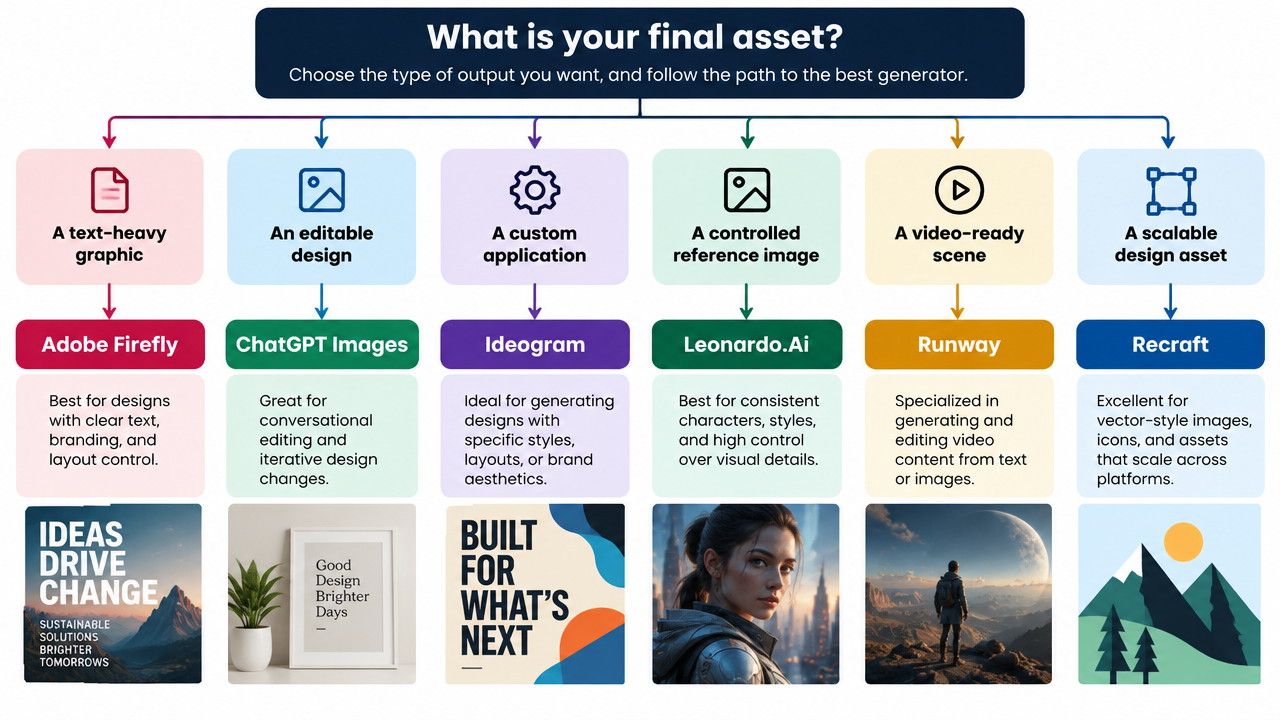
  • Choose Adobe Firefly for Adobe-based creative production.
  • Choose ChatGPT Images for conversational iteration and API workflows.
  • Choose Ideogram for graphics where text must be readable.
  • Choose Leonardo.Ai for reference-driven control.
  • Choose Stable Image for developer-led implementation.
  • Choose Runway for image-to-video production.
  • Choose Recraft for design assets and visual systems.

Flowchart illustrating an AI generator decision tree based on creative outputs.

FAQ: Best Midjourney Alternatives

What is the best free Midjourney alternative?

Free plans change often. Compare current credit limits, queue rules, download restrictions, and usage rights before choosing one.

Which Midjourney alternative is best for commercial work?

Adobe Firefly is worth evaluating for its published training-data approach. But commercial suitability also depends on current terms, the feature used, and the project’s risk requirements.

Which AI image generator handles text best?

Ideogram is a sensible first test for posters and other text-heavy graphics. Always proofread the final image closely.

Can developers add AI image generation to their own apps?

Yes. OpenAI, Leonardo.Ai, Stability AI, Ideogram, and Runway offer documented developer options, though availability and terms vary.

Conclusion: Pick the Tool That Removes the Most Friction

The best Midjourney alternatives aren’t necessarily the ones with the flashiest gallery. They’re the tools that reduce revisions, fit the team’s workflow, and produce assets you can actually use.

Test two or three options with the same creative brief. Track usable outputs, editing time, review needs, and cost per approved image. That small comparison will tell you more than any ranking ever could.


Join the Community

Get the latest tech news, reviews, and exclusive insights delivered straight to your inbox. Join a community of tech enthusiasts who trust Informer Tech.

Weekly digest

No spam

Unsubscribe anytime