
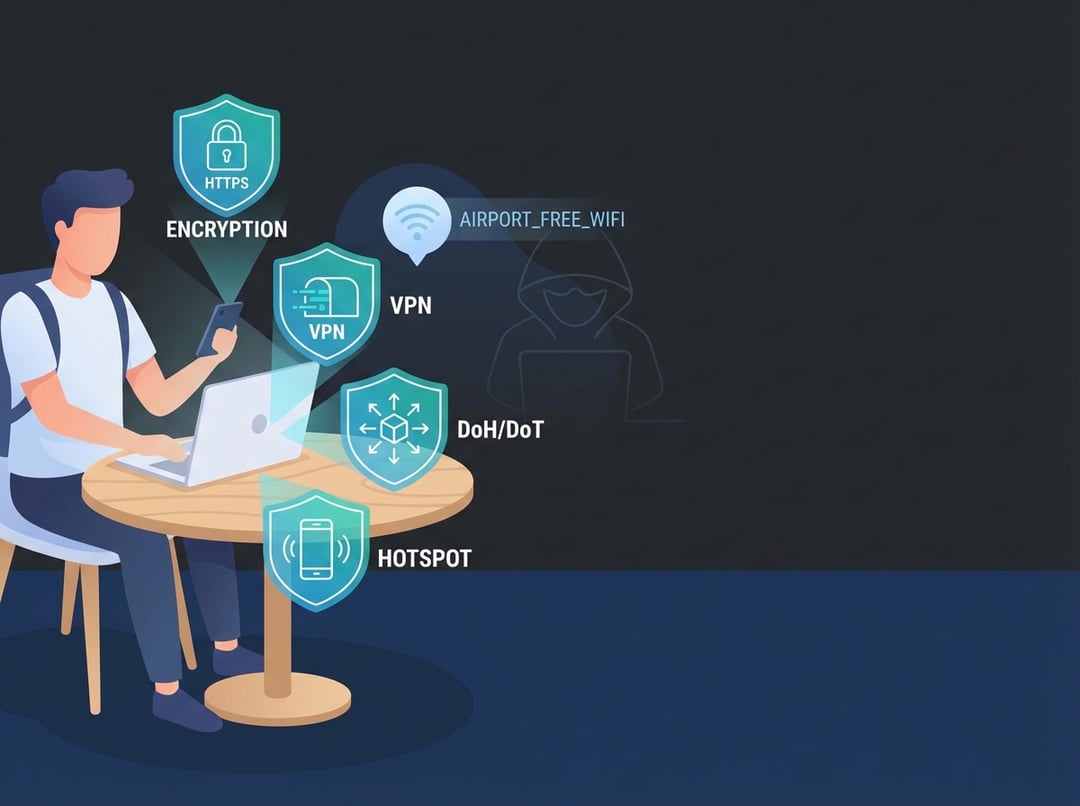
Public Wi‑Fi feels like that free bowl of mints at a hotel front desk. Convenient, tempting, and slightly suspicious. And if you travel even a little, you’ve probably heard the same advice on repeat: “Always use a VPN.”
That advice isn’t wrong. It’s just incomplete. Real public wifi safety comes from understanding which protections solve which problems, then stacking the right ones for the moment.
The Real Threat Model on Public Wi‑Fi (What Actually Goes Wrong)
Most public Wi‑Fi horror stories blend two very different scenarios.
Passive snooping means someone watches traffic that isn’t properly encrypted. Active attacks mean someone tries to change what your device sees, where it connects, or what it downloads.
For intermediate travelers, the highest-frequency risks look like this:
- Evil twin hotspots: A network named “Airport_Free_WiFi” appears next to “Airport Free Wi‑Fi.” Your phone cannot tell you which one is legitimate.
- Captive portal trickery: The login page that asks for “room number and last name” can also ask for far more.
- DNS manipulation: The network answers your “where is my bank” question with the wrong address.
- Weak network segmentation: Other guests can sometimes see your device and poke at open services.
One more thing that matters. Even when content stays encrypted, metadata often leaks. Observers can still learn which domains you visit and when. The EFF puts it plainly: HTTPS protects content but it does not hide all metadata, and that nuance drives sane decisions on public networks (EFF VPN guide).
HTTPS: The Baseline That Quietly Solves Most Public Wi‑Fi Safety Problems
If you remember one thing, make it this: HTTPS is doing most of the heavy lifting for public Wi‑Fi safety today.
HTTPS uses TLS to encrypt the connection between your browser or app and the site’s server. That encryption prevents a random person on the same café Wi‑Fi from reading your password, modifying the page in transit, or injecting extra code into what you load.
Consequently, for everyday browsing, modern HTTPS drastically reduces the classic “someone sniffed my traffic” nightmare.
But HTTPS does not solve everything.
- It does not stop you from signing into a phishing domain that looks legit.
- It does not prevent domain-level visibility in many scenarios.
- It does not fix a compromised device or a malicious app.
Also, browser indicators evolved. Chrome even changed how it presents “secure” signals because the old lock icon created false confidence (Chromium explanation). The practical traveler move stays boring and effective: verify the domain and let a password manager fill credentials only on the correct site.
VPNs on Public Wi‑Fi: Powerful, Useful, and Often Oversold
A VPN creates an encrypted tunnel from your device to a VPN server. From the café’s point of view, your traffic turns into unreadable ciphertext headed to one destination. That changes the game for public wifi safety because it blocks many local-network observers from learning what you do.
A VPN helps most in three situations:
- You do not trust the network owner. Airports and hotels vary wildly in how they run networks.
- You handle sensitive sessions. Work email, admin consoles, or anything tied to money.
- You face network filtering. Some regions and networks block apps and sites.
However, a VPN does not make you invincible. It shifts trust. The café sees less. The VPN provider sees more. The EFF frames it bluntly: VPN marketing often overpromises, and the tool mainly reroutes traffic through a different network (EFF VPN guide).
So pick VPNs like you’d pick a travel credit card. You want boring reliability and transparency.
Look for:
- Clear ownership and a credible track record
- Independent security audits and plain-language privacy policies
- Kill switch support plus leak protection
- Stable speeds across the regions you actually visit
DNS, DoH, and DoT: The Quiet Layer That Improves Public Wi‑Fi Safety
DNS looks mundane. It matters anyway.
When you type a domain, your device asks a DNS resolver where that name lives. On public Wi‑Fi, that resolver often belongs to the hotspot operator. In a worst case, an attacker can try to tamper with DNS responses or observe which domains you request.
Encrypted DNS reduces that exposure:
- DoH (DNS over HTTPS) wraps DNS inside HTTPS.
- DoT (DNS over TLS) encrypts DNS directly with TLS.
This does not equal full privacy. It targets a specific weakness: local DNS snooping and some forms of DNS manipulation. Services like Cloudflare’s 1.1.1.1 explain the privacy and performance angle and they also clarify what DNS resolvers do and do not do (Cloudflare DNS overview).
Personal Hotspots vs Public Wi‑Fi: When “Bring Your Own Internet” Wins
If you want the simplest upgrade for public Wi‑Fi safety, use your phone as a hotspot. You remove the shared local Wi‑Fi environment entirely. That eliminates a whole category of “someone on the same network” problems.
But hotspots do not eliminate upstream visibility. Your carrier still sits in the path. You still need HTTPS, strong authentication, and sane device hygiene.
Think about it this way. Public Wi‑Fi is a shared hallway. A hotspot is your own hotel room door. It does not stop the city from seeing where the hotel sits.
The Traveler’s Public Wi‑Fi Safety Checklist (Fast and Realistic)
Before you connect:
- Disable auto-join for unknown networks.
- Update your OS and browser before the trip.
- Keep sharing off and keep your firewall on.
While connected:
- Prefer HTTPS sites and official apps.
- Use MFA on key accounts.
- Use a VPN for banking, work logins, and high-stakes sessions.
After you leave:
- Forget the network so your phone doesn’t auto-reconnect later.
- Watch for account alerts if anything felt “off.”
NIST’s practical guidance for travelers aligns with this mindset: treat public networks as risky and prioritize protections for data in transit (NIST NCCoE travel tip PDF).
Bottom Line: A Simple Protection Hierarchy
Public Wi‑Fi safety works best as a stack, not a single magic app.
Start with HTTPS plus MFA plus a password manager. Add encrypted DNS for better resistance to local meddling. Use a VPN when you cannot trust the network or the session matters. And when you want the cleanest setup, use your hotspot and move on with your day.