
Want the honest vibe? Leaving Google can feel like moving out of a fully furnished apartment. Everything “just works.” Then you start noticing the rent. Not money rent. Data rent.
This guide walks you through open source alternatives to Google’s biggest products with a self-hosted tilt. Not because self-hosting is a purity test. It’s because owning your stack gives you leverage. You decide what gets logged. You decide what gets trained. You decide what survives if a product gets sunset.
And yes. You also inherit a little responsibility. We’ll keep it sane.
The deal you’re making with “self-hosted freedom”
When people say self-hosted, they usually mean one of these three things:
- Open source and self-hosted: you run it on your hardware or VPS.
- Open source but hosted for you: you still get transparency and portability with less ops.
- Federated: you can self-host or join a network of servers.
Here’s the mental model I use. Simple on purpose.
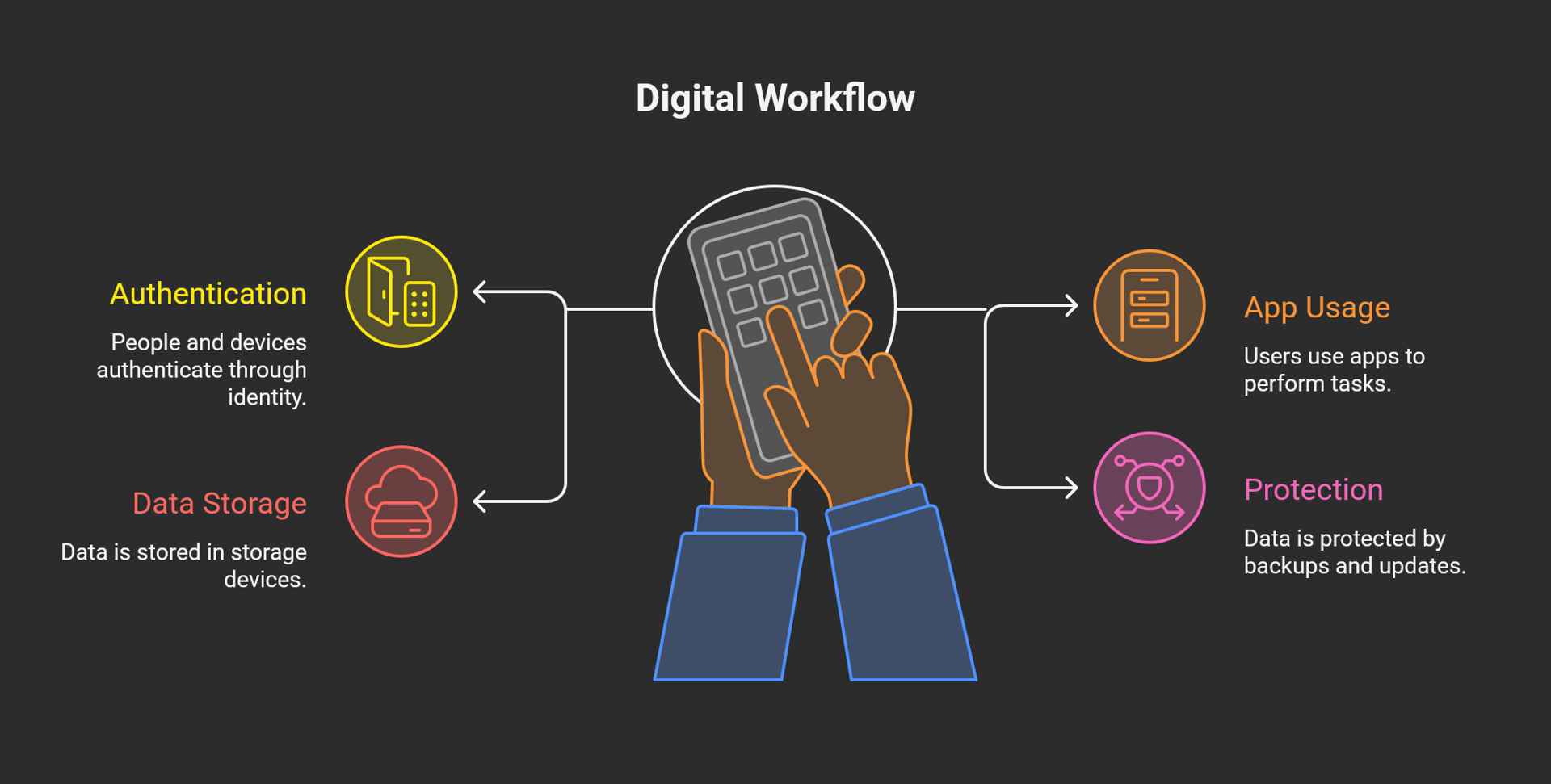
If you pick identity and storage well, everything else gets easier.
Your “don’t regret it later” checklist
Before you swap tools, decide your freedom level:
- Minimal: replace one service like Drive or Photos.
- Moderate: replace cloud, calendar, and notes.
- Full: include email, phone OS, video, and analytics.
Then lock in four basics:
- A domain you control. You’ll reuse it across services.
- TLS everywhere. Reverse proxy helps a lot.
- MFA. Do not negotiate with yourself here.
- Backups you test. The 3-2-1 rule exists for a reason.
If you want one practical security reference, NIST’s consumer guidance stays refreshingly human:
https://www.nist.gov/cybersecurity/how-do-i-create-good-password
Google Drive alternatives (files, sync, sharing)
Replacing Drive sounds easy until you remember the real requirements. Sync clients. Link sharing. Version history. Phone uploads. Permission mistakes that don’t leak everything.
Best open source alternatives to Google Drive
- Nextcloud is the big one. It’s a platform, not just storage. Files, sharing, and a huge app ecosystem. Official site: https://nextcloud.com/
- Seafile Community Edition leans into performance. It uses a “library” model that can feel tighter than folders for some workflows.
How to choose
- If you want an “app store” feel and groupware, start with Nextcloud.
- If you want fast sync and clean clients, test Seafile early.
Migration tip Export your Drive data first. Google Takeout can help. Then validate what you got before you import anywhere. Here’s a solid Takeout primer: https://documentation.its.umich.edu/google-takeout
Google Docs, Sheets, and Slides alternatives (real-time collaboration)
This is where most “I’m leaving Google” projects get wobbly. Editing is easy. Collaborative editing that feels smooth is the hard part.
Best open source alternatives for Google Docs-style work
- Collabora Online is LibreOffice in your browser. It’s deeply open source and pairs well with Nextcloud. https://www.collaboraonline.com/
- ONLYOFFICE Docs often wins on file compatibility feel. It also integrates tightly with Nextcloud. https://www.onlyoffice.com/ and integration notes: https://helpcenter.onlyoffice.com/integration/nextcloud.aspx
Decision points that matter
- File format strategy: go ODF-first if you can. Stay docx-first if your world demands it.
- Performance: collaborative suites want CPU and RAM. Don’t under-size the box.
- Fonts: missing fonts create “why does this look different” drama.
Gmail alternatives
Self-hosting email is possible. It’s also the part of this whole project that punishes overconfidence. Deliverability is political and technical.
Practical paths
- Calm path: keep mailbox hosting with a reputable provider on your own domain. You still escape the account lock-in problem.
- Full self-host: run SMTP and IMAP yourself with a stack like Postfix + Dovecot + Rspamd.
If you go full self-host, learn SPF, DKIM, and DMARC like you mean it. They are not optional. This community guide gives a decent overview of the records and setup flow:
https://gist.github.com/howyay/57982e6ba9eedd3a5662c518f1b985c7
And yes. The r/selfhosted crowd will warn you for a reason. Deliverability is the long game.
Google Calendar alternatives
Calendars work best when you pick boring standards. CalDAV exists for this.
Open source alternatives
- Radicale is lightweight CalDAV and CardDAV. Great for small setups. https://radicale.org/
- Nextcloud Calendar works well if you already run Nextcloud.
Migration tip Export calendars as ICS. Import. Then spot-check recurring events and exceptions. Those are the usual break points.
Google Contacts alternatives
Contacts feel simple until you sync across phones, desktops, and web UIs.
Open source alternatives
- Radicale again, because CardDAV matters.
- Nextcloud Contacts if you want a friendly interface.
What usually breaks Duplicate handling. Group labels. Contact photos. Plan a cleanup pass before you declare victory.
Google Photos alternatives
People don’t just want storage. They want “I can find that picture of the dog in snow from 2019.” That means indexing.
Strong open source alternatives
- Immich feels the most “Google Photos-ish” right now. Auto-upload, albums, and fast browsing. https://www.immich.app/
- PhotoPrism offers powerful organization and indexing with careful tuning. https://www.photoprism.app/
Expert reality check Photo search and ML indexing can be resource-hungry. If you point this at 200,000 images, expect CPU heat. Also plan backups like you’re protecting family history. Because you are.
Google Keep alternatives
Notes become your second brain. Portability matters more than features.
Open source alternatives
- Joplin is a strong all-rounder with encryption options and multi-platform support. https://joplinapp.org/
- Trilium Notes works well for knowledge-base style linking and structure. https://trilium.cc/
Pick a tool that exports cleanly. Future-you will thank you.
Google Maps alternatives
Two separate needs hide under “Maps.”
- Personal navigation on your phone.
- Running map tiles and routing services yourself.
For normal navigation
- Organic Maps uses OpenStreetMap and stays pleasantly simple. https://organicmaps.app/
- OsmAnd gives you more knobs and offline control. https://osmand.net/
Self-hosting tiles is possible. It also gets bandwidth-heavy fast. Most people don’t need it.
Google Search alternatives (you can’t rebuild Google, but you can escape it)
You won’t replicate Google’s index at home. You can still build a private meta-search layer that does not profile you.
Best open source alternative
- SearXNG is the standard pick. You host it. You choose engines. You control logging. https://www.getsearxng.org/
If you want “search without surveillance,” this is a very clean move.
Google Analytics alternatives
A lot of sites do not need surveillance analytics. They need trend visibility.
Open source alternatives
- Matomo is the full analytics suite option and it self-hosts well. https://matomo.org/
- Plausible is simpler and privacy-first by design. It’s open source and easy to run. https://plausible.io/
- Umami is lightweight and straightforward. https://umami.is/
Reality check Compliance depends on how you configure and host it. Data minimization beats pop-up banners every day.
YouTube alternatives
Video has real costs. Storage. Transcoding. Bandwidth. Moderation.
Open source alternative worth knowing
- PeerTube federates video hosting. You can run your own instance or join one. https://joinpeertube.org/
If you host yourself, plan for abuse prevention and resource spikes. Public video invites attention.
Google Meet alternatives (video calls)
Open source alternative
- Jitsi Meet is the classic self-host option. https://jitsi.org/
For reliability, TURN servers matter. Bandwidth matters more. If your home upload speed is weak, use a VPS.
Google Chat alternatives (messaging you can own)
Open source alternatives
- Matrix is the protocol. Element is the popular client. https://matrix.org/ and https://element.io/
- Mattermost feels familiar for Slack-like teams. https://mattermost.com/
Federation is powerful. It also complicates moderation. Choose intentionally.
Google Translate alternatives (self-hosted translation APIs)
Open source alternative
- LibreTranslate gives you a self-hostable translation service. https://libretranslate.com/
Quality varies by language pair. Test your real use cases, not demo sentences.
Android alternatives (de-Googling your phone)
This can be the most satisfying change. It can also be the most disruptive.
Open source friendly options
- LineageOS is the broad community standard. https://lineageos.org/
- GrapheneOS focuses on security hardening, mostly on Pixel devices. https://grapheneos.org/
- /e/OS aims for a de-Googled ecosystem experience. https://e.foundation/
What you trade Some apps assume Google Play Services. Push notifications and location can behave differently. Plan your essential apps list before you flash anything.
Bundles that actually work together
Tool choices interact. Bundles reduce friction.
Start simple bundle
- Nextcloud for files and sharing
- Collabora or ONLYOFFICE for docs
- Immich for photos
- Plausible or Umami for analytics
Privacy-first household bundle
- SearXNG for search
- Organic Maps for navigation
- Joplin for notes
- Radicale for contacts and calendars
Migration sequencing that keeps your blood pressure normal
- Inventory your Google usage. Mark critical workflows.
- Export first. Verify second. Takeout helps. Keep Google running during migration.
- Parallel run for a few weeks. Fix friction while you still have a fallback.
- Cut over deliberately. Update devices, sync clients, and recovery info.
That’s the difference between a smooth move and a weekend-long panic spiral.
Security basics for self-hosted freedom
- Use MFA everywhere. Prefer app-based or hardware keys.
- Patch regularly. Automate where you can.
- Back up off-site. Encrypt the backup. Test restores.
- Monitor disk, uptime, and login anomalies.
Self-hosting rewards consistency, not heroics.
Taking action beats waiting for perfect
The win is not replacing every Google product in a month. The win is regaining agency one service at a time. Start with Drive or Photos. Those give you immediate value. Then build outward.
Actionable next step: pick one category this week. Set it up with TLS and backups. Migrate a small slice. Use it daily for two weeks. Then scale up.