
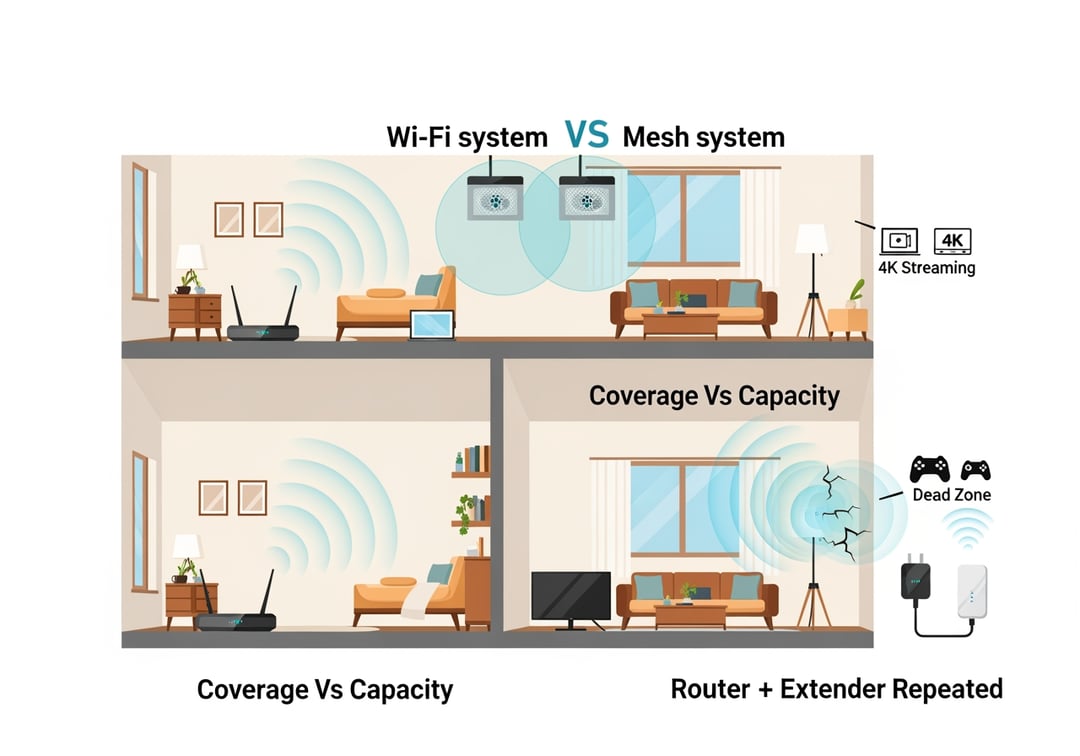
Shopping for home Wi‑Fi should feel simple. But it rarely does. You just want the back bedroom to work. You want calls that don’t freeze. You want your phone to stop clinging to one weak bar like it’s loyal.
That’s why people often choose between mesh WiFi vs extender. Both can improve your coverage, but usually only one solves those everyday WiFi frustrations.
Mesh Wi‑Fi vs Router + Extender: the decision in one minute
Here’s the clean version.
- Buy mesh Wi‑Fi if you want stable performance across the house and you don’t want to babysit your network. Mesh usually costs more. It also feels “done” once it’s set up.
- Buy a router + extender if you have one weak area and you need the cheapest fix. It can work well. But it’s easier to misplace. It’s also easier to outgrow.
If you work from home, stream in multiple rooms, or have two floors, mesh usually wins. If you only need to cover a garage corner or one bedroom, an extender can be perfect.
Quick definitions that make the rest of this easy
A router connects to your modem and creates your Wi‑Fi network.
A Wi‑Fi extender repeats that signal to push it farther. It’s like yelling a message down a hallway. It helps the message travel. It also can distort it.
A mesh Wi‑Fi system uses multiple units that cooperate as one network. Think of it like a relay team that practices together. The handoffs feel smoother.
Mesh Wi‑Fi vs extender for speed: what actually happens
Speed depends on more than your internet plan. It depends on how much wireless “work” your system makes your devices do.
Many extenders talk to your router over Wi‑Fi. Then they talk to your phone over Wi‑Fi. That double duty often reduces real throughput. You might see decent signal bars but disappointing speed.
Mesh systems can hold speed better because the units coordinate traffic. Some mesh kits also include a dedicated “backhaul” radio that handles router-to-node communication. That separation helps. It keeps your main Wi‑Fi bands freer for phones, laptops, and TVs.
Coverage is not capacity, and that’s where extenders feel worse
Coverage means you can connect. Capacity means it stays fast when everyone connects.
Capacity matters when you have:
- a couple of 4K streams running
- a game console pulling updates
- video calls happening at the same time
- smart home devices constantly checking in
In those moments, an extender can become a bottleneck. Mesh can too. But mesh systems usually manage shared airtime more gracefully.
Latency and jitter: the hidden reason calls feel “bad”
Download speed sells Wi‑Fi systems. Latency and jitter decide whether you enjoy using them.
- Latency is how long a packet takes to arrive.
- Jitter is how inconsistent that timing is.
Extenders can add hops and retransmissions. That can increase jitter. Mesh can reduce the ugly parts of roaming and routing. The result often feels calmer. Calls stay stable. Games feel more responsive.
Mesh Wi‑Fi vs Router + Extender: roaming is the everyday difference
Roaming sounds technical. In real life it’s just this. When you walk from the living room to the bedroom, your phone should switch to the best signal without drama.
Extenders sometimes create:
- a separate network name
- a separate password
- devices that “stick” to the wrong access point too long
Mesh Wi‑Fi systems typically broadcast one network name across nodes. Your devices still choose when to switch. But mesh nudges those choices in smarter ways. You spend less time toggling Wi‑Fi off and on to force a better connection.
When extenders roam fine anyway
Extenders can feel perfectly smooth when:
- you place them in a strong signal zone
- you don’t move around the home much
- your devices handle roaming aggressively
If your goal is “better Netflix in the den” you might not care about seamless roaming. That’s fair.
Placement rules that decide whether you’ll love it or hate it
Bad placement ruins both options. Honestly, most “Wi‑Fi product is trash” reviews are placement problems.
Mesh Wi‑Fi placement that works in normal homes
Start simple.
- Put the main router or main mesh unit near where internet enters your home. Also keep it open and elevated.
- Place the second node about halfway toward the dead zone. Avoid closets and metal shelves.
- Add a third node only after testing. More nodes can help. Too many can create extra wireless chatter.
Conceptual diagram description: picture overlapping bubbles. Each bubble is a strong Wi‑Fi zone. You want overlap between bubbles. You do not want isolated islands.
Extender placement that actually helps
This is the key rule. Put the extender where it still gets a good signal from the router. Do not put it inside the dead zone.
A fast sanity check helps. Stand where you plan to plug it in. If your phone already struggles there, the extender will struggle too.
Conceptual diagram description: router bubble in the center. Extender sits at the edge of the bubble. It then extends coverage past that edge into the weak area.
Backhaul: the detail that separates “fine” from “great”
Backhaul is how your Wi‑Fi points talk to each other.
With mesh, backhaul can be:
- wireless, which is easiest
- Ethernet, which is best when available
Ethernet backhaul feels like giving your mesh a private highway. It reduces interference sensitivity. It also makes speeds more consistent across rooms.
How to know if you need tri‑band mesh
Tri‑band mesh matters if you:
- have fast internet and you want to feel it in more rooms
- cannot run Ethernet between nodes
- push a lot of simultaneous traffic
If you have a smaller plan and a smaller home, a solid dual‑band mesh kit can still be excellent.
Wi‑Fi 6, 6E, 7: what’s worth paying for
For home users, Wi‑Fi 6 is the safe default today. It handles busy networks well and it’s widely supported.
Wi‑Fi 6E adds 6 GHz. That can help in crowded areas like apartments because 6 GHz often has less congestion. Range can be shorter though, especially through walls.
Wi‑Fi 7 is premium. It can be great. Most homes won’t fully benefit yet unless you also have compatible devices and a need for higher local network performance.
For reference on standards, the Wi‑Fi Alliance keeps a clean overview: https://www.wi-fi.org/discover-wi-fi
Mesh WiFi vs extender: cost and hassle in plain terms
Extenders usually win on sticker price. Mesh often wins on “total life cost” because you spend less time troubleshooting.
Pay more for mesh if:
- you work from home and depend on stable calls
- you have a multi-story layout
- you have a busy household with many devices
Buy an extender first if:
- you have one dead spot
- your budget is tight
- you’re okay with a little trial and error
What you should buy for common home layouts
Apartment or small home
Start with a strong single router. Add an extender only if one corner stays weak. Mesh can still be nice. It’s just not always necessary.
Two‑story home
Mesh with two units is a solid baseline. Add a third if the farthest rooms still struggle after placement tuning.
Older homes with plaster, brick, or weird materials
Lean mesh. Plan for closer node spacing. If you can use Ethernet backhaul, do it.
Backyard or garage coverage
An extender can work well if it sits near an exterior wall with strong router signal. A mesh node near a window can sometimes outperform a far extender.
Preflight checklist before you spend money
- What speed do you pay your ISP for?
- Where must your modem and router live?
- How many devices connect daily?
- Can you run Ethernet or use MoCA for backhaul?
Google also has practical mesh and home Wi‑Fi guidance that’s worth skimming: https://support.google.com/googlenest/topic/9360593
Final verdict on Mesh Wi‑Fi vs Router + Extender
If your goal is fewer dropouts and less Wi‑Fi babysitting, mesh Wi‑Fi is usually the better buy. If you have one problem room and you want the cheapest fix, router + extender can be the right call.
Do one action today. Run a speed test next to your router. Then run it in the worst room. If the drop is brutal, you’re not imagining it. That result tells you whether you need a patch or a proper system.