
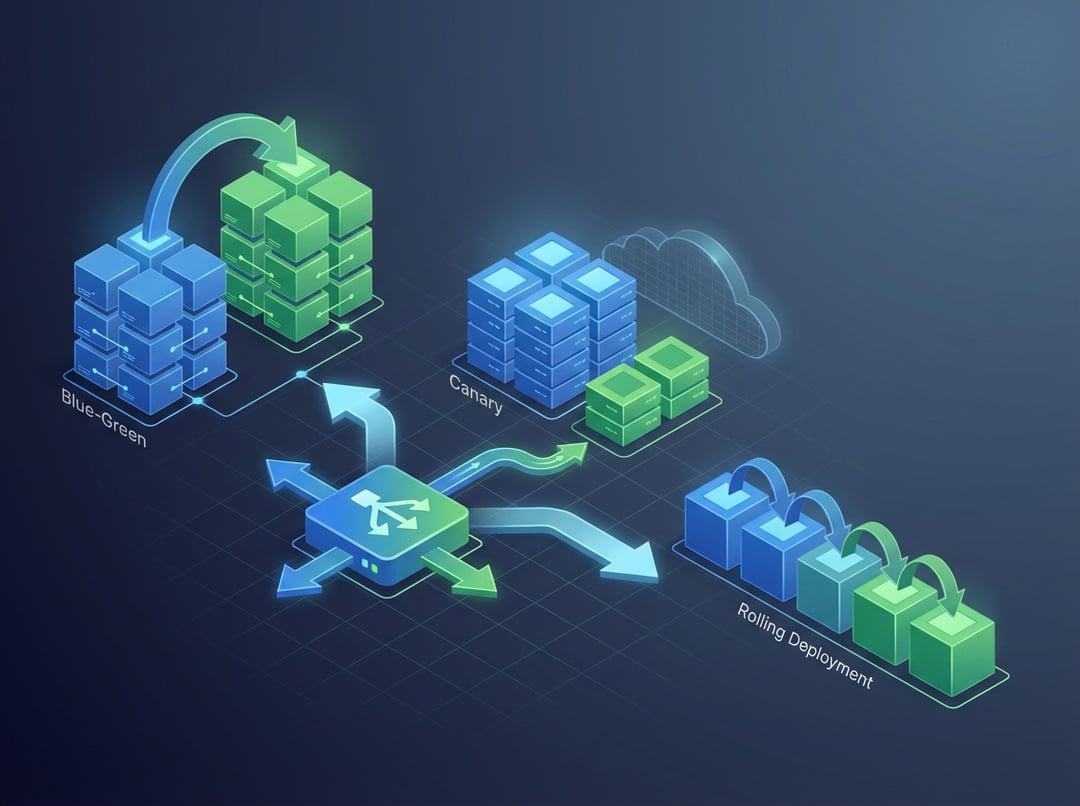
Shipping code to Kubernetes feels easy until you try to do it safely. One rollout goes fine. The next one breaks logins or spikes latency and suddenly everyone debates “deployment strategy” like it’s theology. In reality, Kubernetes deployment strategies exist for one job: reduce user impact while you change running systems.
This guide explains three core Kubernetes deployment strategies—Rolling, Blue-Green, and Canary—in plain language, with enough depth to help you choose well.
Why Kubernetes Deployment Strategies Matter More Than “Just Shipping”
Every production deploy carries two risks: availability risk and correctness risk. Availability failures look obvious. Pods crash, requests time out, pages stop loading. Correctness failures hide longer. The site stays up and users still lose money or trust.
Consequently, a Kubernetes deployment strategy is not just a rollout method. It is a risk policy. It answers three questions:
- How much downtime can you tolerate?
- How much “bad behavior” can you tolerate?
- How fast must rollback happen when the page goes red?
You always juggle speed, safety, and cost. Faster rollouts reduce time in a mixed state. Safer rollouts increase verification time. Cheaper rollouts reduce spare capacity. You can’t maximize all three.
Quick Primer: The Kubernetes Building Blocks Behind Every Strategy
Kubernetes deployment strategies rely on a few primitives. If these pieces feel fuzzy, every rollout will feel unpredictable.
Deployments, ReplicaSets, and Pods
A Deployment declares what you want running. Kubernetes creates a ReplicaSet to enforce that desired state. The ReplicaSet creates Pods.
When you update a Deployment, Kubernetes usually creates a new ReplicaSet and scales it up. It also scales the old ReplicaSet down. That behavior powers the Kubernetes rolling update strategy.
Revision history matters because rollback often means “scale the previous ReplicaSet back up.” Learn the basic model here:
https://kubernetes.io/docs/concepts/workloads/controllers/deployment/
Services and label selectors
A Kubernetes Service selects Pods using labels. That selector stays stable even when Pods change.
Blue-Green and Canary strategies often use labels as traffic steering. You do not “move users to a Deployment.” You move a Service selector or change routing upstream.
Readiness, liveness, and startup probes
Probes decide whether Kubernetes sends traffic to a Pod and whether it restarts it.
- Readiness gates traffic. Bad readiness equals bad rollouts.
- Liveness restarts stuck containers.
- Startup prevents liveness from killing slow starters.
Probe guidance lives here:
Observability turns deploys into controlled experiments
Healthy Pods do not guarantee happy users. Watch signals that represent reality:
- Error rate and tail latency
- Queue depth and saturation
- Business metrics like checkout success
Furthermore, decide your “stop conditions” before the rollout begins. Otherwise, every alert becomes an argument.
Rolling Updates in Kubernetes, Explained (The Default Strategy)
Rolling updates replace Pods gradually while keeping the same Service endpoint. They work well when old and new versions can run together.
Kubernetes documents rolling behavior and tuning here:
https://kubernetes.io/docs/concepts/workloads/controllers/deployment/#rolling-update-deployment
The two knobs that define rollout behavior
Two fields shape most rolling rollouts:
- maxSurge: extra Pods you temporarily add during the rollout.
- maxUnavailable: Pods you can take down at once.
More surge means more capacity and usually faster rollout. More unavailable means faster rollout but higher downtime risk. Conversely, conservative settings reduce risk but can stretch deploy time.
Common failure modes with rolling deployments
Rolling updates fail in predictable ways:
- Mixed-version incompatibility: one version writes data the other can’t read.
- Slow startup: probes mark Pods unready and the rollout stalls.
- Stateful assumptions: sessions or caches stick to old Pods longer than expected.
Rolling updates succeed when you treat backwards compatibility as a first-class feature.
When rolling is the right answer
Choose Rolling when you have:
- Stateless services
- Backward compatible changes
- A team that wants fewer moving parts
Rolling wins on simplicity. It loses when you need strict isolation between versions.
Blue-Green in Kubernetes, Explained (Fast Cutover With a Safety Net)
A Kubernetes blue-green deployment runs two full versions at the same time.
- Blue serves production now.
- Green runs the new release in parallel.
When Green looks ready, you switch traffic.
How traffic switching usually works
Blue-Green often uses a Service selector flip. Blue Pods have version=blue and Green Pods have version=green. You change the Service selector to point at the Green label.
Alternatively, you switch routing at the Ingress layer. That approach can support finer rules but adds more surface area.
What Blue-Green buys you
Blue-Green gives you a clean cutover. It also gives you a rollback story that feels satisfying. Rollback becomes another traffic switch.
That is the real appeal. You avoid slow “recreate the old state” rollbacks during incidents.
Hidden costs and risks
Blue-Green costs more because you run two stacks at once. It also tempts teams to skip realistic load testing. Green can look healthy at idle and still fail under production traffic patterns.
Data changes still matter. If Green runs destructive database migrations, a traffic flip will not save you.
When Blue-Green is the right answer
Pick Blue-Green when:
- You need near-instant rollback
- You cannot tolerate mixed versions
- You can afford temporary double capacity
Canary Deployments in Kubernetes, Explained (Ship Like a Scientist)
A Kubernetes canary deployment sends a small portion of traffic to the new version. You watch metrics. You increase traffic gradually.
Canary treats production as a controlled experiment. It reduces blast radius by design.
Two common ways to implement canary in Kubernetes
- Two Deployments plus weighted routing
- Old and new run side by side.
- Routing splits traffic using Ingress features or a service mesh.
- Service mesh routing
- Weight by percentage.
- Route by headers or user segment.
- Support progressive delivery workflows.
Canary strategy quality depends on your routing layer. The concept stays simple and the plumbing varies.
What canary buys you
Canary lets real users validate the release. It also catches issues that staging never reproduces.
Furthermore, canary makes “unknown unknowns” less catastrophic. Only a slice of traffic sees the new code at first.
Where canary goes wrong
Canary fails when teams lack strong signals.
- Metrics are noisy or missing.
- Rollout steps are too slow so risk lingers.
- Feature flags and canary splits conflict.
A canary without clear gates is just a slow rolling update.
When canary is the right answer
Choose Canary when:
- User impact must stay small
- You can measure success quickly
- You can automate promotion and rollback based on metrics
Blue-Green vs Canary vs Rolling in Kubernetes: A Practical Decision Guide
Use a simple selection rule.
- Pick Rolling for compatible stateless services where simplicity wins.
- Pick Blue-Green when you need hard separation and instant rollback.
- Pick Canary when you want evidence before full exposure.
If your system breaks when versions mix, do not force rolling. If you cannot observe quality, do not pretend you canary.
Advanced Gotchas That Apply to Every Kubernetes Deployment Strategy
Some problems ignore strategy choice.
Database migrations and version skew
Deployments often fail because schema changes break compatibility. Use expand-contract patterns. Keep old code working while new schema lands. Then remove legacy paths later.
Long-lived connections and graceful termination
If Pods hold long connections, rollouts can cause spikes. Configure graceful shutdown and give Pods time to drain. Review Pod lifecycle behavior here:
https://kubernetes.io/docs/concepts/workloads/pods/pod-lifecycle/
Autoscaling can fight your rollout
HPA reacts to load and rollout-induced churn. Surge capacity can look like a traffic shift. Plan your rollout windows and watch scaling events.
Implementation Checklist: Make These Strategies Safer Immediately
- Add realistic readiness probes that reflect dependency health.
- Set resource requests to avoid noisy neighbor failures.
- Define rollback steps before rollout day.
- Watch a small set of metrics that represent user experience.
- Start conservative. Tighten later when you trust your process.
Conclusion: Kubernetes Deployment Strategies Are Risk Policies in Disguise
Rolling updates optimize for simplicity. Blue-Green optimizes for controlled cutover and fast rollback. Canary optimizes for learning through gradual exposure.
Pick one service you own and choose the best-fit strategy. Then write the rollback plan today. Future you will sleep better during the next deploy.